Synthadoc
经 AI Skill Hub 精选评估,Synthadoc 获评「强烈推荐」。这款Agent工作流在功能完整性、社区活跃度和易用性方面表现出色,AI 评分 8.0 分,适合有一定技术背景的用户使用。
📚 深度解析
Synthadoc 工作流的设计遵循"最小配置,最大复用"原则:核心逻辑已经封装好,用户只需配置自己的 API Key 和业务参数即可快速上手。工作流内置错误处理和重试机制,在网络波动或 API 限速等情况下仍能稳定运行,适合作为生产环境的自动化基础设施。
在实际部署时,建议先在测试环境中运行 3-5 次,验证各个环节的输出结果符合预期,再部署到生产环境。AI Skill Hub 评分 8.0 分,是同类 Agent 工作流中的精选推荐。
📋 工具概览
Synthadoc 是一套完整的 AI Agent 自动化工作流方案。通过可视化的节点编排,将复杂的多步骤任务拆解为清晰的自动化流程,实现全程无人值守的智能处理。支持与数百种外部服务和 API 无缝集成,适合构建数据处理管线、业务自动化和 AI 辅助决策系统。
📖 中文文档
Synthadoc 是一套完整的 AI Agent 自动化工作流方案。通过可视化的节点编排,将复杂的多步骤任务拆解为清晰的自动化流程,实现全程无人值守的智能处理。支持与数百种外部服务和 API 无缝集成,适合构建数据处理管线、业务自动化和 AI 辅助决策系统。
- 可视化 Agent 工作流编排,无需编写复杂代码
- 支持多步骤自动化任务链,实现全流程无人值守
- 与外部 API、数据库和第三方服务无缝集成
- 内置错误处理与自动重试机制,保障稳定运行
- 提供可复用的自动化模板,快速在同类场景部署
- 自动化日常重复性工作,将精力集中于创造性任务
- 构建数据采集 → 处理 → 输出的完整自动化管线
- 实现跨平台、跨系统的数据流转和业务协同
# 方式一:pip 安装(推荐)
pip install synthadoc

# 方式二:虚拟环境安装(推荐生产环境)
python -m venv .venv
source .venv/bin/activate  # Windows: .venv\Scripts\activate
pip install synthadoc

# 方式三:从源码安装(获取最新功能)
git clone https://github.com/axoviq-ai/synthadoc
cd synthadoc
pip install -e .

# 验证安装
python -c "import synthadoc; print('安装成功')"
- 访问 GitHub 仓库获取工作流文件
- 在对应平台(Dify / Flowise / Make 等)中找到「导入工作流」功能
- 上传工作流文件
- 按照提示配置必要的环境变量和 API Key
- 运行测试确认流程正常后投入使用
# 命令行使用
synthadoc --help

# 基本用法
synthadoc input_file -o output_file

# Python 代码中调用
import synthadoc

# 示例
result = synthadoc.process("input")
print(result)
# synthadoc 配置文件示例(config.yml)
app:
  name: "synthadoc"
  debug: false
  log_level: "INFO"

# 运行时指定配置文件
synthadoc --config config.yml

# 或通过环境变量配置
export SYNTHADOC_API_KEY="your-key"
export SYNTHADOC_OUTPUT_DIR="./output"
简介
# Synthadoc
      .-+###############+-.
    .##                   ##.
   ##    .----.   .----.    ##
  ##    /######\ /######\    ##
  ##    |######| |######|    ##
  ##    | [SD] | | wiki |    ##
  ##    |######| |######|    ##
  ##    \######/ \######/    ##
   ##    '----'   '----'    ##
    '##                   ##'
      '-+###############+-'

       S Y N T H A D O C
    Community Edition  v1.4.2
  ────────────────────────────────
  Domain-agnostic LLM wiki engine
<p> <a href="https://github.com/axoviq-ai/synthadoc/actions/workflows/ci.yml"><img src="https://github.com/axoviq-ai/synthadoc/actions/workflows/ci.yml/badge.svg" alt="CI"/></a> <a href="https://github.com/axoviq-ai/synthadoc/actions/workflows/ci.yml"><img src="https://img.shields.io/badge/dynamic/json?url=https%3A%2F%2Fraw.githubusercontent.com%2Faxoviq-ai%2Fsynthadoc%2Fbadges%2Fdocs%2Fbadges.json&query=%24.coverage&label=Coverage&suffix=%25&color=brightgreen" alt="Coverage"/></a> <a href="https://github.com/axoviq-ai/synthadoc/blob/main/LICENSE"><img src="https://img.shields.io/badge/License-AGPL--3.0-blue.svg" alt="License"/></a> <a href="https://www.python.org/"><img src="https://img.shields.io/badge/Python-3.11%2B-yellow.svg" alt="Python"/></a> <a href="https://github.com/axoviq-ai/synthadoc/tree/main/synthadoc/agents"><img src="https://img.shields.io/badge/dynamic/json?url=https%3A%2F%2Fraw.githubusercontent.com%2Faxoviq-ai%2Fsynthadoc%2Fbadges%2Fdocs%2Fbadges.json&query=%24.agents&label=AI%20agents&color=crimson" alt="AI agents"/></a> <a href="https://github.com/axoviq-ai/synthadoc/tree/main/synthadoc/skills"><img src="https://img.shields.io/badge/dynamic/json?url=https%3A%2F%2Fraw.githubusercontent.com%2Faxoviq-ai%2Fsynthadoc%2Fbadges%2Fdocs%2Fbadges.json&query=%24.skills&label=Skills&color=purple" alt="Skills"/></a> <a href="https://github.com/axoviq-ai/synthadoc/blob/main/docs/user-quick-start-guide.md#appendix-i--connect-claude-via-mcp"><img src="https://img.shields.io/badge/dynamic/json?url=https%3A%2F%2Fraw.githubusercontent.com%2Faxoviq-ai%2Fsynthadoc%2Fbadges%2Fdocs%2Fbadges.json&query=%24.mcp_tools&label=MCP%20tools&color=orange" alt="MCP tools"/></a> <a href="https://github.com/axoviq-ai/synthadoc/tree/main/hooks"><img src="https://img.shields.io/badge/dynamic/json?url=https%3A%2F%2Fraw.githubusercontent.com%2Faxoviq-ai%2Fsynthadoc%2Fbadges%2Fdocs%2Fbadges.json&query=%24.hooks&label=Hook%20events&color=teal" alt="Hook events"/></a> <a href="https://github.com/axoviq-ai/synthadoc"><img src="https://img.shields.io/badge/dynamic/json?url=https%3A%2F%2Fraw.githubusercontent.com%2Faxoviq-ai%2Fsynthadoc%2Fbadges%2Fdocs%2Fbadges.json&query=%24.cli_commands&label=CLI%20commands&color=darkblue" alt="CLI commands"/></a> <a href="https://github.com/axoviq-ai/synthadoc/tree/main/obsidian-plugin"><img src="https://img.shields.io/badge/dynamic/json?url=https%3A%2F%2Fraw.githubusercontent.com%2Faxoviq-ai%2Fsynthadoc%2Fbadges%2Fdocs%2Fbadges.json&query=%24.obsidian_commands&label=Obsidian%20commands&color=blueviolet" alt="Obsidian commands"/></a> <a href="https://github.com/axoviq-ai/synthadoc/blob/main/docs/user-quick-start-guide.md#agentic-workflows"><img src="https://img.shields.io/badge/dynamic/json?url=https%3A%2F%2Fraw.githubusercontent.com%2Faxoviq-ai%2Fsynthadoc%2Fbadges%2Fdocs%2Fbadges.json&query=%24.maintenance_workflows&label=Maintenance%20workflows&color=green" alt="Maintenance workflows"/></a> <a href="https://github.com/axoviq-ai/synthadoc"><img src="https://img.shields.io/badge/Community%20Edition-v1.4.2-brightgreen.svg" alt="Version"/></a> </p>
Document version: v1.4.2
Engineered for solo users and enterprises alike, providing a domain-specific knowledge base that scales seamlessly while maintaining accuracy through autonomous self-optimization.
Built for individuals, small teams, and large organizations who need a knowledge base that stays accurate as documents accumulate.
Synthadoc reads your raw source documents — PDFs, spreadsheets, PPTs, web pages, images, videos, Word files, TXTs, and AI session transcripts (.jsonl) — and uses an LLM to synthesize them into a persistent, structured wiki. Cross-references are built automatically, contradictions are detected and surfaced, orphan pages are flagged, and every answer cites its sources. Outputs are stored as local Markdown files, ensuring seamless integration and autonomous management within Obsidian or any wiki-compliant ecosystem.
---
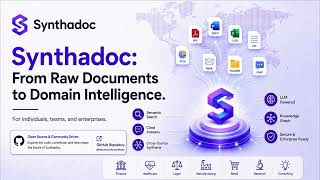
▶ From Documents to Wiki |
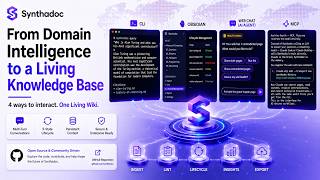
▶ Four Interfaces: CLI, Obsidian, Web UI & MCP |
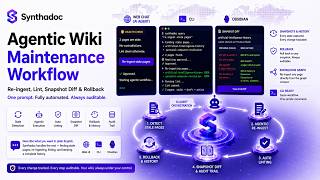
▶ Agentic Maintenance Workflow |
<p align="center"> <a href="docs/media/README.md">📝 Blogs & Media — YouTube · Coderlegion · DEV.to · Medium</a> </p> <p align="center"> <a href="docs/example/aquaflow/README.md">📂 End-to-end Example — AquaFlow Capital M&A due diligence walkthrough</a> </p>
---
What's Included
See docs/design.md — Appendix A: Release Feature Index for a full feature list by version.
---
Installation
Choose one way to run Synthadoc:
| Install with pip | Run with Docker | |
|---|---|---|
| **Host requirements** | Python 3.11+ | A container runtime only, with **no Python or pip on the host** |
| **Best for** | Personal use on one machine | Team or shared servers, CI/CD, isolated or reproducible runtimes |
| **Steps** | [Production](#production), then [Set your API keys](#set-your-api-keys) and [Install a wiki and start the engine](#install-a-wiki-and-start-the-engine) | [Docker](#docker) below, then the [Docker Deployment Guide](docs/docker-deploy.md) |
Docker
Prerequisites: a container runtime only (Docker Engine or Desktop, Apple container, or wslc). No Python, pip, or synthadoc install on the host: every command, including creating the wiki, runs in a container.
For server deployments, team wikis, CI/CD pipelines, and isolated personal use, Synthadoc ships an OCI image, chenp/synthadoc, for linux/amd64 and linux/arm64. It works with Docker Engine and Docker Desktop, the Apple container tool (macOS 26+ Apple Silicon), and WSL Containers (wslc, Windows 11). One container serves one wiki. The HTTP API, Web UI (/app), and MCP over HTTP (/mcp) all share the wiki's port, and the wiki files stay on the host so Obsidian keeps working unchanged.
Commands are shown for Linux / macOS. On Windows, expand the Windows (Command Prompt) block for single-line cmd.exe versions: \ line continuation and ~ in -v paths don't work there. (In PowerShell, replace %USERPROFILE% with $env:USERPROFILE.)
1. Create the wiki in a one-off container. It lands in ~/wikis/history-of-computing; note the port it prints, e.g. 7070. docker run downloads the image on first use. Run docker pull chenp/synthadoc:latest later to update a cached image.
mkdir -p ~/wikis
docker run --rm -v ~/wikis:/wikis chenp/synthadoc:latest \
  synthadoc install history-of-computing --target /wikis --demo
<details> <summary>Windows (Command Prompt)</summary>
if not exist "%USERPROFILE%\wikis" mkdir "%USERPROFILE%\wikis"
docker run --rm -v "%USERPROFILE%\wikis:/wikis" chenp/synthadoc:latest synthadoc install history-of-computing --target /wikis --demo
</details>
2. Put your LLM API key in ~/wikis/.env, never on the command line. Create it with any text editor (Windows: notepad "%USERPROFILE%\wikis\.env"). For example, to use MiniMax:
```bash
Install a wiki and start the engine
A wiki is a self-contained knowledge base — a folder of Markdown pages maintained and cross-referenced automatically by Synthadoc. The fastest way to get started is the History of Computing demo (13 pre-built pages, no LLM API key required to browse).
```bash
1. Pick a template and install
Browse the 30 available templates across 9 categories and pick the one closest to your domain:
synthadoc templates listInstall with a template (example: consumer and competitive market research):
synthadoc install my-market-wiki --target ~/wikis --template research/market-research
synthadoc use my-market-wiki   # set as default — no -w needed from here on
If none of the 30 templates fits, install without one and provide a --domain description instead:
synthadoc install my-wiki --target ~/wikis --domain "Your domain description"→ Full template catalog and per-category install commands: synthadoc/templates/README.md
Quick-Start Guide
The History of Computing demo includes 13 pre-built pages, raw source files covering clean-merge, contradiction, and orphan scenarios, and a full walkthrough of key Synthadoc feature.
Full step-by-step walkthrough: docs/user-quick-start-guide.md
The guide covers:
- Verify the demo server started (banner, health check)
- Install the Synthadoc plugin (auto-installs Dataview) and open the vault
- Review wiki structure and key files (index, purpose, AGENTS.md, dashboard)
- Query the pre-built wiki — including knowledge gap detection
- Batch ingest all demo source files
- Run lint — auto-promote clean pages to active
- Manage page lifecycle — 5-state machine (draft → active → stale/contradicted/archived), manual transitions, immutable audit trail
- Resolve a contradiction
- Fix an orphan page
- Run the adversarial lint pass — flag overstated claims across all pages
- Web search ingestion with automatic decomposition
- Ingest a YouTube video
- Enrich the wiki with scaffold (regenerate/update index, purpose, AGENTS.md)
- Audit features (token cost, history, events)
- Schedule recurring operations
- Set up query-scoped routing with ROUTING.md
- Stage and review candidate pages before promoting them
- Build a context pack for grounded LLM prompts
- Verify claim provenance — source-line citations, broken citation audit, global provenance table
- Export your wiki — llms.txt, llms-full.txt, GraphML wikilink graph, agent-ready JSON with provenance and lifecycle history, OKF v0.2 bundle for zero-code agent consumption
- Use the web chat UI — streaming answers, session-aware hint chips, citations in-browser
- Query caching — understand how answers are cached and how to bypass with
--no-cache - Backup and restore — create a portable wiki zip, restore on a different machine
- Knowledge graph — weighted edges (wikilink + co-source signals), explore clusters in the web UI Graph tab, click a node to query it
- Ingest an AI session transcript — turn Claude Code, Codex, or chat conversations into structured wiki pages
- Agentic maintenance workflows — eight conversational workflows via web UI or CLI: re-ingest stale pages (bulk or by slug), scan and fix broken wikilinks, run lint and view the full report, run scaffold and regenerate wiki files, resolve contradicted pages interactively (diff shown before every write, human approval required), resolve orphaned pages by inserting natural wikilinks into related content, fix broken source citation markers, detect and repair content quality issues (duplicate sections, thin/empty sections, broken markdown structure) with LLM-assisted analysis — agent confirms before touching anything, streams inline progress
- Scan and retract sensitive data — dry-run to surface API keys, emails, SSNs, credit cards, and custom patterns; apply redactions with a single confirmation; incremental
--changed-onlymode for recurring runs; audit trail records pattern names only (never the values)
---
~/wikis/.env
MINIMAX_API_KEY=sk-...
optional — enables web search ingest
TAVILY_API_KEY=tvly-...
Keep comments on their own line; `--env-file` does not strip a trailing `# …` from a value.

Then select the **same provider** in `~/wikis/history-of-computing/.synthadoc/config.toml`. Under `[agents]`, comment out the active `default =` line and uncomment the matching one:
**3. Run the server in a container**, using the same port on both sides of `-p`:
<details>
<summary>Windows (Command Prompt)</summary>
</details>

**4. Use it.** Open the Web UI at `http://localhost:7070/app`, or run the CLI inside the container (same on every platform):
After editing config.toml, run docker restart history-of-computing. After changing .env, remove and re-create the container (docker rm -f history-of-computing, then step 3 again), because restart does not re-read .env.
See docs/docker-deploy.md for the full deployment guide: architecture, API key setup, platform-native runtimes, Docker Compose (single wiki, multi-wiki with cross-wiki queries, Ollama sidecar), CI/CD, file permissions, security, and maintenance.
Docker users: the rest of this Installation section (Development, Set your API keys with shellexports, and Install a wiki and start the engine) is for the pip install. With Docker, API keys go in the.envfile, and anysynthadoc …command elsewhere in this README runs asdocker exec <container> synthadoc …(no-wneeded).
---
2. Configure your LLM provider and start the server
Open ~/.wikis/my-market-wiki/.synthadoc/config.toml and set your LLM provider, then start:
synthadoc serve
synthadoc status   # should show 0 pages and the scheduled jobs registered
→ Provider list and API key setup: Quick-Start Guide — Appendix C
synthadoc install copies the Synthadoc and Dataview plugins into the vault and pre-enables them. Open the wiki folder in Obsidian — both plugins are active immediately. A local web UI is also available at http://localhost:{port}/app via synthadoc web.
Interfaces & Integration
| Capability | Synthadoc | Typical RAG | NotebookLM | Notion AI |
|---|---|---|---|---|
| **[Obsidian integration](docs/user-quick-start-guide.md#step-3--open-the-vault-in-obsidian)** — native plugin: ingest modal, streaming query, lint report, lifecycle controls, context pack builder, provenance viewer, export modal, **knowledge graph panel** (Canvas force graph, type filter, hover tooltip, click-to-open page); **background vault monitoring** (auto-snapshot on every file save, 2 s debounce, dedup so unchanged saves are free); Reading View set as default on install so citation chips are visible immediately | **Yes** | No | No | No |
**[Web chat UI](docs/user-quick-start-guide.md#step-22--use-the-web-chat-ui)** — synthadoc web: streaming answers, session sidebar, multi-turn history, knowledge-gap callouts, knowledge graph tab, **light/dark/system theme toggle** | **Yes** | No | Yes | Yes |
| **[MCP server](docs/design.md#27-mcp-server)** — 12 tools; Claude Desktop (stdio), Claude Code (SSE), n8n/LangGraph (HTTP/SSE); brain+memory architecture; no double-LLM cost for reads | **Yes** | No | No | No |
| **[Context packs](docs/user-quick-start-guide.md#step-19--build-a-context-pack)** — goal → sub-questions → token-budget evidence pack; REST + MCP callable; paste into any LLM chat as grounded context | **Yes** | No | No | No |
**[Export formats](docs/user-quick-start-guide.md#step-21--export-your-wiki)** — llms.txt, llms-full.txt, GraphML, JSON (provenance + lifecycle), OKF v0.2 bundle; lifecycle-filtered; zero extra LLM calls | **Yes** | No | Partial | No |
**[Multi-platform agent skill files](docs/design.md#multi-platform-agent-skill-files)** — AGENTS.md (Codex/OpenCode), CLAUDE.md (Claude Code), GEMINI.md (Gemini CLI); all include full CLI quick-reference, domain guidelines, MCP tool table; regenerated by scaffold | **Yes** | No | No | No |
Set your API keys
At least one LLM API key is required — unless you use Claude Code or Opencode as your provider (no separate API key needed — see Coding tool CLI providers).
Synthadoc defaults to Gemini Flash — free tier, no credit card, 1 million tokens per day. Get a key at aistudio.google.com/app/apikey (click "Create API key").
| Provider | Free tier | Vision | Get key |
|---|---|---|---|
| **Gemini Flash** | Yes — 15 RPM / 1M tokens/day, no credit card | Yes | [aistudio.google.com](https://aistudio.google.com/app/apikey) |
| Groq | Yes — rate-limited | No | [console.groq.com](https://console.groq.com/keys) |
| Ollama | Yes — runs locally, no key (**GPU required**) | Model-dependent | [ollama.com](https://ollama.com) |
| Qwen | Yes — 1M free tokens (90-day trial), then paid DashScope | Model-dependent | [bailian.console.aliyun.com](https://bailian.console.aliyun.com/) |
| MiniMax | No — pay-per-token | Yes | [platform.minimax.io](https://platform.minimax.io/) |
| DeepSeek | No — pay-per-token (very cheap text rates) | No | [platform.deepseek.com](https://platform.deepseek.com/api_keys) |
| Anthropic | No | Yes | [console.anthropic.com](https://console.anthropic.com/) |
| OpenAI | No | Yes | [platform.openai.com](https://platform.openai.com/api-keys) |
| **Claude Code** | Included with subscription — no API key | No | Setprovider = "claude-code" in config.toml |
| **Opencode** | Free via Opencode Zen — no API key | No | Setprovider = "opencode", model = "opencode/big-pickle" in config.toml; connect first: run opencode → /connect → select Zen |
```bash
Synthadoc 是一个社区版的域无关 LLM 维基引擎,旨在为开发者提供一个强大的知识管理工具。它基于 Python 3.11+ 和 Node.js 18+ 开发,支持 Git 和 LLM API key。
Synthadoc 包含了多个功能,包括 LLM 维基引擎、Obsidian 插件、知识库管理、API 接口等。具体功能列表请参见 [docs/design.md — Appendix A: Release Feature Index](docs/design.md#appendix-a--release-feature-index)。
Synthadoc 的环境依赖包括 Python 3.11+、Node.js 18+、Git 和 LLM API key。具体要求请参见 [REQUIREMENTS] 部分。
Synthadoc 的安装步骤包括克隆源码、安装依赖包、配置环境变量等。具体安装步骤请参见 [INSTALL] 部分。
Synthadoc 的使用教程包括快速入门、命令参考、配置说明等。具体使用教程请参见 [USAGE] 部分。
Synthadoc 的配置说明包括环境变量、MCP、关键参数等。具体配置说明请参见 [CONFIG] 部分。
Synthadoc 的 API 接口包括创建新 wiki、安装 Obsidian 插件、启动 HTTP API 等。具体 API 接口请参见 [API] 部分。
Synthadoc 的工作流包括知识库管理、Obsidian 插件、API 接口等。具体工作流请参见 [WORKFLOW/MODULES] 部分。
Synthadoc 的 FAQ 摘要包括常见问题、解决方案等。具体 FAQ 摘要请参见 [FAQ] 部分。
高质量的自动化文档处理工具
- 需要让 Claude / Cursor 操作本地工具的 AI 工程师
- 构建多智能体协作系统的 Agent 开发者
- 构建企业知识库 / RAG 检索应用的团队
- 配置 MCP 服务器时建议使用 stdio 传输 + JSON-RPC,避免暴露公网
- 本地部署优先选 GGUF 量化模型,节省显存并保持响应速度
- 分块大小建议 256-512 tokens,向量库优选 pgvector 或 Qdrant
- Agent 任务先做 dry-run 验证工具调用链,再开启自主执行
- API key 直接提交到 git 仓库(请用 .env 并加入 .gitignore)
- MCP 配置路径拼错或权限不足,重启 Claude Desktop 才生效
- embedding 模型与查询模型不一致导致检索失效
- 显存不足直接 OOM — 优先降低 context 或换更小的量化模型
- Python 依赖冲突:建议用 venv / uv 隔离环境
- CLI:直接 npm install -g / pip install,命令行调用
- 本地部署:CPU 8GB 起,GPU 推荐 16GB+ 显存
- 云端托管:可放在 Vercel / Railway / Fly.io 等 PaaS 平台
⚡ 核心功能
- 可视化 Agent 工作流编排,无需编写复杂代码
- 支持多步骤自动化任务链,实现全流程无人值守
- 与外部 API、数据库和第三方服务无缝集成
- 内置错误处理与自动重试机制,保障稳定运行
- 提供可复用的自动化模板,快速在同类场景部署
- 需要让 Claude / Cursor 操作本地工具的 AI 工程师
- 构建多智能体协作系统的 Agent 开发者
- 构建企业知识库 / RAG 检索应用的团队
- 配置 MCP 服务器时建议使用 stdio 传输 + JSON-RPC,避免暴露公网
- 本地部署优先选 GGUF 量化模型,节省显存并保持响应速度
- 分块大小建议 256-512 tokens,向量库优选 pgvector 或 Qdrant
- Agent 任务先做 dry-run 验证工具调用链,再开启自主执行
- API key 直接提交到 git 仓库(请用 .env 并加入 .gitignore)
- MCP 配置路径拼错或权限不足,重启 Claude Desktop 才生效
- embedding 模型与查询模型不一致导致检索失效
- 显存不足直接 OOM — 优先降低 context 或换更小的量化模型
👥 适合人群
🎯 使用场景
- 自动化日常重复性工作,将精力集中于创造性任务
- 构建数据采集 → 处理 → 输出的完整自动化管线
- 实现跨平台、跨系统的数据流转和业务协同
⚖️ 优点与不足
- +大幅减少重复性人工操作
- +可视化流程,清晰直观
- +可扩展性强,支持复杂场景
- −初始配置和调试需投入一定时间
- −强依赖外部服务的稳定性
- −复杂场景需具备一定技术基础
该工具使用 AGPL-3.0 协议,商用场景请仔细阅读协议条款,必要时咨询法律意见。
AI Skill Hub 为第三方内容聚合平台,本页面信息基于公开数据整理,不对工具功能和质量作任何法律背书。
建议在沙箱或测试环境中充分验证后,再部署至生产环境,并做好必要的安全评估。
⚠️ AGPL 3.0 — 最严格的 Copyleft,网络服务端使用也需开源,SaaS 使用受限。
🔗 相关工具推荐
❓ 常见问题 FAQ
AI Skill Hub 点评:Synthadoc 的核心功能完整,质量优秀。对于自动化工程师和运维人员来说,这是一个值得纳入个人工具库的选择。建议先在非生产环境试用,再逐步推广。
| 原始名称 | synthadoc |
| 原始描述 | 开源AI工作流:Synthadoc: An open-source LLM knowledge compilation engine that turns raw docume。⭐373 · Python |
| Topics | AILLM知识编译 |
| GitHub | https://github.com/axoviq-ai/synthadoc |
| License | AGPL-3.0 |
| 语言 | Python |
收录时间:2026-06-08 · 更新时间:2026-06-08 · License:AGPL-3.0 · AI Skill Hub 不对第三方内容的准确性作法律背书。