Foveance
AI Skill Hub 强烈推荐:Foveance 是一款优质的Agent工作流。AI 综合评分 8.0 分,在同类工具中表现稳健。如果你正在寻找可靠的Agent工作流解决方案,这是一个值得深入了解的选择。
📚 深度解析
Foveance 工作流的设计遵循"最小配置,最大复用"原则:核心逻辑已经封装好,用户只需配置自己的 API Key 和业务参数即可快速上手。工作流内置错误处理和重试机制,在网络波动或 API 限速等情况下仍能稳定运行,适合作为生产环境的自动化基础设施。
在实际部署时,建议先在测试环境中运行 3-5 次,验证各个环节的输出结果符合预期,再部署到生产环境。AI Skill Hub 评分 8.0 分,是同类 Agent 工作流中的精选推荐。
📋 工具概览
Foveance 是一套完整的 AI Agent 自动化工作流方案。通过可视化的节点编排,将复杂的多步骤任务拆解为清晰的自动化流程,实现全程无人值守的智能处理。支持与数百种外部服务和 API 无缝集成,适合构建数据处理管线、业务自动化和 AI 辅助决策系统。
📖 中文文档
Foveance 是一套完整的 AI Agent 自动化工作流方案。通过可视化的节点编排,将复杂的多步骤任务拆解为清晰的自动化流程,实现全程无人值守的智能处理。支持与数百种外部服务和 API 无缝集成,适合构建数据处理管线、业务自动化和 AI 辅助决策系统。
- 可视化 Agent 工作流编排,无需编写复杂代码
- 支持多步骤自动化任务链,实现全流程无人值守
- 与外部 API、数据库和第三方服务无缝集成
- 内置错误处理与自动重试机制,保障稳定运行
- 提供可复用的自动化模板,快速在同类场景部署
- 自动化日常重复性工作,将精力集中于创造性任务
- 构建数据采集 → 处理 → 输出的完整自动化管线
- 实现跨平台、跨系统的数据流转和业务协同
# 方式一:pip 安装(推荐)
pip install foveance

# 方式二:虚拟环境安装(推荐生产环境)
python -m venv .venv
source .venv/bin/activate  # Windows: .venv\Scripts\activate
pip install foveance

# 方式三:从源码安装(获取最新功能)
git clone https://github.com/Aimaghsoodi/foveance
cd foveance
pip install -e .

# 验证安装
python -c "import foveance; print('安装成功')"
- 访问 GitHub 仓库获取工作流文件
- 在对应平台(Dify / Flowise / Make 等)中找到「导入工作流」功能
- 上传工作流文件
- 按照提示配置必要的环境变量和 API Key
- 运行测试确认流程正常后投入使用
# 命令行使用
foveance --help

# 基本用法
foveance input_file -o output_file

# Python 代码中调用
import foveance

# 示例
result = foveance.process("input")
print(result)
# foveance 配置文件示例(config.yml)
app:
  name: "foveance"
  debug: false
  log_level: "INFO"

# 运行时指定配置文件
foveance --config config.yml

# 或通过环境变量配置
export FOVEANCE_API_KEY="your-key"
export FOVEANCE_OUTPUT_DIR="./output"
简介
<p align="center"> <picture> <source media="(prefers-color-scheme: dark)" srcset="https://raw.githubusercontent.com/aimaghsoodi/foveance/main/assets/logo-dark.png"> <img alt="Foveance" src="https://raw.githubusercontent.com/aimaghsoodi/foveance/main/assets/logo.png" width="440"> </picture> </p>
<p align="center"><b>Cut your LLM token bill by 60%+ — without changing your code or your answers.</b></p>
<p align="center"> <a href="https://pypi.org/project/foveance/"><img alt="PyPI" src="https://img.shields.io/pypi/v/foveance?color=blue"></a> <a href="https://pypi.org/project/foveance/"><img alt="Downloads" src="https://img.shields.io/pypi/dm/foveance?color=blue"></a> <a href="https://github.com/aimaghsoodi/foveance/actions/workflows/ci.yml"><img alt="CI" src="https://github.com/aimaghsoodi/foveance/actions/workflows/ci.yml/badge.svg"></a> <a href="LICENSE"><img alt="License" src="https://img.shields.io/badge/license-Apache%202.0-green"></a> <a href="https://www.python.org/"><img alt="Python" src="https://img.shields.io/badge/python-3.10%E2%80%933.13-blue"></a> <a href="https://aimaghsoodi.github.io/foveance/"><img alt="Docs" src="https://img.shields.io/badge/docs-online-6366f1"></a> </p>
<p align="center"> <a href="https://huggingface.co/spaces/AbteeXAILabs/foveance"><img alt="Live demo" src="https://img.shields.io/badge/%F0%9F%A4%97%20live%20demo-try%20in%20browser-yellow"></a> <a href="https://colab.research.google.com/github/aimaghsoodi/foveance/blob/main/examples/foveance_quickstart.ipynb"><img alt="Open in Colab" src="https://colab.research.google.com/assets/colab-badge.svg"></a> </p> <p align="center"> <a href="https://huggingface.co/spaces/AbteeXAILabs/foveance"><b>Try the live demo</b></a> <b>·</b> <a href="#get-started-in-30-seconds">30-second start</a> <b>·</b> <a href="https://aimaghsoodi.github.io/foveance/">Docs</a> </p>
---
What's in the package
src/foveance/   store.py · predictor.py (anticipatory future-relevance) · allocator.py
              (index + exact DP + LP bound) · controller.py · compressors.py · embedders.py ·
              baselines.py · metrics.py · learned.py · proxy.py · cli.py · llm.py
tests/        store/predictor/allocator/controller (100% covered) + integration
bench/        run_bench.py · analyze.py · plots.py · report.md · results/ (real CSVs)
docs/         architecture.md · theory.md · baselines.md · limitations.md · NOVELTY.md
Run with Docker (Recommended)
You can run the Foveance proxy with zero Python setup using Docker:
docker run -p 8799:8799 ghcr.io/aimaghsoodi/foveance --upstream https://api.openai.com/v1Library usage (beyond `shrink`)
from foveance import Controller, Item
from foveance.llm import MockLLM   # or OllamaLLM("gemma2:9b"), OpenAICompatLLM(...)

ctrl = Controller(MockLLM(), budget=2000, policy="foveance", drift=0.7)
ctrl.add_item(Item("obs0", "tool_output", "FACT api_key=sk-123\n...lots of logs...", created_turn=0))
rec = ctrl.step("recall api_key", turn=0)
print(rec.answer, rec.input_tokens, rec.peak_tokens)policy="reactive_afm" (the AFM baseline), "recency", "full", or "oracle" to compare.
The public API at a glance (from foveance import ...):
| Name | What it is |
|---|---|
shrink(messages, budget=2000) | the one-liner — compress a messages list, no setup |
Controller, Item | the full stepping loop (add items, step(query, turn)) |
index_allocate, dp_allocate, lp_bound | the index policy, exact DP optimum, and LP bound (index ≤ OPT ≤ LP) |
AnticipatoryPredictor, PredictorConfig | the anticipatory future-relevance scorer (drift knob) |
MultiFidelityStore, Fidelity | the reversible multi-fidelity store |
HashingEmbedder, cosine | the offline embedder + similarity |
baselines, metrics | policy arms (full/recency/reactive_afm/oracle/…) and scoring helpers |
foveance.proxy.FoveanceProxy | the proxy core, if you want to embed it |
Option A — you use a coding agent (Claude Code, Codex, aider, …)
One command. It runs your tool exactly as before, just cheaper, and prints how much you saved:
pip install foveance
foveance wrap claude          # or:  foveance wrap -- codex "fix the tests"
<p align="center"><img alt="foveance wrap demo — 3,590 to 1,677 input tokens, -53%, same answer" src="https://raw.githubusercontent.com/aimaghsoodi/foveance/main/assets/demo.gif" width="640"></p>
That's the whole thing. Your API key is untouched, nothing is stored, and a live "tokens saved ≈ $" dashboard runs at <http://localhost:8799/> while you work.
Option B — you write Python
One install, one function. No server, no config, nothing to run:
pip install foveancesmaller = shrink(messages, budget=2000) # messages = your OpenAI-style list
Option C — try it right now, no API key, no GPU
pip install foveance
foveance demo---
then point any client at it with one variable (your API key still goes straight upstream):
export OPENAI_BASE_URL=http://localhost:8799/v1 # OpenAI SDK, Codex, Ollama-backed apps export ANTHROPIC_BASE_URL=http://localhost:8799 # Anthropic SDK, Claude Code ```
Works with anything that lets you set its base URL — the OpenAI and Anthropic SDKs, Claude Code, Codex (with an API key), aider, Continue, Cursor, LangChain, LiteLLM, and local runtimes like Ollama / vLLM / LM Studio. Foveance is auth-free: it adds no login of its own and stores no key. The only thing it can't intercept is a client that cryptographically hard-pins its endpoint (e.g. ChatGPT-subscription Codex); give such a tool an API key and it works like everything else.
It listens on http://localhost:8799 and exposes POST /v1/chat/completions, POST /v1/messages, POST /v1/responses, GET /v1/models, GET /health, GET /admin/stats (JSON), and a live dashboard at GET / (tokens saved and ≈$ at --price-per-mtok). "stream": true is passed through verbatim. Plain chat is compressed by the anticipatory allocator; tool-using (agentic) requests are compressed structurally in place, preserving every message and tool-call pairing.
Prompt-cache aware: blocks carrying an Anthropic cache_control breakpoint are never modified, and with --cache-aware the proxy never touches anything at or before the last breakpoint — so it never invalidates the provider's prompt cache. See docs/limitations.md for the cost arithmetic.
<p align="center"><img alt="foveance works with Claude Code, Codex, Ollama, and any OpenAI/Anthropic-compatible tool" src="https://raw.githubusercontent.com/aimaghsoodi/foveance/main/assets/demo_anytool.gif" width="640"></p>
| Client / agent | How to route it through Foveance |
|---|---|
| **OpenAI SDK** (Python/JS) | base_url="http://localhost:8799/v1" (or OPENAI_BASE_URL) |
| **Anthropic SDK** / **Claude Code** | ANTHROPIC_BASE_URL=http://localhost:8799 |
| **Ollama** | foveance proxy --upstream http://localhost:11434/v1; point your app at :8799/v1 |
| **OpenAI Codex CLI** | API-key custom provider in ~/.codex/config.toml: base_url="http://localhost:8799/v1", wire_api="responses" (subscription Codex can't be proxied — use an API key) |
| **Cursor / Continue / Antigravity** | set the custom OpenAI base URL to http://localhost:8799/v1 |
| **aider / opencode / Crush** | set the OpenAI-compatible base URL to http://localhost:8799/v1 |
| **LangChain / LlamaIndex / LiteLLM** | pass base_url=/api_base="http://localhost:8799/v1" |
| **Node / npm tools** | npx foveance-proxy --upstream https://api.openai.com/v1 |
Head-to-head vs other methods (real model + real LLMLingua-2)
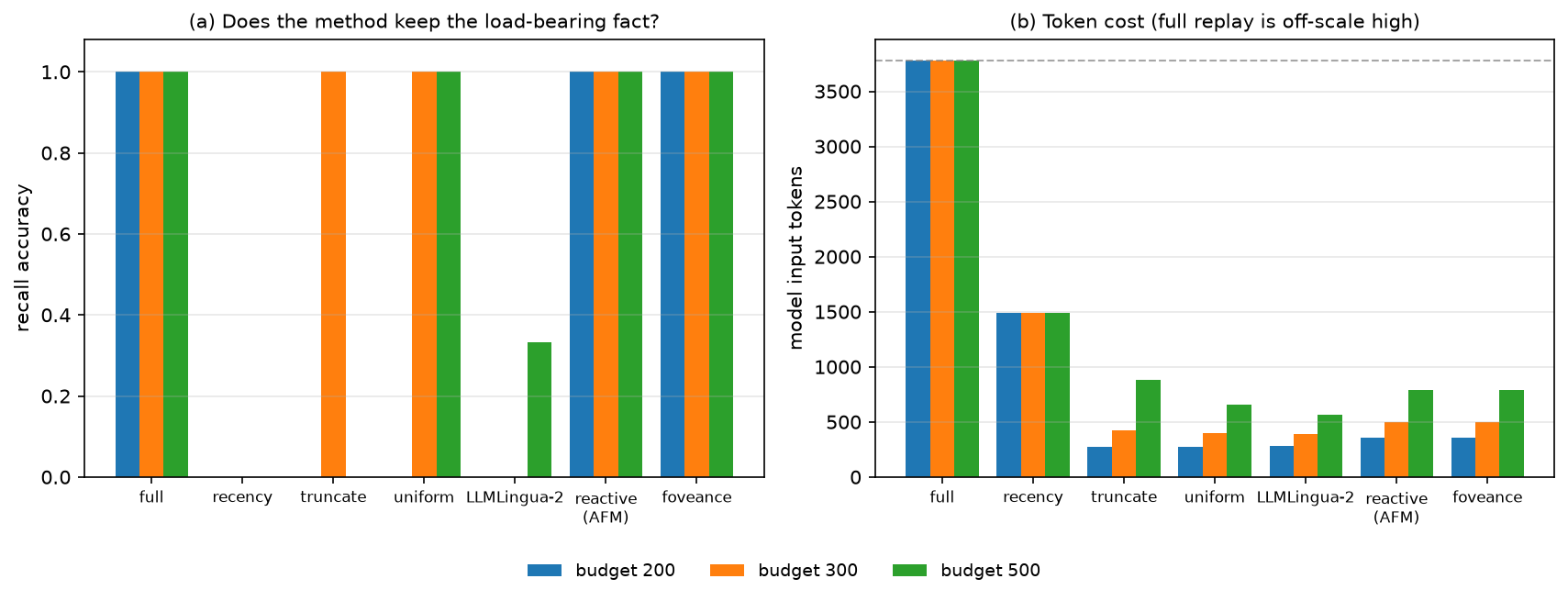
A long trajectory hides one load-bearing fact early amid filler; each method compresses to a budget, then the real model (llama3.2:1b) is asked to recall it. Only the query-aware allocators recall it at every budget, at 5–10× fewer tokens than full replay:
| recall @ budget | full | keep-recent | truncate | spread-evenly | **LLMLingua-2** | reactive (AFM) | **Foveance** |
|---|---|---|---|---|---|---|---|
| **200** (tight) | 1.00 | 0.00 | 0.00 | 0.00 | **0.00** | 1.00 | **1.00** |
| 300 | 1.00 | 0.00 | 1.00 | 1.00 | **0.00** | 1.00 | **1.00** |
| 500 | 1.00 | 0.00 | 0.00 | 1.00 | **0.33** | 1.00 | **1.00** |
The same ordering holds in the full multi-turn agent loop, ruling out a one-shot artifact:
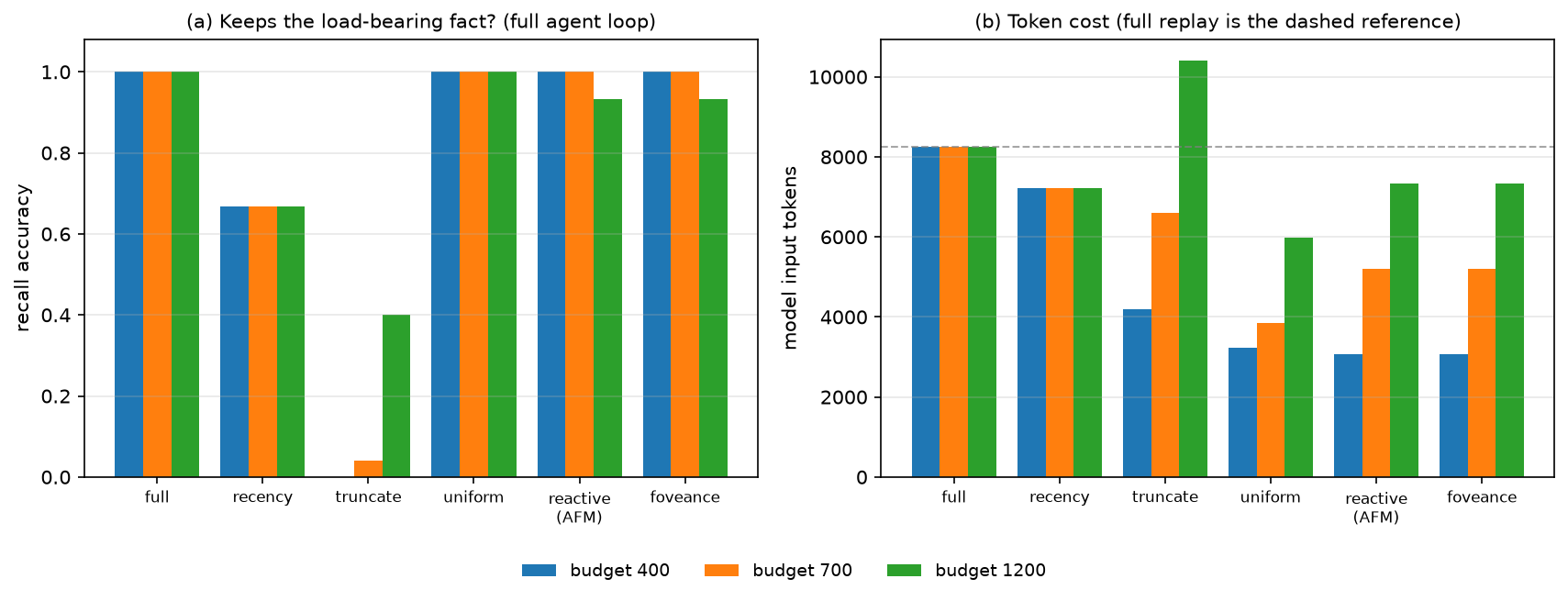
Reproduce: python bench/compare_baselines.py --with-llmlingua && python bench/plot_baselines.py. LLMLingua-2 is a real run via the llmlingua package (CPU).
foveance是一个开源的AI工作流优化工具,能够有效减少LLM代币账单
⚡ 核心功能
- 可视化 Agent 工作流编排,无需编写复杂代码
- 支持多步骤自动化任务链,实现全流程无人值守
- 与外部 API、数据库和第三方服务无缝集成
- 内置错误处理与自动重试机制,保障稳定运行
- 提供可复用的自动化模板,快速在同类场景部署
👥 适合人群
🎯 使用场景
- 自动化日常重复性工作,将精力集中于创造性任务
- 构建数据采集 → 处理 → 输出的完整自动化管线
- 实现跨平台、跨系统的数据流转和业务协同
⚖️ 优点与不足
- +大幅减少重复性人工操作
- +可视化流程,清晰直观
- +可扩展性强,支持复杂场景
- −初始配置和调试需投入一定时间
- −强依赖外部服务的稳定性
- −复杂场景需具备一定技术基础
该工具使用 NOASSERTION 协议,商用场景请仔细阅读协议条款,必要时咨询法律意见。
AI Skill Hub 为第三方内容聚合平台,本页面信息基于公开数据整理,不对工具功能和质量作任何法律背书。
建议在沙箱或测试环境中充分验证后,再部署至生产环境,并做好必要的安全评估。
📄 NOASSERTION — 请查阅原始协议条款了解具体使用限制。
🔗 相关工具推荐
❓ 常见问题 FAQ
总体来看,Foveance 是一款质量优秀的Agent工作流,在同类工具中具备一定竞争力。AI Skill Hub 将持续追踪其更新动态,建议收藏备用,结合自身场景选择合适时机引入使用。
| 原始名称 | foveance |
| Topics | ai-agentsanthropicclaude-codecodexcontext-compression |
| GitHub | https://github.com/Aimaghsoodi/foveance |
| License | NOASSERTION |
| 语言 | Python |
收录时间:2026-07-07 · 更新时间:2026-07-07 · License:NOASSERTION · AI Skill Hub 不对第三方内容的准确性作法律背书。