
MCP数据包跟踪器
AI Skill Hub 强烈推荐:MCP数据包跟踪器 是一款优质的MCP工具。AI 综合评分 8.0 分,在同类工具中表现稳健。如果你正在寻找可靠的MCP工具解决方案,这是一个值得深入了解的选择。
📚 深度解析
通过安装 MCP数据包跟踪器,你的 AI 助手将获得额外的工具调用能力,可以用自然语言直接操控该工具的功能,无需学习复杂的命令行语法。MCP 工具的核心价值在于"一次配置,永久增强"——配置完成后,每次与 AI 对话时都可以无缝调用这些工具。
在技术实现上,MCP 工具通过标准的 JSON-RPC 协议与 AI 客户端通信,工具的功能以"工具列表"的形式暴露给 AI 模型,AI 可以按需调用。MCP数据包跟踪器 提供了结构化的工具调用接口,使 AI 模型能够精确地理解和使用每个功能点,显著降低 AI 在工具使用上的错误率。
与传统的 API 集成相比,MCP 工具的优势在于无需编写代码——用户只需在配置文件中添加几行 JSON,即可让 AI 获得全新能力。AI Skill Hub 将 MCP数据包跟踪器 评为 AI 评分 8.0 分,属于同类工具中的优质选择。
📋 工具概览
AI驱动的Cisco数据包跟踪器自动化工具
MCP数据包跟踪器 是一款遵循 MCP(Model Context Protocol)标准协议的 AI 工具扩展。通过 MCP 协议,它可以让 Claude、Cursor 等主流 AI 客户端直接访问和操作外部工具、数据源和服务,实现 AI 能力的无缝扩展。无论是文件操作、数据库查询还是 API 调用,都可以通过自然语言在 AI 对话中直接触发,极大提升生产效率。
📖 中文文档
AI驱动的Cisco数据包跟踪器自动化工具
MCP数据包跟踪器 是一款遵循 MCP(Model Context Protocol)标准协议的 AI 工具扩展。通过 MCP 协议,它可以让 Claude、Cursor 等主流 AI 客户端直接访问和操作外部工具、数据源和服务,实现 AI 能力的无缝扩展。无论是文件操作、数据库查询还是 API 调用,都可以通过自然语言在 AI 对话中直接触发,极大提升生产效率。
- 通过标准 MCP 协议与 Claude、Cursor 等主流 AI 客户端深度集成
- 提供结构化工具调用接口,显著降低 AI 集成复杂度
- 支持 Claude Desktop 和 Claude Code 无缝接入,开箱即用
- 可与其他 MCP 工具组合叠加,构建完整 AI 工作站
- 轻量无侵入设计,不影响现有系统架构
- 在 Claude Desktop 对话中直接调用本地工具,实现 AI 与系统的深度联动
- 通过自然语言驱动复杂的多步骤自动化任务,代替繁琐手动操作
- 将多个 MCP 工具组合使用,构建个人专属 AI 工作站
# 方式一:通过 Claude Code CLI 一键安装
claude skill install https://github.com/Mats2208/MCP-Packet-Tracer

# 方式二:手动配置 claude_desktop_config.json
{
  "mcpServers": {
    "mcp------": {
      "command": "npx",
      "args": ["-y", "mcp-packet-tracer"]
    }
  }
}

# 配置文件位置
# macOS: ~/Library/Application Support/Claude/claude_desktop_config.json
# Windows: %APPDATA%/Claude/claude_desktop_config.json
- 确认已安装 Node.js(v18 或以上版本)
- 打开 Claude Desktop 或 Claude Code 的 MCP 配置文件
- 按「交给 Agent 安装 → Claude Desktop」标签中的 JSON 配置填入 mcpServers 字段
- 保存配置文件并重启 Claude 客户端
- 重启后,在对话中即可使用本工具
# 安装后在 Claude 对话中直接使用
# 示例:
用户: 请帮我用 MCP数据包跟踪器 执行以下任务...
Claude: [自动调用 MCP数据包跟踪器 MCP 工具处理请求]

# 查看可用工具列表
# 在 Claude 中输入:"列出所有可用的 MCP 工具"
// claude_desktop_config.json 配置示例
{
  "mcpServers": {
    "mcp______": {
      "command": "npx",
      "args": ["-y", "mcp-packet-tracer"],
      "env": {
        // "API_KEY": "your-api-key-here"
      }
    }
  }
}

// 保存后重启 Claude Desktop 生效
简介
<img src="https://raw.githubusercontent.com/Mats2208/MCP-Packet-Tracer/main/demo/banner.png" alt="Packet Tracer MCP — AI-powered Cisco Packet Tracer automation: generate, validate and deploy network topologies from natural-language prompts" width="100%"/>
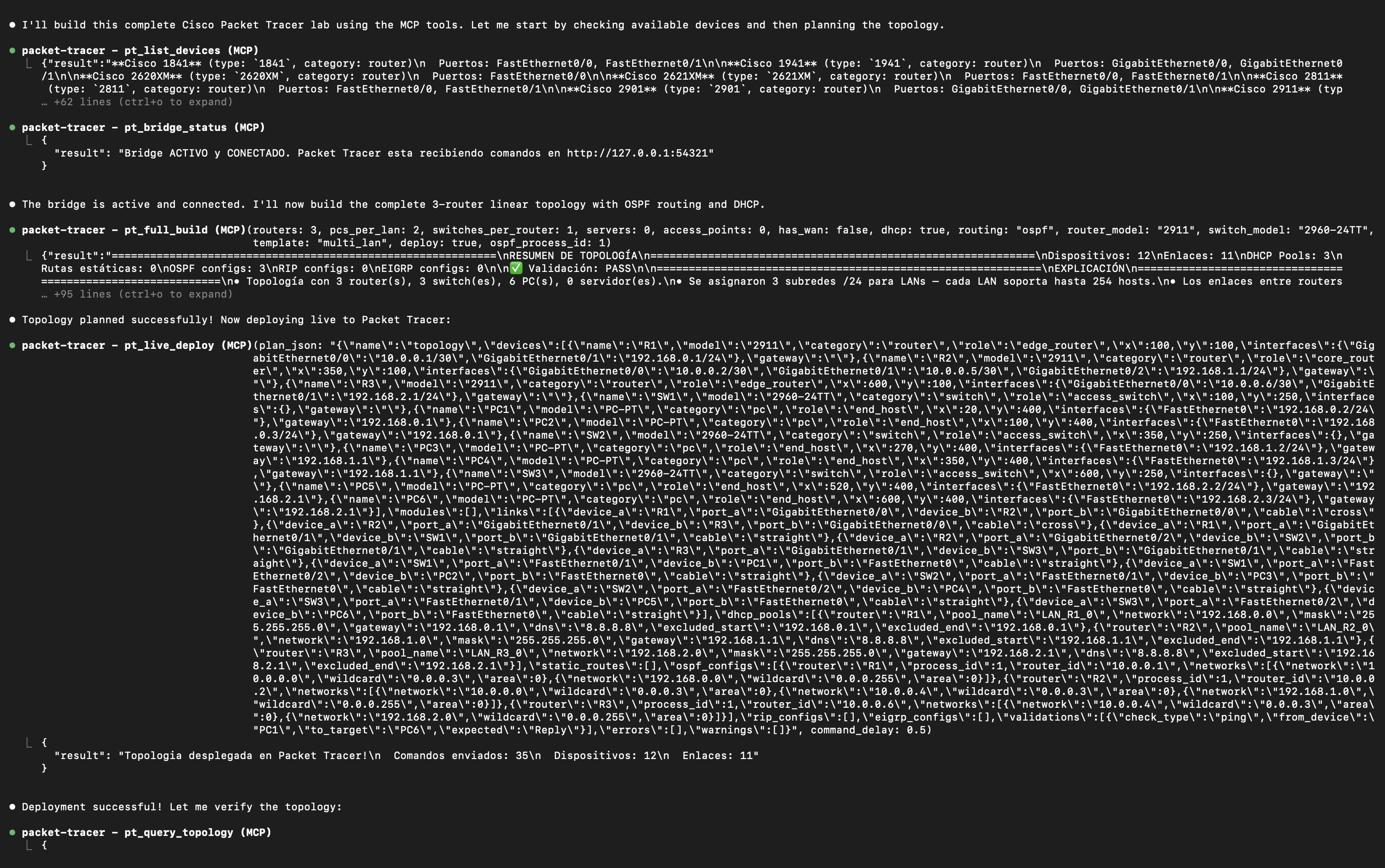
Tell your AI "create a network with 3 routers, OSPF and DHCP" — it plans, validates, generates, and deploys the topology directly into Cisco Packet Tracer in real time.







<br/>
| 61 MCP Tools | 5 MCP Resources | 74 Device Models | 151 Modules | 15 Cable Types |
🌐 Website: https://www.mcpnetwork.top • 📚 Documentation: https://mats2208.github.io/MCP-Packet-Tracer/
</div>
---
What's new
v0.9.0 — the first release you can pip install, and the one that went hunting for silent false OKs: a topology split into islands that validation approved with error_count: 0, a bridge handing back the previous operation's result, a "CONECTIVIDAD OK" reported with 75% packet loss. None of them crashed; all of them lied. The server also reports its own version during the MCP handshake now — it used to announce the version of the mcp SDK. v0.8.0 let the agent show the network instead of only describing it: canvas screenshots plus notes and drawings, for topologies that document themselves. v0.7.0 made the server read a live topology, not just build one: security auditing, per-port inspection, packet tracing with Packet Tracer's own per-layer decision log, NetFlow, and config backup. Full list in the Changelog.
Installation
1. Install the server
pip install packet-tracer-mcpOr from source, if you want to modify it:
git clone https://github.com/Mats2208/MCP-Packet-Tracer
cd MCP-Packet-Tracer
pip install -e .
2. Connect your MCP client (Claude Code shown)
Linux · macOS · Git Bash · Windows cmd.exe:
claude mcp add --scope user --transport stdio packet-tracer -- python -m packet_tracer_mcp --stdioWindows PowerShell — quote the -- separator, or PowerShell swallows it and Claude aborts with error: unknown option '-m':
claude mcp add --scope user --transport stdio packet-tracer "--" python -m packet_tracer_mcp --stdioVerify with claude mcp list (look for packet-tracer … ✓ Connected).
3. Install the live-deploy extension — only if you want real-time deploy into a running Packet Tracer
Download V5.2.pts from Releases, then in Packet Tracer go to Extensions → Scripting → Configure PT Script Modules → Add… and select it. Full walkthrough in Live deploy below.
v0.6.0+ requires V5. The bridge now authenticates with a per-machine token that the V5 extension reads automatically; builds before V5 can't authenticate.
4. Install the Claude Code Skill — recommended; makes the AI use the MCP correctly instead of guessing
The repo ships a companion Agent Skill that teaches the model the exact tool catalog, the discover→plan→validate→deploy workflow, and the precise Script-Engine API (so it never invents method/model/port names). Install it globally from the repo root:
Linux · macOS · Git Bash:
mkdir -p ~/.claude/skills/packet-tracer && cp skill/SKILL.md ~/.claude/skills/packet-tracer/SKILL.mdWindows PowerShell:
New-Item -ItemType Directory -Force "$HOME\.claude\skills\packet-tracer" | Out-Null; Copy-Item skill\SKILL.md "$HOME\.claude\skills\packet-tracer\SKILL.md"Then run /reload-skills in Claude Code (or restart it) and confirm with /skills. Details → Skill docs.
Requires Python 3.11+ (depsmcp[cli]>=1.13,pydantic>=2.11install automatically). Full setup for every client → Installation docs.
Live deploy
Stream topologies into a running Packet Tracer in real time. Install this repo's own MCP Control Center extension once — the .pts from Releases — via Extensions → Scripting → Configure PT Script Modules → Add…, then open Extensions → MCP BUILDER. It auto-connects to the bridge — no snippet to paste.
<p align="center"><img src="https://raw.githubusercontent.com/Mats2208/MCP-Packet-Tracer/main/demo/install-demo.gif" alt="Installing the MCP Control Center extension in Packet Tracer" width="760"/></p> <p align="center"><sub>Installing the MCP Control Center extension (V5) in Packet Tracer</sub></p>
📖 Full steps → Live Deploy Setup.
Quick start
Just talk to your AI:
"Build a network with 2 routers, 2 switches, 4 PCs, DHCP and static routing."
The LLM calls pt_full_build, which plans → validates → generates → deploys. See the Quick Start guide.
Showcase
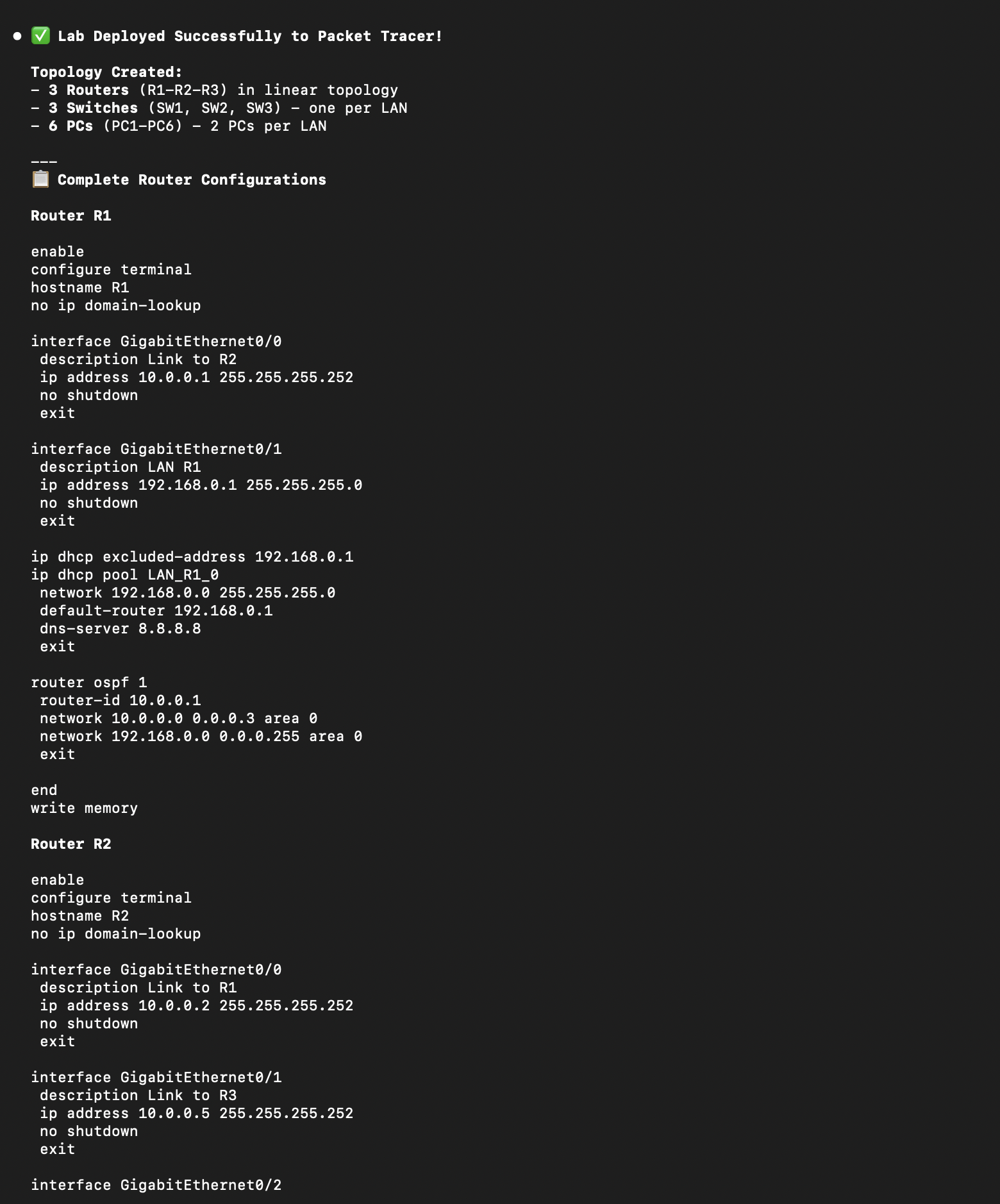
<p align="center"> <img src="https://raw.githubusercontent.com/Mats2208/MCP-Packet-Tracer/main/demo/topology-screenshot.png" alt="3-router OSPF topology deployed to Packet Tracer" width="720"/> </p> <p align="center"><sub>3-router linear topology with OSPF, DHCP, and 6 PCs — planned and deployed via MCP tools</sub></p>
|
Full build + live deploy pipeline in VS Code |
Auto-generated IOS CLI configs with OSPF & DHCP |
<p align="center"> <img src="https://raw.githubusercontent.com/Mats2208/MCP-Packet-Tracer/main/demo/live-deploy.gif" alt="Live deploy demo — from prompt to Packet Tracer in real time" width="720"/> </p> <p align="center"><sub>Live deploy — from a natural-language prompt to a running topology in Packet Tracer</sub></p>
---
高质量的MCP自动化工具,具有较强的实用价值
- 需要让 Claude / Cursor 操作本地工具的 AI 工程师
- 配置 MCP 服务器时建议使用 stdio 传输 + JSON-RPC,避免暴露公网
- API key 直接提交到 git 仓库(请用 .env 并加入 .gitignore)
- MCP 配置路径拼错或权限不足,重启 Claude Desktop 才生效
- Python 依赖冲突:建议用 venv / uv 隔离环境
- CLI:直接 npm install -g / pip install,命令行调用
- 云端托管:可放在 Vercel / Railway / Fly.io 等 PaaS 平台
⚡ 核心功能
- 通过标准 MCP 协议与 Claude、Cursor 等主流 AI 客户端深度集成
- 提供结构化工具调用接口,显著降低 AI 集成复杂度
- 支持 Claude Desktop 和 Claude Code 无缝接入,开箱即用
- 可与其他 MCP 工具组合叠加,构建完整 AI 工作站
- 轻量无侵入设计,不影响现有系统架构
- 需要让 Claude / Cursor 操作本地工具的 AI 工程师
- 配置 MCP 服务器时建议使用 stdio 传输 + JSON-RPC,避免暴露公网
- API key 直接提交到 git 仓库(请用 .env 并加入 .gitignore)
- MCP 配置路径拼错或权限不足,重启 Claude Desktop 才生效
- Python 依赖冲突:建议用 venv / uv 隔离环境
👥 适合人群
🎯 使用场景
- 在 Claude Desktop 对话中直接调用本地工具,实现 AI 与系统的深度联动
- 通过自然语言驱动复杂的多步骤自动化任务,代替繁琐手动操作
- 将多个 MCP 工具组合使用,构建个人专属 AI 工作站
⚖️ 优点与不足
- +MIT 协议,可免费商用
- +标准化 MCP 协议,生态互联性强
- +与 Claude 官方生态无缝对接
- +即插即用,配置简单快捷
- −依赖 Claude 客户端,非 Claude 用户无法使用
- −MCP 协议仍在持续演进,接口可能变更
- −需要一定的配置步骤
AI Skill Hub 为第三方内容聚合平台,本页面信息基于公开数据整理,不对工具功能和质量作任何法律背书。
建议在沙箱或测试环境中充分验证后,再部署至生产环境,并做好必要的安全评估。
✅ MIT 协议 — 最宽松的开源协议之一,可自由商用、修改、分发,仅需保留版权声明。
❓ 常见问题 FAQ
总体来看,MCP数据包跟踪器 是一款质量优秀的MCP工具,在同类工具中具备一定竞争力。AI Skill Hub 将持续追踪其更新动态,建议收藏备用,结合自身场景选择合适时机引入使用。
| 原始名称 | MCP-Packet-Tracer |
| 原始描述 | 开源MCP工具:AI-powered Cisco Packet Tracer automation using MCP. Generate, validate and depl。⭐79 · Python |
| Topics | aiciscomcppython |
| GitHub | https://github.com/Mats2208/MCP-Packet-Tracer |
| License | MIT |
| 语言 | Python |
收录时间:2026-06-22 · 更新时间:2026-06-22 · License:MIT · AI Skill Hub 不对第三方内容的准确性作法律背书。
🤖 交给 Agent 安装 · MCP数据包跟踪器
选择 Agent 类型,复制安装指令后粘贴到对应客户端