
日志分析工具
经 AI Skill Hub 精选评估,日志分析工具 获评「推荐使用」。这款AI工具在功能完整性、社区活跃度和易用性方面表现出色,AI 评分 7.5 分,适合有一定技术背景的用户使用。
📚 深度解析
**为什么要使用开源工具而非商业 SaaS?**
对于个人开发者和有隐私需求的用户,本地部署的开源工具意味着数据不离本机,不受第三方服务商的数据政策约束。同时,开源工具通常没有使用次数限制和月度费用,一次安装即可长期使用,对于高频使用场景的总拥有成本(TCO)远低于订阅制商业工具。
**安装与环境准备**
日志分析工具 依赖 Python 运行环境。建议通过 pyenv(Python)或 nvm(Node.js)管理 Python 版本,避免全局环境污染。对于新手用户,推荐先创建虚拟环境(python -m venv venv && source venv/bin/activate),再安装依赖,这样即使出现问题也可以随时删除虚拟环境重新开始,不影响系统稳定性。
**社区与维护**
GitHub Issue 和 Discussion 是获取帮助的最快渠道。在提问前建议先检查 Closed Issues(已关闭的问题),大多数常见问题都已有解答。遇到 Bug 时,提供 pip list 的输出、完整错误堆栈和最小可复现示例,能显著提高开发者响应速度。AI Skill Hub 将持续追踪 日志分析工具 的版本更新,及时通知重要功能变化。
📋 工具概览
本地日志分析,支持个人信息遮蔽、威胁检测、异常检测
日志分析工具 是一款基于 Python 开发的开源工具,专注于 anomaly-detection、cli、devops 等核心功能。作为 GitHub 开源项目,它拥有活跃的社区支持和持续的版本迭代,代码完全透明可审计,支持本地部署以保护数据隐私。无论是个人使用还是集成到企业工作流,都能提供稳定可靠的解决方案。
📖 中文文档
本地日志分析,支持个人信息遮蔽、威胁检测、异常检测
日志分析工具 是一款基于 Python 开发的开源工具,专注于 anomaly-detection、cli、devops 等核心功能。作为 GitHub 开源项目,它拥有活跃的社区支持和持续的版本迭代,代码完全透明可审计,支持本地部署以保护数据隐私。无论是个人使用还是集成到企业工作流,都能提供稳定可靠的解决方案。
- 开源免费,支持本地部署,数据完全自主可控
- 活跃的 GitHub 开源社区,持续迭代更新
- 提供详细文档和使用示例,新手友好
- 支持自定义配置,灵活适配不同使用环境
- 可作为基础组件集成进现有技术栈或进行二次开发
- 本地部署运行,保护数据隐私,满足合规要求
- 自定义集成到现有系统,扩展技术栈能力
- 作为开源基础组件进行商业化二次开发
# 方式一:pip 安装(推荐)
pip install logatory

# 方式二:虚拟环境安装(推荐生产环境)
python -m venv .venv
source .venv/bin/activate  # Windows: .venv\Scripts\activate
pip install logatory

# 方式三:从源码安装(获取最新功能)
git clone https://github.com/T0nd3/logatory
cd logatory
pip install -e .

# 验证安装
python -c "import logatory; print('安装成功')"
- 访问 GitHub 仓库页面
- 按照 README 文档完成依赖安装
- 根据系统环境完成初始化配置
- 参考官方示例或文档开始使用
- 遇到问题可在 GitHub Issues 中查找解答
# 命令行使用
logatory --help

# 基本用法
logatory input_file -o output_file

# Python 代码中调用
import logatory

# 示例
result = logatory.process("input")
print(result)
# logatory 配置文件示例(config.yml)
app:
  name: "logatory"
  debug: false
  log_level: "INFO"

# 运行时指定配置文件
logatory --config config.yml

# 或通过环境变量配置
export LOGATORY_API_KEY="your-key"
export LOGATORY_OUTPUT_DIR="./output"
Logatory




Local log analysis with PII redaction, rule-based threat detection, anomaly detection, LLM-powered insights, and a web dashboard — all running on your machine, no data leaves your infrastructure by default.
Or stay in the terminal — format auto-detected, PII redacted, threats flagged:
```text
Features
| Capability | Details |
|---|---|
| **Format support** | Syslog, Nginx/Apache access, Apache error, HAProxy, Traefik, JSON Lines, logfmt, CEF, LEEF, plaintext — auto-detected; reads plain, gzip, and .xlsx files |
| **PII redaction** | Emails, IPv4/IPv6, credit cards (Luhn-checked), IBANs, German phone numbers — deterministic pseudonymisation or masking |
| **Rule engine** | YAML-based rules with eq, ne, contains, startswith, endswith, re, gt, lt, gte, lte operators; multi-field AND/OR |
| **Sigma support** | Convert Sigma rules to native format |
| **Anomaly detection** | Statistical Z-score baseline over 60-second buckets, trains automatically from historical logs |
| **LLM integration** | Ollama (default), Claude, OpenAI-compatible APIs; explain findings, summarize errors, RAG Q&A |
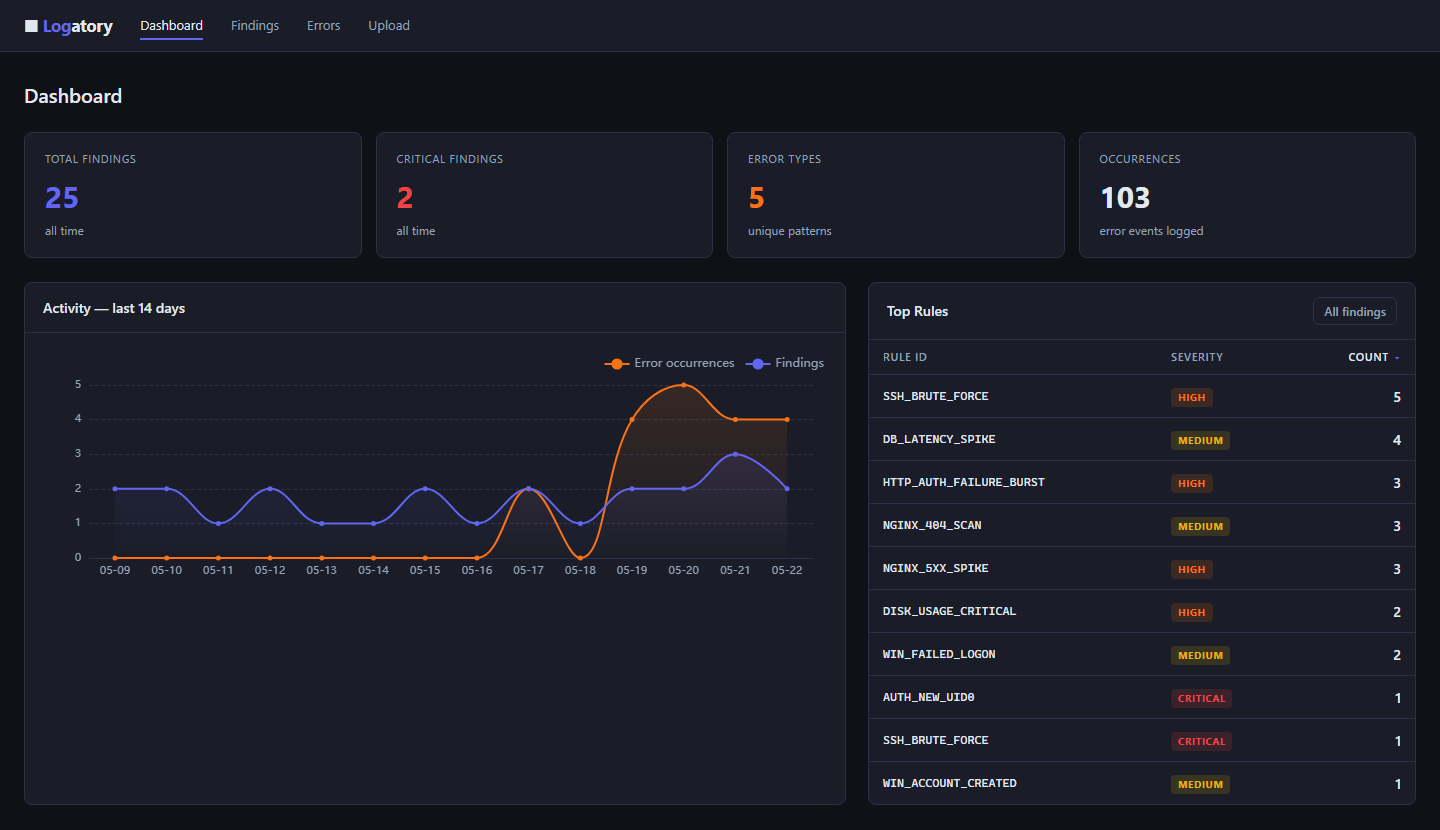
| **Web dashboard** | FastAPI + HTMX; findings/errors table, trend chart (ECharts), inline LLM explain, log file upload |
| **Log upload** | Drag-and-drop log upload in the browser — instant scan with PII redaction, results shown inline |
| **REST API v1** | Bearer-token auth, JSON endpoints for findings, errors, stats, live event ingestion |
| **OpenSearch** | Query and analyse logs from OpenSearch / Elasticsearch clusters |
| **systemd journal** | Read logs straight from journald via journalctl — scan history or follow live |
| **Docker logs** | Read container logs straight from the Docker daemon — scan or follow, no log stack required |
| **Kubernetes** | Read pod logs through kubectl — by namespace, label selector or pod; scan or follow, no log stack required |
| **Windows Event Log** | Analyze a JSON event export anywhere (even on Linux), or read a live log on Windows via Get-WinEvent |
| **S3 / object storage** | Read log objects straight from a bucket via the aws CLI — AWS S3 or any S3-compatible store; gzip decompressed on the fly |
| **Syslog listener** | Bind UDP/TCP 514 and receive syslog (RFC 3164 / RFC 5424) from network devices, firewalls and appliances |
| **AWS CloudWatch** | Pull events from a CloudWatch log group via the aws CLI — no boto3; scan or follow live |
| **GCP Cloud Logging** | Read entries via the gcloud CLI — no google-cloud dependency; scan or follow live with native severities |
| **Remote over SSH** | Pull logs from any SSH-reachable host — no agent on the remote box; scan or follow live with auto-reconnect |
| **Grafana Loki** | Query a Loki instance with LogQL — scan or follow live |
| **Graylog** | Query a Graylog server via its search API — scan or follow live |
| **Fleet** | Declare many log sources in one file — scan, follow, and manage a whole fleet at once |
| **Finding persistence** | SQLite store for HIGH/CRITICAL findings with retention, dedup, severity filtering |
| **FP suppression** | Dismiss rules globally or per source file; reversible |
| **Markdown export** | Automated security reports from the SQLite database |
| **Plugin system** | Drop Python files into a directory to add custom rules, PII patterns, parsers and source adapters |
| **Docker** | Multi-stage image, non-root user, /data volume — production-ready |
---
Install (core only — no external dependencies beyond PyYAML and typer)
pip install logatory
Build the vector index first (requires pip install 'logatory[embed]')
logatory llm index
Installation
Requirements: Python 3.11+
Docker container logs
No log aggregation stack (ELK, Loki, Graylog) required — if your services run in Docker, Logatory reads their logs straight from the daemon. Install the optional dependency and use the native docker command:
```bash pip install 'logatory[docker]'
Install and start Ollama: https://ollama.ai
ollama pull gemma3:4b
Docker
Environment variables for Docker
```bash
docker-compose.yml (or .env file)
LOGATORY_API_TOKEN=change-me-in-production LOGATORY_PII_SALT=a-long-random-string ```
Build and run manually
docker build -t logatory .

docker run -d \
  -p 8080:8080 \
  -v logatory-data:/data \
  -e LOGATORY_API_TOKEN=mytoken \
  -e LOGATORY_PII_SALT=mysalt \
  logatory
The container runs as a non-root user (logatory, UID 1001). The database and config are stored in /data.
Scanning log files inside Docker
Mount the host log directory and run a one-shot scan:
docker run --rm \
  -v /var/log:/logs:ro \
  -v logatory-data:/data \
  logatory \
  logatory scan /logs/syslog --track-errors
Quick Start
```bash
Quick start
docker compose up -dThe stack starts Logatory on port 8080 with a named volume for the SQLite database.
demo
Interactive demo and database seeding using synthetic data — no real log files, Ollama, or database required for demo run.
logatory demo [run|seed|clear]demo run
Guided CLI walkthrough of all 7 feature sections (log parsing, PII, rules, error tracking, findings, anomaly detection, LLM):
logatory demo run           # pause after each section
logatory demo run --no-pause  # print everything at once
demo seed
Populate the SQLite database with synthetic findings and errors so the web dashboard has something to display immediately. Inserts 25 findings spread over 14 days (for the trend chart) and 5 error groups. All records are tagged internally and never mixed with real data.
logatory demo seeddemo clear
Remove every record written by demo seed. Real findings and errors are never touched.
logatory demo clear---
Demo data for the web dashboard
Seed the database with synthetic findings and errors so the dashboard shows data immediately:
```bash
Remove all demo data (real data is untouched)
docker compose exec logatory logatory demo clear ```
Alternatively, upload a real log file via the browser at http://localhost:8080/upload for an instant, transient scan.
---
Optional feature sets
pip install 'logatory[web]'         # web dashboard + REST API (FastAPI, uvicorn, Jinja2)
pip install 'logatory[docker]'      # read logs from local Docker containers
pip install 'logatory[opensearch]'  # OpenSearch / Elasticsearch integration
pip install 'logatory[xlsx]'        # read .xlsx spreadsheet log exports
pip install 'logatory[claude]'      # Anthropic Claude API
pip install 'logatory[embed]'       # ChromaDB for RAG (llm ask command)
Install everything:
pip install 'logatory[web,docker,opensearch,xlsx,claude,embed]'List the configured targets; --check probes each for reachability
logatory fleet list --check
Configuration
Run logatory init to generate a config.yaml (with a freshly generated PII salt), or copy config.yaml.example and adapt. When no --config is passed, Logatory looks for a config in $LOGATORY_CONFIG, ./config.yaml, then ~/.config/logatory/config.yaml.
logatory init                              # write ./config.yaml
logatory init --minimal                    # smaller starter config
logatory init -o ~/.config/logatory/config.yaml
Run logatory doctor to verify your setup — it checks that the config loads, a PII salt is set, the database directory is writable, the LLM provider is configured/reachable (and that cloud API keys are present), plugins load, and alert channels build. It exits non-zero on hard failures, so it works in CI too.
logatory doctor
logatory doctor --config ~/.config/logatory/config.yaml
```yaml
Custom PII patterns file (optional)
pii_rules_path: pii_rules.yaml
Prefer env var LOGATORY_PII_SALT over storing here
pii_salt: ""
Prefer env var LOGATORY_API_TOKEN
api_token: ""
Environment variables
| Variable | Description |
|---|---|
LOGATORY_PII_SALT | Salt for PII pseudonymisation |
LOGATORY_API_TOKEN | Bearer token for REST API auth |
ANTHROPIC_API_KEY | API key when llm.provider: claude |
OPENAI_API_KEY | API key when llm.provider: openai |
GROQ_API_KEY | API key when llm.provider: groq |
MISTRAL_API_KEY | API key when llm.provider: mistral |
OPENSEARCH_USERNAME | OpenSearch basic auth username |
OPENSEARCH_PASSWORD | OpenSearch basic auth password |
OPENSEARCH_API_KEY | OpenSearch API key (id:base64key) |
OPENSEARCH_CLIENT_CERT | Path to client certificate |
OPENSEARCH_CLIENT_KEY | Path to client private key |
OPENSEARCH_CA_CERTS | Path to CA certificate bundle |
LOGATORY_CONFIG | Config file path used by logatory serve --reload |
---
Default config already points to http://localhost:11434
logatory llm info ```
config.yaml
llm: provider: claude model: claude-3-5-haiku-20241022
CLI Reference
All commands accept --config/-c <path> to specify a config file. Without it, Logatory auto-discovers one from (in order) $LOGATORY_CONFIG, ./config.yaml, then ~/.config/logatory/config.yaml; if none exist, built-in defaults are used.
---
REST API Bearer token — leave empty to disable auth (local dev)
OpenAI-compatible APIs
llm:
  provider: openai
  model: gpt-4o-mini
  endpoint: https://api.openai.com/v1
export OPENAI_API_KEY=sk-...Web Dashboard & REST API
Start the server (requires pip install 'logatory[web]'):
logatory serve --port 8080REST API v1
Base path: /api/v1/ Interactive docs: /api/docs
| Method | Path | Description |
|---|---|---|
GET | /api/v1/health | Liveness probe (no auth) |
GET | /api/v1/findings | List findings (?severity=high&since_hours=24&source=nginx.log) |
GET | /api/v1/findings/{id} | Get finding by ID |
GET | /api/v1/errors | List error groups (?sort=count) |
GET | /api/v1/errors/{fingerprint} | Get error group + recent occurrences |
GET | /api/v1/stats | Aggregate counts |
POST | /api/v1/events | Ingest a raw log line → returns triggered findings |
Authentication
Set api_token in config.yaml or via LOGATORY_API_TOKEN. Pass it as:
Authorization: Bearer <token>Leave empty to disable auth (for local development or Docker with network-level access control).
Event ingestion example
curl -X POST http://localhost:8080/api/v1/events \
  -H "Authorization: Bearer mytoken" \
  -H "Content-Type: application/json" \
  -d '{"raw": "Failed password for root from 1.2.3.4 port 22", "source": "sshd"}'
Plugin directory — all *.py files here are auto-loaded at startup
plugins_dir: plugins/
Plugin System
Drop Python files into a directory and register custom rules, PII patterns, log-format parsers and source adapters. Enable in config.yaml:
plugins_dir: plugins/A plugin file must expose a register(registry) function:
```python
plugins/my_plugin.py
def register(registry) -> None: # Custom detection rule registry.add_rule({ "id": "MY_DB_LEAK", "title": "Database credentials exposed in log", "description": "Fires when a connection string appears in a log message.", "level": "critical", "detection": { "match": [ {"field": "message", "op": "re", "value": r"postgresql://\S+:\S+@"}, ] }, })
# Custom PII pattern — redacts internal employee IDs registry.add_pii_pattern( name="employee_id", pattern=r"\bEMP-\d{4,8}\b", prefix="employee", )
# Load an entire directory of YAML rule files from pathlib import Path registry.add_rule_dir(Path(file).parent / "my_rules")
# Custom log-format parser — auto-detected like any built-in format # registry.add_parser(name="myfmt", detect=looks_like_myfmt, factory=MyParser)
# Custom source adapter — looked up by name like any built-in source # registry.add_adapter(name="kafka", adapter_cls=KafkaAdapter) ```
Plugin rules participate in logatory scan, logatory tail, and the web dashboard rule engine. Plugin PII patterns apply to every redaction pass; plugin parsers and adapters register into the global parser/adapter registries, so format auto-detection and source lookup pick them up everywhere. A plugin that raises an exception is logged as a warning and skipped — it never crashes the host process.
A complete, runnable example covering all four contribution types lives in plugins/example_plugin.py, and the full guide is in docs/PLUGINS.md.
---
LLM Integration
Free-form question; the agent gathers evidence with tools as needed
logatory agent ask "Why did the API start failing this afternoon?"
Logatory 是一个用于日志分析和处理的开源项目,提供了多种功能和特性,包括日志格式支持、PII(个人信息)抹除、规则引擎等。它可以读取多种日志文件格式,包括 Syslog、Nginx/Apache access、Apache error 等。
Logatory 提供了多种功能,包括日志格式支持、PII 抹除、规则引擎等。它可以读取多种日志文件格式,包括 Syslog、Nginx/Apache access、Apache error 等。PII 抹除功能可以抹除个人信息,如电子邮件、IP 地址、信用卡号码等。规则引擎可以根据自定义的规则来处理日志数据。
Logatory 需要 Python 3.11+ 环境,安装方式包括 pip、Docker 和源码部署。它还支持使用 Docker 容器读取日志文件。
安装 Logatory 可以使用 pip、Docker 和源码部署。使用 pip 安装可以使用以下命令:pip install logatory。使用 Docker 部署可以使用以下命令:docker compose up -d。源码部署可以从 GitHub 上下载源码并使用 pip 安装。
使用 Logatory 可以通过以下步骤:1. 安装 Logatory;2. 配置 Logatory;3. 使用 Logatory 来读取和处理日志数据。
Logatory 的配置可以通过 MCP(Master Configuration Profile)来完成。MCP 是一个用于配置 Logatory 的文件,包含了 Logatory 的所有配置项。配置项包括日志读取源、日志格式、PII 抹除规则等。配置文件可以使用 env 变量来指定。
Logatory 提供了 REST API 和 CLI 接口。REST API 可以使用 Bearer token 来进行认证。CLI 接口可以使用 --config/-c <path> 来指定配置文件。
Logatory 的工作流包括了日志读取、日志处理、日志输出等步骤。日志读取步骤可以使用多种日志读取源,如 Docker 容器、文件系统等。日志处理步骤可以使用多种日志处理规则,如 PII 抹除规则、日志格式转换规则等。日志输出步骤可以输出日志数据到多种输出源,如文件系统、数据库等。
Logatory 的 FAQ 包括了常见问题和答案。例如,为什么 Logatory 需要 Python 3.11+ 环境?答案是因为 Logatory 使用了 Python 3.11+ 的特性来实现其功能。
- 构建多智能体协作系统的 Agent 开发者
- 构建企业知识库 / RAG 检索应用的团队
- 生产部署优先使用 Docker Compose 隔离依赖,并挂载 volume 持久化数据
- 本地部署优先选 GGUF 量化模型,节省显存并保持响应速度
- 分块大小建议 256-512 tokens,向量库优选 pgvector 或 Qdrant
- Agent 任务先做 dry-run 验证工具调用链,再开启自主执行
- API key 直接提交到 git 仓库(请用 .env 并加入 .gitignore)
- 容器内无法访问宿主机 localhost — 使用 host.docker.internal
- embedding 模型与查询模型不一致导致检索失效
- 显存不足直接 OOM — 优先降低 context 或换更小的量化模型
- Python 依赖冲突:建议用 venv / uv 隔离环境
- Docker:logatory 提供官方镜像,docker compose up 一键启动
- CLI:直接 npm install -g / pip install,命令行调用
- 本地部署:CPU 8GB 起,GPU 推荐 16GB+ 显存
- 云端托管:可放在 Vercel / Railway / Fly.io 等 PaaS 平台
⚡ 核心功能
- 开源免费,支持本地部署,数据完全自主可控
- 活跃的 GitHub 开源社区,持续迭代更新
- 提供详细文档和使用示例,新手友好
- 支持自定义配置,灵活适配不同使用环境
- 可作为基础组件集成进现有技术栈或进行二次开发
- 构建多智能体协作系统的 Agent 开发者
- 构建企业知识库 / RAG 检索应用的团队
- 生产部署优先使用 Docker Compose 隔离依赖,并挂载 volume 持久化数据
- 本地部署优先选 GGUF 量化模型,节省显存并保持响应速度
- 分块大小建议 256-512 tokens,向量库优选 pgvector 或 Qdrant
- Agent 任务先做 dry-run 验证工具调用链,再开启自主执行
- API key 直接提交到 git 仓库(请用 .env 并加入 .gitignore)
- 容器内无法访问宿主机 localhost — 使用 host.docker.internal
- embedding 模型与查询模型不一致导致检索失效
- 显存不足直接 OOM — 优先降低 context 或换更小的量化模型
👥 适合人群
🎯 使用场景
- 本地部署运行,保护数据隐私,满足合规要求
- 自定义集成到现有系统,扩展技术栈能力
- 作为开源基础组件进行商业化二次开发
⚖️ 优点与不足
- +Apache-2.0 协议,可免费商用
- +完全开源免费,无授权费用
- +本地部署,数据完全自主可控
- +开发者社区支持,遇问题可查可问
- −安装和初始配置可能需要一定技术基础
- −功能完整性通常不如成熟商业产品
- −技术支持主要依赖开源社区,响应速度不稳定
AI Skill Hub 为第三方内容聚合平台,本页面信息基于公开数据整理,不对工具功能和质量作任何法律背书。
建议在沙箱或测试环境中充分验证后,再部署至生产环境,并做好必要的安全评估。
✅ Apache 2.0 — 宽松开源协议,可商用,需保留版权声明和 NOTICE 文件,含专利授权条款。
🔗 相关工具推荐
❓ 常见问题 FAQ
AI Skill Hub 点评:日志分析工具 的核心功能完整,质量良好。对于AI 技术爱好者来说,这是一个值得纳入个人工具库的选择。建议先在非生产环境试用,再逐步推广。
| 原始名称 | logatory |
| 原始描述 | 开源AI工具:Local-first log analysis with PII redaction, threat detection, anomaly detection。⭐10 · Python |
| Topics | anomaly-detectionclidevopsfastapillmpython |
| GitHub | https://github.com/T0nd3/logatory |
| License | Apache-2.0 |
| 语言 | Python |
收录时间:2026-06-13 · 更新时间:2026-06-16 · License:Apache-2.0 · AI Skill Hub 不对第三方内容的准确性作法律背书。