MCP工具
MCP工具 是 AI Skill Hub 本期精选MCP工具之一。综合评分 8.0 分,整体质量较高。我们强烈推荐将其纳入你的 AI 工具库,帮助提升工作效率。
📚 深度解析
通过安装 MCP工具,你的 AI 助手将获得额外的工具调用能力,可以用自然语言直接操控该工具的功能,无需学习复杂的命令行语法。MCP 工具的核心价值在于"一次配置,永久增强"——配置完成后,每次与 AI 对话时都可以无缝调用这些工具。
在技术实现上,MCP 工具通过标准的 JSON-RPC 协议与 AI 客户端通信,工具的功能以"工具列表"的形式暴露给 AI 模型,AI 可以按需调用。MCP工具 提供了结构化的工具调用接口,使 AI 模型能够精确地理解和使用每个功能点,显著降低 AI 在工具使用上的错误率。
与传统的 API 集成相比,MCP 工具的优势在于无需编写代码——用户只需在配置文件中添加几行 JSON,即可让 AI 获得全新能力。AI Skill Hub 将 MCP工具 评为 AI 评分 8.0 分,属于同类工具中的优质选择。
📋 工具概览
MCP工具 是一款遵循 MCP(Model Context Protocol)标准协议的 AI 工具扩展。通过 MCP 协议,它可以让 Claude、Cursor 等主流 AI 客户端直接访问和操作外部工具、数据源和服务,实现 AI 能力的无缝扩展。无论是文件操作、数据库查询还是 API 调用,都可以通过自然语言在 AI 对话中直接触发,极大提升生产效率。
📖 中文文档
MCP工具 是一款遵循 MCP(Model Context Protocol)标准协议的 AI 工具扩展。通过 MCP 协议,它可以让 Claude、Cursor 等主流 AI 客户端直接访问和操作外部工具、数据源和服务,实现 AI 能力的无缝扩展。无论是文件操作、数据库查询还是 API 调用,都可以通过自然语言在 AI 对话中直接触发,极大提升生产效率。
- 通过标准 MCP 协议与 Claude、Cursor 等主流 AI 客户端深度集成
- 提供结构化工具调用接口,显著降低 AI 集成复杂度
- 支持 Claude Desktop 和 Claude Code 无缝接入,开箱即用
- 可与其他 MCP 工具组合叠加,构建完整 AI 工作站
- 轻量无侵入设计,不影响现有系统架构
- 在 Claude Desktop 对话中直接调用本地工具,实现 AI 与系统的深度联动
- 通过自然语言驱动复杂的多步骤自动化任务,代替繁琐手动操作
- 将多个 MCP 工具组合使用,构建个人专属 AI 工作站
# 方式一:通过 Claude Code CLI 一键安装
claude skill install https://github.com/Sidd27/infrawise

# 方式二:手动配置 claude_desktop_config.json
{
  "mcpServers": {
    "mcp--": {
      "command": "npx",
      "args": ["-y", "infrawise"]
    }
  }
}

# 配置文件位置
# macOS: ~/Library/Application Support/Claude/claude_desktop_config.json
# Windows: %APPDATA%/Claude/claude_desktop_config.json
- 确认已安装 Node.js(v18 或以上版本)
- 打开 Claude Desktop 或 Claude Code 的 MCP 配置文件
- 按「交给 Agent 安装 → Claude Desktop」标签中的 JSON 配置填入 mcpServers 字段
- 保存配置文件并重启 Claude 客户端
- 重启后,在对话中即可使用本工具
# 安装后在 Claude 对话中直接使用
# 示例:
用户: 请帮我用 MCP工具 执行以下任务...
Claude: [自动调用 MCP工具 MCP 工具处理请求]

# 查看可用工具列表
# 在 Claude 中输入:"列出所有可用的 MCP 工具"
// claude_desktop_config.json 配置示例
{
  "mcpServers": {
    "mcp__": {
      "command": "npx",
      "args": ["-y", "infrawise"],
      "env": {
        // "API_KEY": "your-api-key-here"
      }
    }
  }
}

// 保存后重启 Claude Desktop 生效
简介
<p align="center"> <a href="https://sidd27.github.io/infrawise/"> <img src="https://raw.githubusercontent.com/Sidd27/infrawise/main/website/public/logo-400.png" alt="Infrawise logo" width="130" /> </a> </p>
Infrawise
<p align="center"><b>Your AI coding assistant finally knows your infra.</b></p>
<p align="center"> <a href="https://www.npmjs.com/package/infrawise"><img src="https://img.shields.io/npm/v/infrawise" alt="npm version" /></a> <a href="https://github.com/Sidd27/infrawise/actions/workflows/npm-publish.yml"><img src="https://github.com/Sidd27/infrawise/actions/workflows/npm-publish.yml/badge.svg" alt="Publish to npm" /></a> <a href="https://github.com/Sidd27/infrawise/actions/workflows/ci.yml"><img src="https://github.com/Sidd27/infrawise/actions/workflows/ci.yml/badge.svg" alt="CI" /></a> <a href="LICENSE"><img src="https://img.shields.io/badge/License-MIT-yellow.svg" alt="License: MIT" /></a> <a href="https://scorecard.dev/viewer/?uri=github.com/Sidd27/infrawise"><img src="https://api.securityscorecards.dev/projects/github.com/Sidd27/infrawise/badge" alt="OpenSSF Scorecard" /></a> <a href="https://glama.ai/mcp/servers/Sidd27/infrawise"><img src="https://glama.ai/mcp/servers/Sidd27/infrawise/badges/score.svg" alt="infrawise MCP server" /></a> <a href="https://www.producthunt.com/posts/infrawise"><img src="https://api.producthunt.com/widgets/embed-image/v1/featured.svg?post_id=1191162&theme=light" alt="Infrawise on Product Hunt" height="20" /></a> </p>
<p align="center"> <a href="https://sidd27.github.io/infrawise/">Website</a> · <a href="https://sidd27.github.io/infrawise/getting-started/installation/">Docs</a> · <a href="#quick-start">Quick start</a> </p>
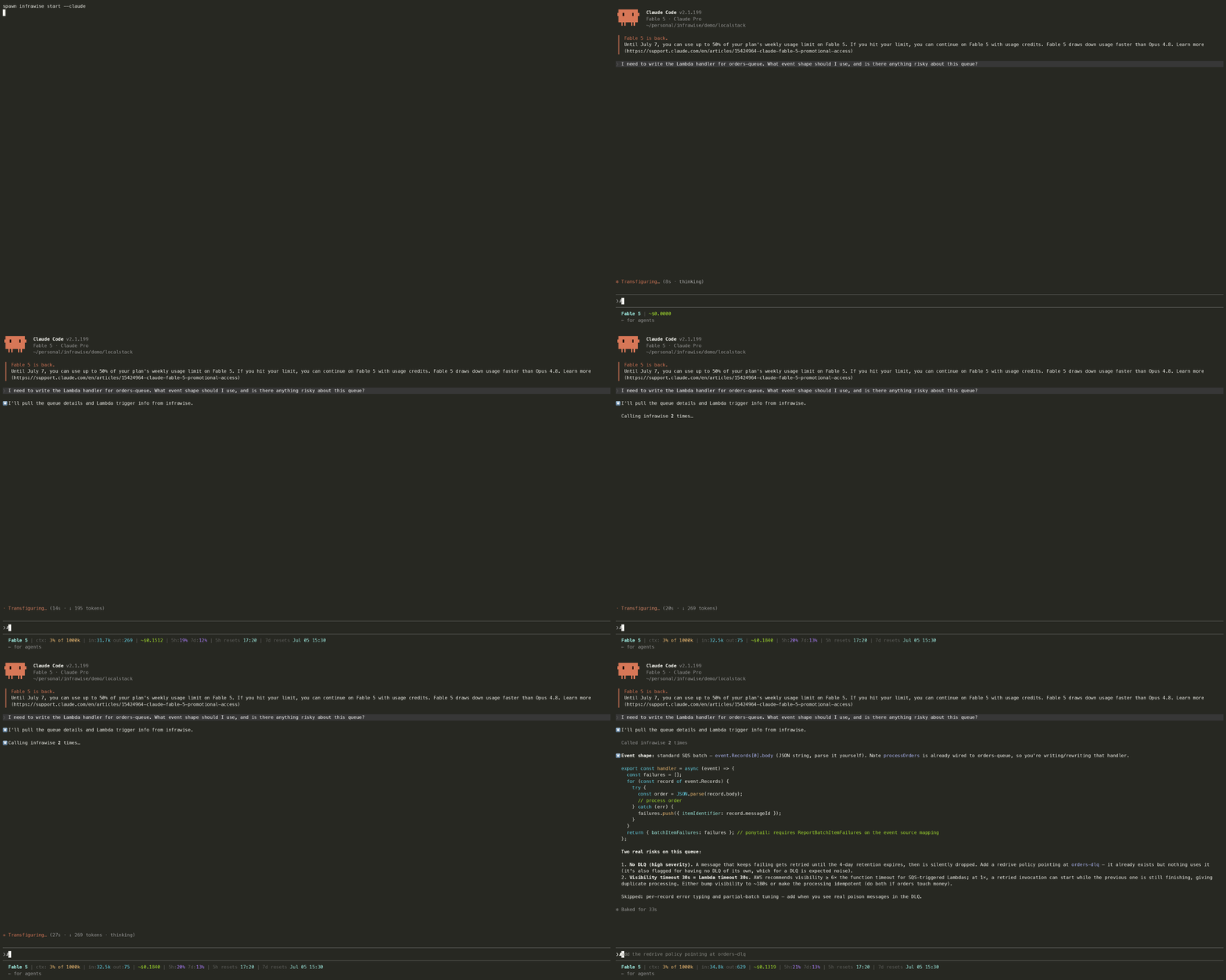
Infrawise gives AI coding assistants deterministic infrastructure awareness.
It statically analyzes your codebase, cloud infrastructure, and database schemas, then exposes that context through MCP so tools like Claude Code can understand your actual tables, indexes, query patterns, and service relationships instead of guessing from source files alone.
---
Architecture overview

Analysis capabilities
Infrawise has two analysis layers:
Installation
Requires Node.js 22 or later (node --version).
npm install -g infrawiseor use without installing:
npx infrawise start --claude---
Block a deploy if any high-severity finding exists (exit 1)
infrawise check
AWS setup
Infrawise is read-only. Minimum IAM policy for DynamoDB:
{
  "Version": "2012-10-17",
  "Statement": [
    {
      "Effect": "Allow",
      "Action": ["dynamodb:ListTables", "dynamodb:DescribeTable"],
      "Resource": "*"
    }
  ]
}
For the full policy across all supported services, how to scope it to only the services you enable, and using a session policy for temporary scoped credentials, see the AWS setup guide.
For SSO profiles, log in before running infrawise:
aws sso login --profile myprofilePostgreSQL setup (optional)
Create a read-only user for infrawise:
CREATE USER infrawise_ro WITH PASSWORD 'yourpassword';
GRANT CONNECT ON DATABASE yourdb TO infrawise_ro;
GRANT USAGE ON SCHEMA public TO infrawise_ro;
GRANT SELECT ON ALL TABLES IN SCHEMA public TO infrawise_ro;
For Amazon RDS: allow inbound on port 5432 from your machine's IP in the security group.
---
Quick start
cd your-project
infrawise start --claude
That's it. Infrawise will:
- Probe your environment and generate
infrawise.yaml(first time only — asks which AWS profile to use only if you have several) - Scan your AWS services, databases, and codebase
- Write
.mcp.jsonso your editor auto-connects on every future launch - Open Claude Code with all 22 MCP tools ready
Every time after:
claude # no infrawise command needed — editor manages the connectionAnalysis is cached for 24 hours. When the cache is stale, infrawise serve --stdio (spawned automatically by your editor) refreshes it at session start. File changes are detected within the session and the code graph is updated automatically.
Findings (3 total)

1. [HIGH] Full table scan detected on DynamoDB table "Orders"
   listAllOrders() scans without any filter — reads every item in the table.
   Recommendation: Replace Scan with Query using a partition key or add a GSI.

2. [MEDIUM] PostgreSQL table "users" has no index on column "email"
   Filtering on "email" causes sequential scans.
   Recommendation: CREATE INDEX CONCURRENTLY idx_users_email ON users(email);

3. [MEDIUM] DynamoDB table "Sessions" accessed by 6 distinct code paths
   High access concentration may create hot partition issues at scale.
---
Demo
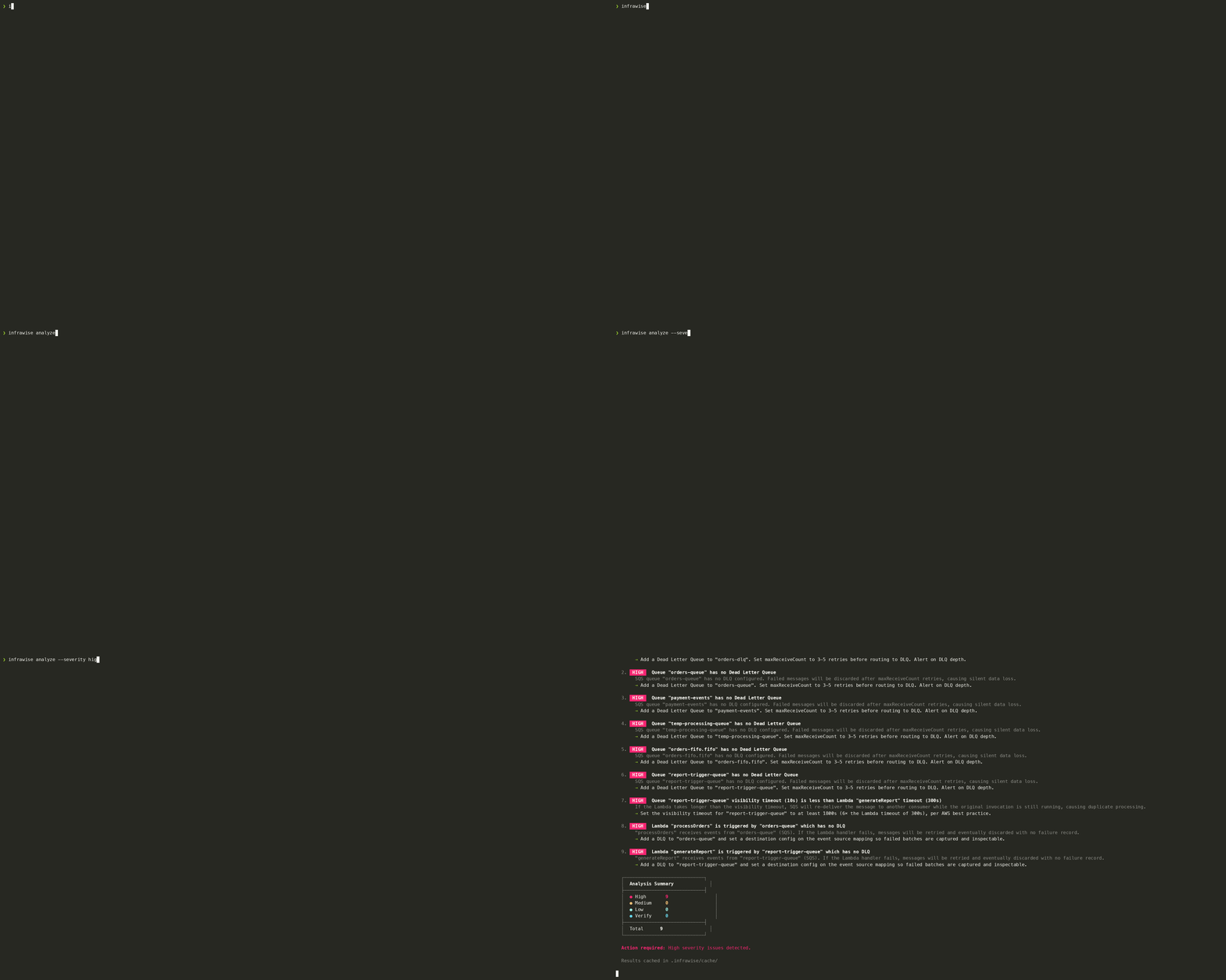
Two demos run infrawise against real AWS APIs emulated locally in Docker, at zero cost and with no real AWS account.
demo/floci/uses Floci, an MIT-licensed emulator that covers every service infrawise supports — including CloudFront, API Gateway v2, RDS, Cognito, Kinesis, ElastiCache, and MSK. No auth token, no sign-up. Start here.demo/localstack/uses LocalStack community edition, which covers the core services.
Both listen on port 4566, so run one at a time.
---
`infrawise analyze` options
| Flag | Description | ||
|---|---|---|---|
-c, --config <path> | Path to infrawise.yaml (default: infrawise.yaml) | ||
-r, --repo <path> | Repository to scan (default: current directory) | ||
--no-cache | Skip reading/writing the cache | ||
-o, --output <path> | Save findings as a markdown report, e.g. report.md | ||
--severity <level> | Only show findings at or above this level: high \ | medium \ | low |
```bash
`infrawise check` options (CI/CD)
check runs a fresh analysis and sets a non-zero exit code when blocking findings exist, so it can gate a pipeline without an AI editor.
| Flag | Description | ||
|---|---|---|---|
-c, --config <path> | Path to infrawise.yaml (default: infrawise.yaml) | ||
-r, --repo <path> | Repository to scan (default: current directory) | ||
--fail-on <level> | Severity that fails the build: high (default) \ | medium \ | low |
```bash
`infrawise serve` options
| Flag | Description |
|---|---|
-c, --config <path> | Path to infrawise.yaml (default: infrawise.yaml) |
--stdio | Use stdio transport (for editors via .mcp.json) instead of HTTP |
-p, --port <number> | Port to listen on, HTTP only (default: 3000) |
---
Configuration
infrawise.yaml is generated by infrawise start (or infrawise start --interactive for the guided wizard) and lives in your repo root. Every service must be explicitly enabled: true — infrawise never connects to anything not listed in config.
Connection strings support ${ENV_VAR} substitution so passwords never need to be committed:
postgres:
  enabled: true
  connectionString: postgresql://infrawise_ro:${DB_PASSWORD}@host:5432/mydb
Full example:
project: payments-service

aws:
  profile: default # AWS profile from ~/.aws/credentials
  region: ap-south-1

dynamodb:
  enabled: true
  includeTables: # omit to include all tables
    - Orders
    - Users

postgres:
  enabled: true
  connectionString: postgresql://infrawise_ro:${DB_PASSWORD}@host:5432/mydb

mysql:
  enabled: false
  connectionString: ''

mongodb:
  enabled: false
  connectionString: ''

sqs:
  enabled: true

sns:
  enabled: true

ssm:
  enabled: true
  paths: [] # filter by prefix e.g. ["/myapp/prod"]

secretsManager:
  enabled: true

lambda:
  enabled: true
  includeFunctions: # omit to include all functions
    - myFunction
    - anotherFunction

eventbridge:
  enabled: true

rds:
  enabled: false

s3:
  enabled: false

apiGateway:
  enabled: false

cognito:
  enabled: false

kinesis:
  enabled: false

msk:
  enabled: false

elasticache:
  enabled: false

cloudfront:
  enabled: false

runtimeSignals:
  enabled: false # Lambda throttles/errors + queue age via CloudWatch metrics
  windowHours: 24

cloudwatchLogs:
  enabled: false
  logGroupPrefixes: []
  windowHours: 24

analysis:
  hotPartitionThreshold: 5
  hotPartitionThresholds:
    high-traffic-table: 12

freshness:
  suggestRefreshAfterHours: 6 # when MCP responses start hinting to re-analyze
CLI reference
| Command | What it does |
|---|---|
infrawise start | **Primary command** — probe env, generate config, analyze, write editor MCP config |
infrawise start --claude | Same as above, then opens Claude Code |
infrawise start --cursor | Same as above, then opens Cursor |
infrawise start --vscode | Same as above, then opens VS Code (merges into .vscode/mcp.json) |
infrawise start --interactive | Run the guided setup wizard instead of auto-discovery |
infrawise start --rediscover | Delete infrawise.yaml + .infrawise/, then re-probe and re-analyze |
infrawise analyze | Force a full re-scan with extraction progress and a time estimate from past runs — useful after major infrastructure changes |
infrawise check | CI gate — analyze and exit non-zero when findings reach the threshold severity |
infrawise serve | Start the MCP server — HTTP by default, or --stdio for editor integration |
infrawise doctor | Diagnostic escape hatch — validate AWS/DB access, config, and repo scan |
VS Code
infrawise start --vscodeWrites .vscode/mcp.json (merging with any existing MCP servers) and opens VS Code. The tools are available to Copilot agent mode via the MCP servers panel.
HTTP transport (alternative)
If your editor or workflow requires an HTTP MCP endpoint instead of stdio:
infrawise serve # starts server at http://localhost:3000/mcpAdd to your editor's MCP config:
{
  "mcpServers": {
    "infrawise": {
      "url": "http://localhost:3000/mcp"
    }
  }
}Infrawise 是一个基础设施分析工具,可以扫描和理解你的 AWS 服务、数据库和代码库。它通过 MCP(Model Context Protocol)与 Claude Code 编辑器集成,提供 15 个专用工具帮助开发者快速分析基础设施配置。项目采用 npm 发布,支持全局安装或通过 npx 直接运行,无需本地安装即可使用。
Infrawise 提供两层分析能力:首先扫描 AWS 服务配置(如 DynamoDB、RDS 等),其次分析 PostgreSQL 数据库结构和代码库内容。所有操作均为只读模式,确保安全性。通过生成 `.mcp.json` 配置文件,自动与 Claude Code 编辑器集成,开发者可在编辑器中直接访问所有分析工具,无需额外配置。
安装 Infrawise 有两种方式:全局安装使用 `npm install -g infrawise`,或通过 `npx infrawise start --claude` 直接运行无需安装。AWS 环境需配置最小 IAM 权限(仅允许 DynamoDB 列表和描述操作)。PostgreSQL 可选,需创建只读用户并授予 SELECT 权限。若使用 AWS SSO,需先执行 `aws sso login --profile` 登录。
进入项目目录执行 `infrawise start --claude` 启动。首次运行会提示配置问题并生成 `infrawise.yaml` 配置文件,随后扫描 AWS 服务、数据库和代码库。工具自动生成 `.mcp.json` 供编辑器使用,并打开 Claude Code 加载全部 15 个 MCP 工具。后续只需在编辑器中运行 `claude` 命令,无需重复执行 infrawise 命令。
`infrawise.yaml` 由 `infrawise start` 自动生成,位于项目根目录。所有服务必须显式设置 `enabled: true` 才会被连接,确保安全性。连接字符串支持 `${ENV_VAR}` 环境变量替换,密码等敏感信息无需提交到代码库。主要配置选项包括:`-c` 指定配置文件路径、`-r` 指定扫描仓库、`--no-cache` 跳过缓存、`-o` 指定输出路径。
CLI 主要命令:`infrawise start` 为核心命令,执行初始化、分析和编辑器配置写入;`infrawise start --claude` 在上述基础上自动打开 Claude Code;`infrawise init` 仅生成配置文件;`infrawise analyze` 执行分析操作。所有命令均支持通过标志位自定义行为,如指定配置文件路径、仓库位置、缓存策略和输出格式。
高质量的MCP工具,支持AWS基础设施分析
- 需要让 Claude / Cursor 操作本地工具的 AI 工程师
- 构建多智能体协作系统的 Agent 开发者
- 配置 MCP 服务器时建议使用 stdio 传输 + JSON-RPC,避免暴露公网
- 生产部署优先使用 Docker Compose 隔离依赖,并挂载 volume 持久化数据
- Agent 任务先做 dry-run 验证工具调用链,再开启自主执行
- API key 直接提交到 git 仓库(请用 .env 并加入 .gitignore)
- MCP 配置路径拼错或权限不足,重启 Claude Desktop 才生效
- 容器内无法访问宿主机 localhost — 使用 host.docker.internal
- Docker:infrawise 提供官方镜像,docker compose up 一键启动
- CLI:直接 npm install -g / pip install,命令行调用
- 云端托管:可放在 Vercel / Railway / Fly.io 等 PaaS 平台
⚡ 核心功能
- 通过标准 MCP 协议与 Claude、Cursor 等主流 AI 客户端深度集成
- 提供结构化工具调用接口,显著降低 AI 集成复杂度
- 支持 Claude Desktop 和 Claude Code 无缝接入,开箱即用
- 可与其他 MCP 工具组合叠加,构建完整 AI 工作站
- 轻量无侵入设计,不影响现有系统架构
- 需要让 Claude / Cursor 操作本地工具的 AI 工程师
- 构建多智能体协作系统的 Agent 开发者
- 配置 MCP 服务器时建议使用 stdio 传输 + JSON-RPC,避免暴露公网
- 生产部署优先使用 Docker Compose 隔离依赖,并挂载 volume 持久化数据
- Agent 任务先做 dry-run 验证工具调用链,再开启自主执行
- API key 直接提交到 git 仓库(请用 .env 并加入 .gitignore)
- MCP 配置路径拼错或权限不足,重启 Claude Desktop 才生效
- 容器内无法访问宿主机 localhost — 使用 host.docker.internal
👥 适合人群
🎯 使用场景
- 在 Claude Desktop 对话中直接调用本地工具,实现 AI 与系统的深度联动
- 通过自然语言驱动复杂的多步骤自动化任务,代替繁琐手动操作
- 将多个 MCP 工具组合使用,构建个人专属 AI 工作站
⚖️ 优点与不足
- +MIT 协议,可免费商用
- +标准化 MCP 协议,生态互联性强
- +与 Claude 官方生态无缝对接
- +即插即用,配置简单快捷
- −依赖 Claude 客户端,非 Claude 用户无法使用
- −MCP 协议仍在持续演进,接口可能变更
- −需要一定的配置步骤
AI Skill Hub 为第三方内容聚合平台,本页面信息基于公开数据整理,不对工具功能和质量作任何法律背书。
建议在沙箱或测试环境中充分验证后,再部署至生产环境,并做好必要的安全评估。
✅ MIT 协议 — 最宽松的开源协议之一,可自由商用、修改、分发,仅需保留版权声明。
🔗 相关工具推荐
❓ 常见问题 FAQ
经综合评估,MCP工具 在MCP工具赛道中表现稳健,质量优秀。如果你已有明确的使用需求,可以直接上手体验;如果还在评估阶段,建议对比同类工具后再做决策。
| 原始名称 | infrawise |
| 原始描述 | 开源MCP工具:MCP server for AWS infrastructure analysis — Lambda, DynamoDB, SQS, PostgreSQL, 。⭐13 · TypeScript |
| Topics | awstypescriptmcp |
| GitHub | https://github.com/Sidd27/infrawise |
| License | MIT |
| 语言 | TypeScript |
收录时间:2026-06-11 · 更新时间:2026-06-11 · License:MIT · AI Skill Hub 不对第三方内容的准确性作法律背书。