MCP客户端
AI Skill Hub 推荐使用:MCP客户端 是一款优质的MCP工具。AI 综合评分 7.5 分,在同类工具中表现稳健。如果你正在寻找可靠的MCP工具解决方案,这是一个值得深入了解的选择。
📚 深度解析
通过安装 MCP客户端,你的 AI 助手将获得额外的工具调用能力,可以用自然语言直接操控该工具的功能,无需学习复杂的命令行语法。MCP 工具的核心价值在于"一次配置,永久增强"——配置完成后,每次与 AI 对话时都可以无缝调用这些工具。
在技术实现上,MCP 工具通过标准的 JSON-RPC 协议与 AI 客户端通信,工具的功能以"工具列表"的形式暴露给 AI 模型,AI 可以按需调用。MCP客户端 提供了结构化的工具调用接口,使 AI 模型能够精确地理解和使用每个功能点,显著降低 AI 在工具使用上的错误率。
与传统的 API 集成相比,MCP 工具的优势在于无需编写代码——用户只需在配置文件中添加几行 JSON,即可让 AI 获得全新能力。AI Skill Hub 将 MCP客户端 评为 AI 评分 7.5 分,属于同类工具中的优质选择。
📋 工具概览
MCP客户端 是一款遵循 MCP(Model Context Protocol)标准协议的 AI 工具扩展。通过 MCP 协议,它可以让 Claude、Cursor 等主流 AI 客户端直接访问和操作外部工具、数据源和服务,实现 AI 能力的无缝扩展。无论是文件操作、数据库查询还是 API 调用,都可以通过自然语言在 AI 对话中直接触发,极大提升生产效率。
📖 中文文档
MCP客户端 是一款遵循 MCP(Model Context Protocol)标准协议的 AI 工具扩展。通过 MCP 协议,它可以让 Claude、Cursor 等主流 AI 客户端直接访问和操作外部工具、数据源和服务,实现 AI 能力的无缝扩展。无论是文件操作、数据库查询还是 API 调用,都可以通过自然语言在 AI 对话中直接触发,极大提升生产效率。
- 通过标准 MCP 协议与 Claude、Cursor 等主流 AI 客户端深度集成
- 提供结构化工具调用接口,显著降低 AI 集成复杂度
- 支持 Claude Desktop 和 Claude Code 无缝接入,开箱即用
- 可与其他 MCP 工具组合叠加,构建完整 AI 工作站
- 轻量无侵入设计,不影响现有系统架构
- 在 Claude Desktop 对话中直接调用本地工具,实现 AI 与系统的深度联动
- 通过自然语言驱动复杂的多步骤自动化任务,代替繁琐手动操作
- 将多个 MCP 工具组合使用,构建个人专属 AI 工作站
# 方式一:通过 Claude Code CLI 一键安装
claude skill install https://github.com/apify/mcpc

# 方式二:手动配置 claude_desktop_config.json
{
  "mcpServers": {
    "mcp---": {
      "command": "npx",
      "args": ["-y", "mcpc"]
    }
  }
}

# 配置文件位置
# macOS: ~/Library/Application Support/Claude/claude_desktop_config.json
# Windows: %APPDATA%/Claude/claude_desktop_config.json
- 确认已安装 Node.js(v18 或以上版本)
- 打开 Claude Desktop 或 Claude Code 的 MCP 配置文件
- 按「交给 Agent 安装 → Claude Desktop」标签中的 JSON 配置填入 mcpServers 字段
- 保存配置文件并重启 Claude 客户端
- 重启后,在对话中即可使用本工具
# 安装后在 Claude 对话中直接使用
# 示例:
用户: 请帮我用 MCP客户端 执行以下任务...
Claude: [自动调用 MCP客户端 MCP 工具处理请求]

# 查看可用工具列表
# 在 Claude 中输入:"列出所有可用的 MCP 工具"
// claude_desktop_config.json 配置示例
{
  "mcpServers": {
    "mcp___": {
      "command": "npx",
      "args": ["-y", "mcpc"],
      "env": {
        // "API_KEY": "your-api-key-here"
      }
    }
  }
}

// 保存后重启 Claude Desktop 生效
List available tools (full details including input/output args and description)
mcpc @apify tools-list --full
JSON for scripts: [{ name, description, type, url }]
mcpc --json @apify skills-list | jq '.[].name'
Recognized index entry types (per SEP-2640): `skill-md` (concrete skill), `mcp-resource-template`
(parameterized namespace), and `archive` (`.tar.gz`/`.zip` bundle — fetch the URL via `resources-read`).
Entries with an unrecognized `type` are silently skipped.

Skills appear under capabilities in `mcpc @session` output when a server advertises the extension
under either `capabilities.extensions["io.modelcontextprotocol/skills"]` (per spec) or
`capabilities.experimental["io.modelcontextprotocol/skills"]` (the SDK-preserved escape hatch some
SDKs still use). Skill content is treated as untrusted input — `mcpc` only reads and prints it; it
never executes hooks, scripts, or other frontmatter-declared behavior.

#### List change notifications

When connected via a [session](#sessions), `mcpc` automatically handles `list_changed`
notifications for tools, resources, and prompts.
The bridge process tracks when each notification type was last received.
The timestamps are available in JSON output of `mcpc @session --json` under the `_mcpc.notifications`
field - see [Server instructions](#server-instructions).

#### Server logs

`mcpc` supports server logging settings (`logging/setLevel`) and log messages (`notifications/message`).
Log messages are printed to bridge log or stderr, subject to [verbosity level](#verbose-mode).

You can instruct MCP servers to adjust their [logging level](https://modelcontextprotocol.io/specification/latest/server/utilities/logging)
using the `logging-set-level` command:
MCP feature support
| **Feature** | **Status** |
|---|---|
| 📖 [**Instructions**](#server-instructions) | ✅ Supported |
| 🔧 [**Tools**](#tools) | ✅ Supported |
| 💬 [**Prompts**](#prompts) | ✅ Supported |
| 📦 [**Resources**](#resources) | ✅ Supported |
| 🧠 [**Skills**](#skills) | 🧪 Experimental (SEP-2640) |
| 📝 [**Logging**](#server-logs) | ✅ Supported (deprecated by MCP) |
| 🔔 [**Notifications**](#list-change-notifications) | ✅ Supported |
| 📄 [**Pagination**](#pagination) | ✅ Supported |
| 🏓 [**Ping**](#ping) | ✅ Supported |
| ⏳ [**Async tasks**](#async-tasks) | ✅ Supported |
| 📁 **Roots** | ❌ Not planned (deprecated by MCP) |
| ❓ **Elicitation** | 🚧 Planned |
| 🔤 **Completion** | 🚧 Planned |
| 🤖 **Sampling** | ❌ Not applicable (no LLM access) |
Server instructions
MCP servers can provide instructions describing their capabilities and usage. These are displayed when you connect to a server or run the help command:
```bash
Show server info, capabilities, and instructions (both commands behave the same)
mcpc @apify mcpc @apify help
Sign a payment using the base64-encoded PAYMENT-REQUIRED header
mcpc x402 sign <base64-payment-required>
Install
Requires a JavaScript runtime — install the latest Node.js or Bun if you don't have one yet.
```bash npm install -g @apify/mcpc
Wallet setup
mcpc stores a single wallet in ~/.mcpc/wallets.json (file permissions 0600). You need to create or import a wallet before using x402 payments.
```bash
Quickstart
```bash
Usage
Usage: mcpc [<@session>] [<command>] [options]

Universal command-line client for the Model Context Protocol (MCP).

Commands:
  connect [<server>] [@session]  Connect to an MCP server and start a new named @session
  close <@session>               Close a session
  restart <@session>             Restart a session (losing all state)
  login <server>                 Interactively login to a server using OAuth and save profile
  logout <server>                Delete an OAuth profile for a server
  clean [resources...]           Clean up mcpc data (sessions, profiles, logs, all)
  grep <pattern>                 Search tools and instructions across all active sessions
  x402 [subcommand] [args...]    Configure an x402 payment wallet (EXPERIMENTAL)
  help [command] [subcommand]    Show help for a specific command

Options:
  --json                         Output in JSON format for scripting
  --verbose                      Enable debug logging
  --profile <name>               OAuth profile for the server ("default" if not provided)
  --timeout <seconds>            Request timeout in seconds (default: 300)
  --max-chars <n>                Truncate output to n characters (ignored in --json mode)
  --insecure                     Skip TLS certificate verification (for self-signed certs)
  -v, --version                  Output the version number
  -h, --help                     Display help

MCP session commands (after connecting):
  <@session>                   Show MCP server info, capabilities, and tools overview
  <@session> grep <pattern>    Search tools and instructions
  <@session> tools-list        List all server tools
  <@session> tools-get <name>  Get tool details and schema
  <@session> tools-call <name> [arg:=val ... | <json> | <stdin]
  <@session> prompts-list
  <@session> prompts-get <name> [arg:=val ... | <json> | <stdin]
  <@session> resources-list
  <@session> resources-read <uri>
  <@session> resources-subscribe <uri>
  <@session> resources-unsubscribe <uri>
  <@session> resources-templates-list
  <@session> skills-list
  <@session> skills-get <name> [--raw]
  <@session> tasks-list
  <@session> tasks-get <taskId>
  <@session> tasks-result <taskId>
  <@session> tasks-cancel <taskId>
  <@session> logging-set-level <level>
  <@session> ping
  <@session> logs [-n N] [--follow] [--since 1h]

Run "mcpc" without arguments to show active sessions and OAuth profiles.
Run "mcpc --json" to get the same data as `{ sessions: [...], profiles: [...] }`.
Use a local MCP server package (stdio) referenced from config file
mcpc connect ./.vscode/mcp.json:filesystem @fs mcpc @fs tools-list ```
Connect to a local server via config file entry
mcpc connect ~/.vscode/mcp.json:filesystem @fs mcpc @fs tools-list mcpc @fs tools-call list_directory path:=/
See [MCP feature support](#mcp-feature-support) for details about all supported MCP features and commands.

#### Command arguments

The `tools-call` and `prompts-get` commands accept arguments as positional parameters after the tool/prompt name:
Optionally protect proxy with bearer token for better security (stored in OS keychain)
mcpc connect mcp.apify.com @secure-relay --proxy 8081 --proxy-bearer-token secret123
Configuration
You can configure mcpc using a config file, environment variables, or command-line flags.
Precedence (highest to lowest):
- Command-line flags (including
--configoption) - Environment variables
- Built-in defaults
MCP server config file
mcpc supports the "standard" MCP server JSON config file, compatible with Claude Desktop, VS Code, and other MCP clients. Use the file:entry syntax to reference a server from a config file:
```bash
Open a session to a server specified in the Visual Studio Code config
mcpc connect .vscode/mcp.json:apify @my-apify mcpc @my-apify tools-list
`mcpc` also finds these files for you: run `mcpc connect` with no arguments to auto-discover config
files in standard locations and connect every server, or pass a file without an entry to connect all
of its servers. See [Server formats](#server-formats).

**Example MCP config JSON file:**
**Server configuration properties:**

For **Streamable HTTP servers:**

- `url` (required) - MCP server endpoint URL
- `headers` (optional) - HTTP headers to include with requests
- `timeout` (optional) - Request timeout in seconds

For **stdio servers:**

- `command` (required) - Command to execute (e.g., `node`, `npx`, `python`)
- `args` (optional) - Array of command arguments
- `env` (optional) - Environment variables for the process

> **Note:** Stdio servers inherit only a minimal env whitelist from the shell
> (`PATH`, `HOME`, `SHELL`, …). Other vars — `NODE_EXTRA_CA_CERTS`, `HTTPS_PROXY`,
> `SSL_CERT_FILE`, etc. — must be forwarded explicitly via the `env` block using
> `${VAR_NAME}`. Anything the server writes to stderr is captured to
> `~/.mcpc/logs/bridge-<session>.log` with a `[server stderr]` prefix, and the
> tail is appended to the error message if `mcpc connect` fails, so you can see
> why a stdio server failed to start.

**Environment variable substitution:**

Config files support environment variable substitution using `${VAR_NAME}` syntax:
Environment variables
MCPC_HOME_DIR- Directory for session and authentication profiles data (default is~/.mcpc)MCPC_VERBOSE- Enable verbose logging (set to1,true, oryes, case-insensitive)MCPC_JSON- Enable JSON output (set to1,true, oryes, case-insensitive)HTTPS_PROXY/https_proxy/HTTP_PROXY/http_proxy- Proxy URL for outbound connections (e.g.http://proxy.example.com:8080);HTTPS_PROXYtakes precedenceNO_PROXY/no_proxy- Comma-separated list of hostnames/IPs to bypass the proxy (e.g.localhost,127.0.0.1)
Nuclear option: remove everything
mcpc clean all # Delete all sessions, profiles, logs, and sockets ```
mcpc — a universal MCP CLI client





mcpc is a command-line client for the Model Context Protocol (MCP) that maps MCP operations to intuitive commands for interactive shell use, scripting, and AI agents.
mcpc is your new Swiss Army knife for MCP. It's great for manual inspection and debugging of MCP servers, as well as for agents to leverage all modern MCP capabilities through the most universal coding interface: the UNIX shell.
Key features:
- 🔧 Full MCP support - HTTP/stdio transports, instructions, tools, async tasks, resources, prompts, ...
- 🔄 Persistent sessions - Keep multiple stateful connections alive simultaneously.
- 🗺️ Progressive tool discovery - Find relevant MCP tools on the fly to save tokens and increase accuracy.
- 🔌 Code mode - JSON output composes with
jq,xargs, and shell pipelines for MCP workflows as shell scripts. - 🔒 Secure - Full OAuth 2.1 support with CMID and DCR, uses OS keychain for credentials storage.
- 🤖 AI sandboxing - Proxy MCP server connections to protect credentials from AI-generated code.
- 🪶 Lightweight - Minimal dependencies, works on Mac/Win/Linux, doesn't use LLMs on its own.
- 💸 Agentic payments - Experimental support for the x402 protocol on Base.
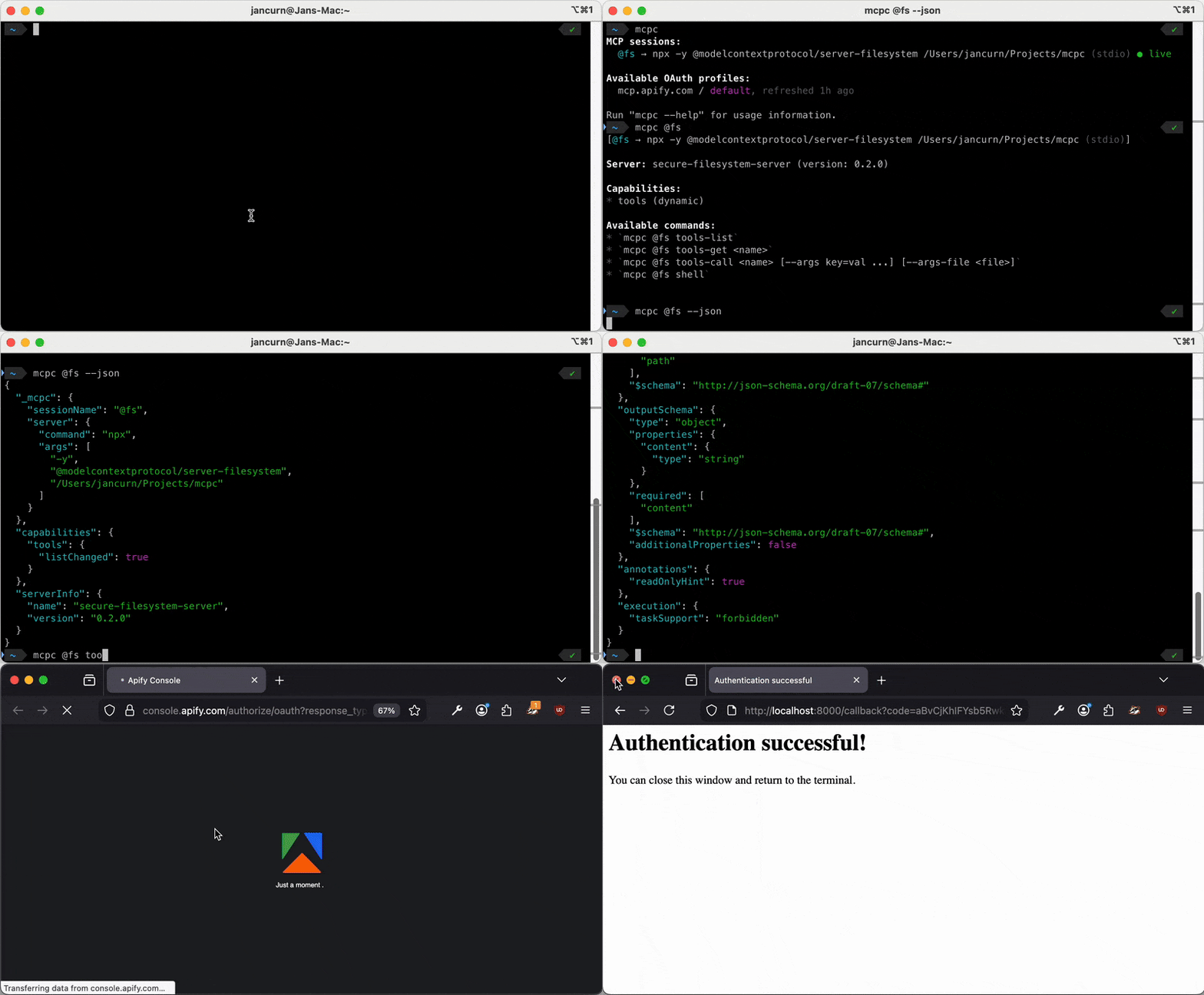
...now session name "@apify" is forgotten and available for future use
```
Bind to all interfaces (allows network access - use with caution!)
mcpc connect mcp.apify.com @relay --proxy 0.0.0.0:8080
Bind to specific interface
mcpc connect mcp.apify.com @relay --proxy 192.168.1.100:8080
When listing sessions, proxy info is displayed prominently:
@relay → https://mcp.apify.com (HTTP, OAuth: default) [proxy: 127.0.0.1:8080]
```
The session now automatically handles 402 responses using your preference
mcpc @apify tools-call expensive-tool query:="hello"
MCP CLI clients
| Tool | Lang | Stars | Contrib / Commits | Active | Tools | Resources | Prompts | Tasks | Code mode | Sessions | OAuth | Stdio | HTTP | Tool search | x402 | LLM |
|---|---|---|---|---|---|---|---|---|---|---|---|---|---|---|---|---|
| **[apify/mcpc](https://github.com/apify/mcpc)** | TS | ~590 | 8 / ~640 | ✅ | ✅ | ✅ | ✅ | ✅ | ✅ | ✅ | ✅ | ✅ | ✅ | ✅ | ✅ | — |
| [steipete/mcporter](https://github.com/steipete/mcporter) | TS | ~4.4k | 29 / ~650 | ✅ | ✅ | — | — | — | ✅ | ✅ | ✅ | ✅ | ✅ | — | — | — |
| [knowsuchagency/mcp2cli](https://github.com/knowsuchagency/mcp2cli) | Python | ~2.1k | 11 / ~91 | ✅ | ✅ | ✅ | ✅ | — | ✅ | ✅ | ✅ | ✅ | ✅ | ✅ | — | — |
| [IBM/mcp-cli](https://github.com/IBM/mcp-cli) | Python | ~2.0k | 24 / ~790 | ✅ | ✅ | ✅ | ✅ | — | ✅ | ✅ | ✅ | ✅ | ✅ | — | — | ✅ |
| [f/mcptools](https://github.com/f/mcptools) | Go | ~1.6k | 15 / ~175 | ⚠️ | ✅ | ✅ | ✅ | — | ✅ | — | — | ✅ | ✅ | — | — | — |
| [philschmid/mcp-cli](https://github.com/philschmid/mcp-cli) | TS | ~1.1k | 3 / ~30 | ⚠️ | ✅ | — | — | — | ✅ | ✅ | — | ✅ | ✅ | ✅ | — | — |
| [adhikasp/mcp-client-cli](https://github.com/adhikasp/mcp-client-cli) | Python | ~670 | 6 / ~110 | ⚠️ | ✅ | ✅ | ✅ | — | — | — | — | ✅ | — | — | — | ✅ |
| [thellimist/clihub](https://github.com/thellimist/clihub) | Go | ~670 | 1 / ~60 | ✅ | ✅ | — | — | — | — | — | ✅ | ✅ | ✅ | ✅ | — | — |
| [wong2/mcp-cli](https://github.com/wong2/mcp-cli) | JS | ~430 | 4 / ~63 | ⚠️ | ✅ | ✅ | ✅ | — | — | — | ✅ | — | ✅ | — | — | — |
| [mcpshim/mcpshim](https://github.com/mcpshim/mcpshim) | Go | ~58 | 1 / ~13 | ✅ | ✅ | — | — | — | ✅ | ✅ | ✅ | — | ✅ | ✅ | — | — |
| [evantahler/mcpx](https://github.com/evantahler/mcpx) | TS | ~32 | 2 / ~100 | ✅ | ✅ | ✅ | ✅ | ✅ | ✅ | — | ✅ | ✅ | ✅ | ✅ | — | — |
| [EstebanForge/mcp-cli-ent](https://github.com/EstebanForge/mcp-cli-ent) | Go | ~15 | 3 / ~46 | ✅ | ✅ | — | — | — | ✅ | ✅ | — | ✅ | ✅ | ✅ | — | — |
Legend: ✅ = supported, ⚠️ = stale (no commits in 3+ months), Contrib / Commits = contributors / total commits, Tasks = async tasks, x402 = x402 payment protocol support, LLM = requires/uses an LLM.
Notes:
- thellimist/clihub is a code generator that compiles MCP tools into standalone CLI binaries, rather than a runtime client (HN discussion).
- knowsuchagency/mcp2cli also supports OpenAPI specs directly and uses a custom TOON encoding for token-efficient tool schemas.
- IBM/mcp-cli and mcp-client-cli integrate an LLM (Ollama, OpenAI, etc.) for chat-style interaction, while the other tools are pure CLI clients.
Troubleshooting
"Cannot connect to bridge"
- Bridge may have crashed. Try:
mcpc @<session-name> tools-listto restart the bridge - Check bridge is running:
ps aux | grep -e 'mcpc-bridge' -e '[m]cpc/dist/bridge' - Check socket exists:
ls ~/.mcpc/bridges/
"Session not found"
- List existing sessions:
mcpc - Create new session if expired:
mcpc @<session-name> closeandmcpc connect <server> @<session-name>
"Authentication failed"
- List saved OAuth profiles:
mcpc - Re-authenticate:
mcpc login <server> [--profile <name>] - For bearer tokens: provide
--header "Authorization: Bearer ${TOKEN}"again
功能齐全的MCP客户端
- 需要让 Claude / Cursor 操作本地工具的 AI 工程师
- 配置 MCP 服务器时建议使用 stdio 传输 + JSON-RPC,避免暴露公网
- API key 直接提交到 git 仓库(请用 .env 并加入 .gitignore)
- MCP 配置路径拼错或权限不足,重启 Claude Desktop 才生效
- CLI:直接 npm install -g / pip install,命令行调用
- 云端托管:可放在 Vercel / Railway / Fly.io 等 PaaS 平台
⚡ 核心功能
- 通过标准 MCP 协议与 Claude、Cursor 等主流 AI 客户端深度集成
- 提供结构化工具调用接口,显著降低 AI 集成复杂度
- 支持 Claude Desktop 和 Claude Code 无缝接入,开箱即用
- 可与其他 MCP 工具组合叠加,构建完整 AI 工作站
- 轻量无侵入设计,不影响现有系统架构
- 需要让 Claude / Cursor 操作本地工具的 AI 工程师
- 配置 MCP 服务器时建议使用 stdio 传输 + JSON-RPC,避免暴露公网
- API key 直接提交到 git 仓库(请用 .env 并加入 .gitignore)
- MCP 配置路径拼错或权限不足,重启 Claude Desktop 才生效
👥 适合人群
🎯 使用场景
- 在 Claude Desktop 对话中直接调用本地工具,实现 AI 与系统的深度联动
- 通过自然语言驱动复杂的多步骤自动化任务,代替繁琐手动操作
- 将多个 MCP 工具组合使用,构建个人专属 AI 工作站
⚖️ 优点与不足
- +Apache-2.0 协议,可免费商用
- +标准化 MCP 协议,生态互联性强
- +与 Claude 官方生态无缝对接
- +即插即用,配置简单快捷
- −依赖 Claude 客户端,非 Claude 用户无法使用
- −MCP 协议仍在持续演进,接口可能变更
- −需要一定的配置步骤
AI Skill Hub 为第三方内容聚合平台,本页面信息基于公开数据整理,不对工具功能和质量作任何法律背书。
建议在沙箱或测试环境中充分验证后,再部署至生产环境,并做好必要的安全评估。
✅ Apache 2.0 — 宽松开源协议,可商用,需保留版权声明和 NOTICE 文件,含专利授权条款。
🔗 相关工具推荐
❓ 常见问题 FAQ
总体来看,MCP客户端 是一款质量良好的MCP工具,在同类工具中具备一定竞争力。AI Skill Hub 将持续追踪其更新动态,建议收藏备用,结合自身场景选择合适时机引入使用。
| 原始名称 | mcpc |
| 原始描述 | 开源MCP工具:A universal CLI client for MCP. mcpc supports persistent sessions, stdio/HTTP, O。⭐683 · TypeScript |
| Topics | mcpclitypescript |
| GitHub | https://github.com/apify/mcpc |
| License | Apache-2.0 |
| 语言 | TypeScript |
收录时间:2026-06-11 · 更新时间:2026-06-11 · License:Apache-2.0 · AI Skill Hub 不对第三方内容的准确性作法律背书。