ROS机器人MCP工具
AI Skill Hub 推荐使用:ROS机器人MCP工具 是一款优质的MCP工具。AI 综合评分 7.8 分,在同类工具中表现稳健。如果你正在寻找可靠的MCP工具解决方案,这是一个值得深入了解的选择。
📚 深度解析
通过安装 ROS机器人MCP工具,你的 AI 助手将获得额外的工具调用能力,可以用自然语言直接操控该工具的功能,无需学习复杂的命令行语法。MCP 工具的核心价值在于"一次配置,永久增强"——配置完成后,每次与 AI 对话时都可以无缝调用这些工具。
在技术实现上,MCP 工具通过标准的 JSON-RPC 协议与 AI 客户端通信,工具的功能以"工具列表"的形式暴露给 AI 模型,AI 可以按需调用。ROS机器人MCP工具 提供了结构化的工具调用接口,使 AI 模型能够精确地理解和使用每个功能点,显著降低 AI 在工具使用上的错误率。
与传统的 API 集成相比,MCP 工具的优势在于无需编写代码——用户只需在配置文件中添加几行 JSON,即可让 AI 获得全新能力。AI Skill Hub 将 ROS机器人MCP工具 评为 AI 评分 7.8 分,属于同类工具中的优质选择。
📋 工具概览
为OpenClaw、Claude、Google Gemini等AI助手提供ROS机器人操作系统集成的MCP插件。支持多种AI平台和代码编辑器,专为机器人开发者和AI应用集成者设计,实现AI与机器人系统的无缝协作。
ROS机器人MCP工具 是一款遵循 MCP(Model Context Protocol)标准协议的 AI 工具扩展。通过 MCP 协议,它可以让 Claude、Cursor 等主流 AI 客户端直接访问和操作外部工具、数据源和服务,实现 AI 能力的无缝扩展。无论是文件操作、数据库查询还是 API 调用,都可以通过自然语言在 AI 对话中直接触发,极大提升生产效率。
📖 中文文档
为OpenClaw、Claude、Google Gemini等AI助手提供ROS机器人操作系统集成的MCP插件。支持多种AI平台和代码编辑器,专为机器人开发者和AI应用集成者设计,实现AI与机器人系统的无缝协作。
ROS机器人MCP工具 是一款遵循 MCP(Model Context Protocol)标准协议的 AI 工具扩展。通过 MCP 协议,它可以让 Claude、Cursor 等主流 AI 客户端直接访问和操作外部工具、数据源和服务,实现 AI 能力的无缝扩展。无论是文件操作、数据库查询还是 API 调用,都可以通过自然语言在 AI 对话中直接触发,极大提升生产效率。
- 通过标准 MCP 协议与 Claude、Cursor 等主流 AI 客户端深度集成
- 提供结构化工具调用接口,显著降低 AI 集成复杂度
- 支持 Claude Desktop 和 Claude Code 无缝接入,开箱即用
- 可与其他 MCP 工具组合叠加,构建完整 AI 工作站
- 轻量无侵入设计,不影响现有系统架构
- 在 Claude Desktop 对话中直接调用本地工具,实现 AI 与系统的深度联动
- 通过自然语言驱动复杂的多步骤自动化任务,代替繁琐手动操作
- 将多个 MCP 工具组合使用,构建个人专属 AI 工作站
# 方式一:通过 Claude Code CLI 一键安装
claude skill install https://github.com/agenticros/agenticros

# 方式二:手动配置 claude_desktop_config.json
{
  "mcpServers": {
    "ros---mcp--": {
      "command": "npx",
      "args": ["-y", "agenticros"]
    }
  }
}

# 配置文件位置
# macOS: ~/Library/Application Support/Claude/claude_desktop_config.json
# Windows: %APPDATA%/Claude/claude_desktop_config.json
- 确认已安装 Node.js(v18 或以上版本)
- 打开 Claude Desktop 或 Claude Code 的 MCP 配置文件
- 按「交给 Agent 安装 → Claude Desktop」标签中的 JSON 配置填入 mcpServers 字段
- 保存配置文件并重启 Claude 客户端
- 重启后,在对话中即可使用本工具
# 安装后在 Claude 对话中直接使用
# 示例:
用户: 请帮我用 ROS机器人MCP工具 执行以下任务...
Claude: [自动调用 ROS机器人MCP工具 MCP 工具处理请求]

# 查看可用工具列表
# 在 Claude 中输入:"列出所有可用的 MCP 工具"
// claude_desktop_config.json 配置示例
{
  "mcpServers": {
    "ros___mcp__": {
      "command": "npx",
      "args": ["-y", "agenticros"],
      "env": {
        // "API_KEY": "your-api-key-here"
      }
    }
  }
}

// 保存后重启 Claude Desktop 生效
AgenticROS
    _                     _   _       ____   ___  ____
   / \   __ _  ___ _ __ | |_(_) ___ |  _ \ / _ \/ ___|
  / _ \ / _` |/ _ \ '_ \| __| |/ __|| |_) | | | \___ \
 / ___ \ (_| |  __/ | | | |_| | (__ |  _ <| |_| |___) |
/_/   \_\__, |\___|_| |_|\__|_|\___||_| \_\___/|____/
        |___/
  AgenticROS - agentic AI for ROS-powered robots
Physical AI Agents for ROS Robots
▶ Watch the AgenticROS intro on YouTube
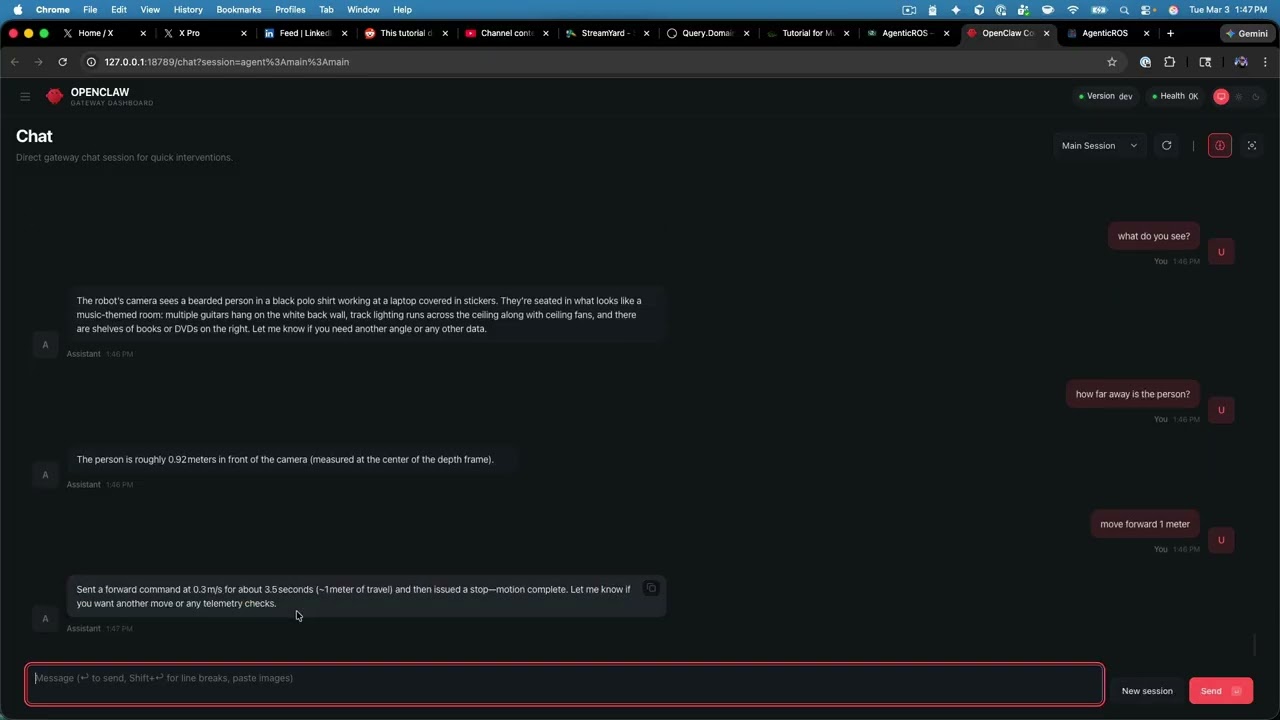
AgenticROS turns ROS 2 robots into agent-native machines. Speak, type, or message — and your robot perceives, reasons, and acts. It is an open, AI-agent-agnostic interface layer that bridges the world of frontier reasoning models with the world of cameras, depth sensors, motors, and cmd_vel, so robots stop being remote-controlled tools and start collaborating like teammates.
With AgenticROS, your robot can describe what it sees, follow intent ("go check the front door"), run skills you author, and respond to natural language across the agent platforms you already use. One ROS 2 workspace, one config, many agents.
Requirements
- Node.js ≥ 20 (the only hard requirement — npx agenticros installs pnpm itself if missing) - ROS 2 Humble or Jazzy if you plan to use the real-robot stack or any simulation (the CLI sources /opt/ros/<distro>/setup.bash and runs colcon build for you) - OpenClaw gateway only if you also want the OpenClaw web UI / chat / teleop adapter
Install
You only need one command. The agenticros CLI handles everything else — installing the ROS 2 workspace, building the MCP server, registering the OpenClaw plugin, and wiring up your robot config.
npx agenticrosThat's it. Run it on any machine with Node ≥ 20, no git clone required. The first run launches the interactive menu:
╔──────────────────────────────────────────────────╗
║  AgenticROS - agentic AI for ROS-powered robots  ║
╚──────────────────────────────────────────────────╝

? What would you like to do?
  Launch with real robot
❯ Launch with simulation
  First-time setup (workspace + OpenClaw plugin + API key)
  Stop everything
  Doctor (health check)
  Configure (API keys, namespace, transport)
  Tail logs
Pick First-time setup once (workspace + OpenClaw plugin + API key, all idempotent), then choose how you want to run:
| You want to … | Pick |
|---|---|
| Drive your **real robot** (RealSense + motors + MCP) | **Launch with real robot** |
| Demo a **simulated 2-wheel AMR** in Gazebo + RViz | **Launch with simulation → AMR** |
| Demo a **simulated 6-DOF arm** (UR5e-shaped, per-joint position control) | **Launch with simulation → 6-DOF arm** |
Once a stack is up, point any of the supported agents — OpenClaw, Claude Code, Claude Desktop / Dispatch, or Gemini CLI — at the same robot and start talking to it. The CLI tracks what it spawned (pidfiles + logs under /tmp/agenticros-*), so Stop everything cleanly tears the demo down.
Prefer scripted invocations? Every menu item maps to a direct command:
npx agenticros init             # one-time workspace + plugin + API key
agenticros up real              # real robot stack
agenticros up sim-amr           # simulated AMR (Gazebo + RViz, headless on Jetson)
agenticros up sim-arm           # simulated 6-DOF arm
agenticros mode <real|sim>      # swap the active config profile (namespace, transport)
agenticros doctor               # coloured health check
agenticros down                 # stop everything we started
Full CLI reference: packages/agenticros-cli/README.md.
Contributing / building from source
Hacking on the packages themselves? Clone and use the local checkout — the CLI auto-detects the workspace and uses live sources instead of the bundled snapshot:
git clone https://github.com/PlaiPin/agenticros && cd agenticros
pnpm install && pnpm build
./agenticros                    # repo-local CLI shim, same menu as `npx agenticros`
For the OpenClaw plugin specifically, point the gateway at this repo's packages/agenticros and configure under plugins.entries.agenticros.config. Recommended: OpenClaw 2026.3.11+ — routes work at http://127.0.0.1:18789/plugins/agenticros/ (config, teleop). For local dev without token auth: node scripts/setup-openclaw-local.cjs then restart the gateway. Older gateways needing token auth: run node scripts/agenticros-proxy.cjs 18790 and open http://127.0.0.1:18790/plugins/agenticros/. See docs/openclaw-releases-and-plugin-routes.md and docs/teleop.md.
See docs/ for robot setup, skills, teleop, simulation internals, and Docker.
1. Build + pack the plugin so it works in the sandbox's offline-npm env
pnpm install && pnpm build pnpm --filter @agenticros/agenticros deploy --prod /tmp/agenticros-deploy rm -f /tmp/agenticros-deploy/node_modules/.pnpm/node_modules/@agenticros/agenticros
3. Register + configure the plugin inside the sandbox (HOME=/sandbox is required)
docker exec -u sandbox -e HOME=/sandbox "$CONTAINER" \ openclaw plugins install -l /sandbox/agenticros # Ctrl-C once it starts logging "ROS2 transport status:"
Memory (optional)
AgenticROS can give every adapter a shared, persistent, cross-process long-term memory so facts you teach the robot from one agent are immediately available in the others — Claude Desktop, Claude Code, Gemini CLI, OpenClaw chat. Off by default. Two backends:
local— zero deps, JSON-on-disk at~/.agenticros/memory.json, keyword + recency search. Enable with one config flag.mem0— semantic search via the pure-Nodemem0aipackage (pnpm add mem0ai); file-backed vector store at~/.mem0/vector_store.db(shared across all processes on the host, no server to run); embedder auto-detects Ollama (http://localhost:11434) →OPENAI_API_KEY→ clear error.
When enabled, every adapter exposes four tools — memory_remember, memory_recall, memory_forget, memory_status. OpenClaw chats additionally get a system-context section that lists recently-remembered facts and instructs the LLM to call memory_recall before answering personal-context questions like "what do I have for X?" or "what's my Y?".
Memory is namespaced by robot.namespace so adapters talking to the same robot share the same store. See docs/memory.md for ready-to-paste recipes, cross-process verification steps, and troubleshooting. OpenClaw users can also enable it from the web config UI at /agenticros/config (Memory section).
Quickest path to try it (fully local, no API keys):
pnpm add mem0ai
ollama pull nomic-embed-text   # ~270 MB embedder model
Add { "memory": { "enabled": true, "backend": "mem0" } } to ~/.agenticros/config.json (or the OpenClaw config UI). Restart the gateway / MCP client. Then ask Claude Desktop "remember that I have a RealSense D435i for eyes" and ask OpenClaw "what do I have for eyes?" — same fact, both agents.
Claude Code CLI (terminal)
1. Register MCP (project scope, from repo root):
claude mcp add --transport stdio --scope project agenticros -- node packages/agenticros-claude-code/dist/index.js
.mcp.json in the repo. To avoid multiple MCP processes, run pnpm mcp:kill before starting a fresh claude session after rebuilding. 2. Run: claude — e.g. “List ROS2 topics”, “What do you see?”, “Publish a stop to cmd_vel.”
创新的���器人-AI融合方案,MCP协议设计合理,支持多平台是亮点。代码质量良好,但社区活跃度需提升。
⚡ 核心功能
- 通过标准 MCP 协议与 Claude、Cursor 等主流 AI 客户端深度集成
- 提供结构化工具调用接口,显著降低 AI 集成复杂度
- 支持 Claude Desktop 和 Claude Code 无缝接入,开箱即用
- 可与其他 MCP 工具组合叠加,构建完整 AI 工作站
- 轻量无侵入设计,不影响现有系统架构
👥 适合人群
🎯 使用场景
- 在 Claude Desktop 对话中直接调用本地工具,实现 AI 与系统的深度联动
- 通过自然语言驱动复杂的多步骤自动化任务,代替繁琐手动操作
- 将多个 MCP 工具组合使用,构建个人专属 AI 工作站
⚖️ 优点与不足
- +Apache-2.0 协议,可免费商用
- +标准化 MCP 协议,生态互联性强
- +与 Claude 官方生态无缝对接
- +即插即用,配置简单快捷
- −依赖 Claude 客户端,非 Claude 用户无法使用
- −MCP 协议仍在持续演进,接口可能变更
- −需要一定的配置步骤
AI Skill Hub 为第三方内容聚合平台,本页面信息基于公开数据整理,不对工具功能和质量作任何法律背书。
建议在沙箱或测试环境中充分验证后,再部署至生产环境,并做好必要的安全评估。
✅ Apache 2.0 — 宽松开源协议,可商用,需保留版权声明和 NOTICE 文件,含专利授权条款。
🔗 相关工具推荐
❓ 常见问题 FAQ
总体来看,ROS机器人MCP工具 是一款质量良好的MCP工具,在同类工具中具备一定竞争力。AI Skill Hub 将持续追踪其更新动态,建议收藏备用,结合自身场景选择合适时机引入使用。
| 原始名称 | agenticros |
| Topics | 机器人ROSMCP协议多AI平台TypeScript |
| GitHub | https://github.com/agenticros/agenticros |
| License | Apache-2.0 |
| 语言 | TypeScript |
收录时间:2026-06-06 · 更新时间:2026-06-06 · License:Apache-2.0 · AI Skill Hub 不对第三方内容的准确性作法律背书。