
阿里云MCP服务器
阿里云MCP服务器 是 AI Skill Hub 本期精选MCP工具之一。综合评分 8.0 分,整体质量较高。我们强烈推荐将其纳入你的 AI 工具库,帮助提升工作效率。
📚 深度解析
通过安装 阿里云MCP服务器,你的 AI 助手将获得额外的工具调用能力,可以用自然语言直接操控该工具的功能,无需学习复杂的命令行语法。MCP 工具的核心价值在于"一次配置,永久增强"——配置完成后,每次与 AI 对话时都可以无缝调用这些工具。
在技术实现上,MCP 工具通过标准的 JSON-RPC 协议与 AI 客户端通信,工具的功能以"工具列表"的形式暴露给 AI 模型,AI 可以按需调用。阿里云MCP服务器 提供了结构化的工具调用接口,使 AI 模型能够精确地理解和使用每个功能点,显著降低 AI 在工具使用上的错误率。
与传统的 API 集成相比,MCP 工具的优势在于无需编写代码——用户只需在配置文件中添加几行 JSON,即可让 AI 获得全新能力。AI Skill Hub 将 阿里云MCP服务器 评为 AI 评分 8.0 分,属于同类工具中的优质选择。
📋 工具概览
阿里云MCP服务器 是一款遵循 MCP(Model Context Protocol)标准协议的 AI 工具扩展。通过 MCP 协议,它可以让 Claude、Cursor 等主流 AI 客户端直接访问和操作外部工具、数据源和服务,实现 AI 能力的无缝扩展。无论是文件操作、数据库查询还是 API 调用,都可以通过自然语言在 AI 对话中直接触发,极大提升生产效率。
📖 中文文档
阿里云MCP服务器 是一款遵循 MCP(Model Context Protocol)标准协议的 AI 工具扩展。通过 MCP 协议,它可以让 Claude、Cursor 等主流 AI 客户端直接访问和操作外部工具、数据源和服务,实现 AI 能力的无缝扩展。无论是文件操作、数据库查询还是 API 调用,都可以通过自然语言在 AI 对话中直接触发,极大提升生产效率。
- 通过标准 MCP 协议与 Claude、Cursor 等主流 AI 客户端深度集成
- 提供结构化工具调用接口,显著降低 AI 集成复杂度
- 支持 Claude Desktop 和 Claude Code 无缝接入,开箱即用
- 可与其他 MCP 工具组合叠加,构建完整 AI 工作站
- 轻量无侵入设计,不影响现有系统架构
- 在 Claude Desktop 对话中直接调用本地工具,实现 AI 与系统的深度联动
- 通过自然语言驱动复杂的多步骤自动化任务,代替繁琐手动操作
- 将多个 MCP 工具组合使用,构建个人专属 AI 工作站
# 方式一:通过 Claude Code CLI 一键安装
claude skill install https://github.com/aliyun/alibabacloud-devops-mcp-server

# 方式二:手动配置 claude_desktop_config.json
{
  "mcpServers": {
    "---mcp---": {
      "command": "npx",
      "args": ["-y", "alibabacloud-devops-mcp-server"]
    }
  }
}

# 配置文件位置
# macOS: ~/Library/Application Support/Claude/claude_desktop_config.json
# Windows: %APPDATA%/Claude/claude_desktop_config.json
- 确认已安装 Node.js(v18 或以上版本)
- 打开 Claude Desktop 或 Claude Code 的 MCP 配置文件
- 按「交给 Agent 安装 → Claude Desktop」标签中的 JSON 配置填入 mcpServers 字段
- 保存配置文件并重启 Claude 客户端
- 重启后,在对话中即可使用本工具
# 安装后在 Claude 对话中直接使用
# 示例:
用户: 请帮我用 阿里云MCP服务器 执行以下任务...
Claude: [自动调用 阿里云MCP服务器 MCP 工具处理请求]

# 查看可用工具列表
# 在 Claude 中输入:"列出所有可用的 MCP 工具"
// claude_desktop_config.json 配置示例
{
  "mcpServers": {
    "___mcp___": {
      "command": "npx",
      "args": ["-y", "alibabacloud-devops-mcp-server"],
      "env": {
        // "API_KEY": "your-api-key-here"
      }
    }
  }
}

// 保存后重启 Claude Desktop 生效
alibabacloud-devops-mcp-server
AlibabaCloud Devops MCP Server provides AI assistants with the ability to interact with the Yunxiao platform, enabling them to read work item contents in projects, automatically write code after understanding requirements, and submit code merge requests. Enterprise development teams can use it to assist with code reviews, optimize task management, reduce repetitive operations, and thus focus on more important innovation and product delivery.
Features
alibabacloud-devops-mcp-server provides the following capabilities for AI assistants:
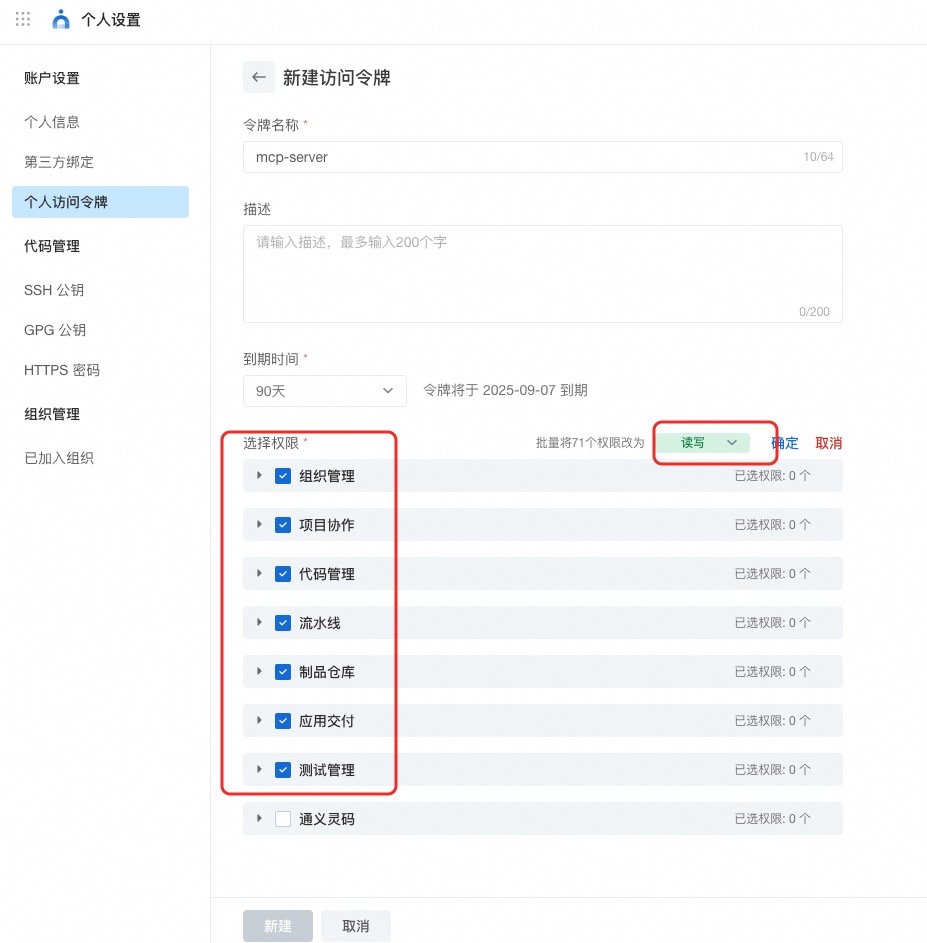
organization-management: Organization management tools (organization list, organization details, department information, organizational roles, member information, etc.)code-management: Code repository management tools (repository management, branch management, merge request management, file tree, etc.)project-management: Project management tools (project management, work item management, work item fields, work item comments, time tracking, etc.)pipeline-management: Pipeline management tools (pipeline list, pipeline configuration, resource management, tag management, deployment management, etc.)application-delivery: Application delivery tools (deployment order management, application management, application tags, variable group management, etc.)packages-management: Artifact repository management tools (artifact repositories, artifact lists, etc.)test-management: Test management tools (test case management, test case directories, test plans, test results, etc.)
Prerequisites
- node version >= 18.0.0
- AlibabaCloud Devops Personal Access Token, click here to obtain. Grant read and write permissions to all APIs under organization management, project collaboration, code management, pipeline management, artifact repository management, application delivery and testing management.
Official Hosted MCP Service (No Install)
Yunxiao provides an officially hosted MCP endpoint — no local install or Docker needed. Just point your client at it and authenticate with your Yunxiao token.
- Central:
https://openapi-rdc.aliyuncs.com/ai/mcp - Region edition: your organization's region domain +
/ai/mcp, e.g.https://<your-org>.devops.aliyuncs.com/ai/mcp— the same domain you use to access Yunxiao in your region. - Transport: Streamable HTTP (stateless)
- Auth:
Authorization: Bearer <YOUR_TOKEN>(or headerX-Yunxiao-Token: <YOUR_TOKEN>)
Client config — Central (clients with native remote support, e.g. Cursor):
{
  "mcpServers": {
    "yunxiao": {
      "url": "https://openapi-rdc.aliyuncs.com/ai/mcp",
      "headers": { "Authorization": "Bearer <YOUR_TOKEN>" }
    }
  }
}
Client config — Region edition (replace the URL with your own region domain):
{
  "mcpServers": {
    "yunxiao": {
      "url": "https://<your-org>.devops.aliyuncs.com/ai/mcp",
      "headers": { "Authorization": "Bearer <YOUR_TOKEN>" }
    }
  }
}
Tip: cut context usage by requesting only the toolsets you need —?toolsets=code-management,project-managementor headerX-Devops-Toolsets. See the full guide: docs/hosted-mcp-guide.zh-CN.md.
---
Using Docker (Optional)
Docker Compose
cp .env.example .env   # set YUNXIAO_ACCESS_TOKEN
docker compose up -d
Client URL: http://localhost:3000/sse (SSE) or http://localhost:3000/mcp (Streamable HTTP)
Usage
Quick Start (Self-host, Using Stdio Mode)
Stdio mode is the simplest self-hosting way, suitable for most MCP clients (like Cursor, Claude Desktop, iFlow, etc.). No Docker installation required, just run via npx.
Option 1: Direct Use via NPX (Simplest)
Add the following configuration to your MCP client configuration file:
{
  "mcpServers": {
    "yunxiao": {
      "command": "npx",
      "args": [
        "-y",
        "alibabacloud-devops-mcp-server"
      ],
      "env": {
        "YUNXIAO_ACCESS_TOKEN": "<YOUR_TOKEN>"
      }
    }
  }
}Note: - Replace<YOUR_TOKEN>with your Yunxiao access token - The-yflag automatically confirms installation without manual confirmation - By default the tool calls the Yunxiao Central Station OpenAPI (https://openapi-rdc.aliyuncs.com); no extra configuration is required - If you are on a Region edition (organization-specific domain), set an additional environment variableYUNXIAO_API_BASE_URLto your Yunxiao instance URL, e.g.https://your-org.devops.aliyuncs.com. See the Configuring Region Edition section above for details - This method uses stdio mode, communicating with the MCP client via standard input/output
---
3. Configure MCP Client
Stdio:
{
  "mcpServers": {
    "yunxiao": {
      "command": "docker",
      "args": ["run", "-i", "--rm", "-e", "YUNXIAO_ACCESS_TOKEN", "build-steps-public-registry.cn-beijing.cr.aliyuncs.com/build-steps/alibabacloud-devops-mcp-server:latest"],
      "env": { "YUNXIAO_ACCESS_TOKEN": "<YOUR_TOKEN>" }
    }
  }
}
SSE: http://localhost:3000/sse
Streamable HTTP: http://localhost:3000/mcp
Pass credentials via query parameter or header:
http://localhost:3000/mcp?yunxiao_access_token=YOUR_TOKEN_HEREx-yunxiao-token: YOUR_TOKEN_HERE
Region / instance OpenAPI base:
http://localhost:3000/mcp?yunxiao_access_token=TOKEN&yunxiao_api_base_url=https%3A%2F%2Fyour-org.devops.aliyuncs.comx-yunxiao-api-base-url: https://your-org.devops.aliyuncs.com
Pipeline Management Tools
get_pipeline: Get pipeline detailslist_pipelines: Get pipeline listsmart_list_pipelines: Smart pipeline search with natural language time referencesgenerate_pipeline_yaml: [Pipeline Management] Generate pipeline YAML configurationcreate_pipeline_from_description: Create a pipeline from natural language descriptionupdate_pipeline: [Pipeline Management] Update pipeline YAML contentcreate_pipeline_run: Create a pipeline run instanceget_latest_pipeline_run: Get the latest pipeline run instanceget_pipeline_run: Get pipeline run detailslist_pipeline_runs: Get pipeline run listlist_pipeline_jobs_by_category: Get pipeline execution tasks by categorylist_pipeline_job_historys: Get the execution history of a pipeline taskexecute_pipeline_job_run: Manually run a pipeline taskget_pipeline_job_run_log: Get the execution logs of a pipeline joblist_service_connections: List service connections in organizationcreate_pipeline_from_description: Automatically generates YAML configuration and creates pipelineupdate_pipeline: Update an existing pipeline in Yunxiao by pipelineId. Use this to update pipeline YAML, stages, jobs, etc.create_resource_member: Create a resource memberdelete_resource_member: Delete a resource memberlist_resource_members: Get a list of resource membersupdate_resource_member: Update a resource memberupdate_resource_owner: Transfer resource ownercreate_tag: Create a tagcreate_tag_group: Create a tag grouplist_tag_groups: Get a list of tag groupsdelete_tag_group: Delete a tag groupupdate_tag_group: Update a tag groupget_tag_group: Get a tag groupdelete_tag: Delete a tagupdate_tag: Update a tagstop_vm_deploy_order: Stop VM deploy orderskip_vm_deploy_machine: Skip VM deploy machineretry_vm_deploy_machine: Retry VM deploy machineresume_vm_deploy_order: Resume VM deploy orderget_vm_deploy_order: Get VM deploy order detailsget_vm_deploy_machine_log: Get VM deploy machine log
Packages Management Tools
list_package_repositories: Get package repositories details listlist_artifacts: Get artifacts details listget_artifact: Get single artifact details
alibabacloud-devops-mcp-server 是专为 AI 助手设计的 MCP Server,旨在通过 Model Context Protocol (MCP) 将 AI 能力与 AlibabaCloud Devops(云效)平台深度连接。它允许 AI 助手直接读取项目中的 Work Item 内容、理解需求并自动编写代码,甚至能够自主提交 Merge Request。通过该工具,企业开发团队可以实现智能化的代码评审、任务管理优化以及研发流程自动化,显著提升开发效率。
本项目为 AI 助手提供了丰富的管理能力:首先是 organization-management(组织管理),支持查询组织列表、部门信息、角色及成员详情;其次是 code-management(代码管理),涵盖了代码仓库、分支管理、Merge Request 管理以及文件树查看等功能。通过这些能力,AI 可以无缝介入研发全生命周期。
在使用本项目前,请确保您的开发环境满足以下要求:1. Node.js 版本需大于等于 18.0.0;2. 您需要拥有 AlibabaCloud Devops 的 Personal Access Token(个人访问令牌),并确保该 Token 已授予相应的读(Read)和写(Write)权限,以便 AI 助手能够正常操作云效资源。
您可以根据使用场景选择不同的安装方式:1. 通过 Lingma(通义灵码)内置的 MCP Marketplace 进行安装,搜索 "Yunxiao DevOps" 并点击安装即可;2. 使用 Docker 进行部署,通过 Docker Compose 启动服务,并配置好 .env 文件中的 YUNXIAO_ACCESS_TOKEN;3. 对于开发者,也可以通过 npx 直接运行相关包。
推荐使用 Stdio 模式进行快速启动,这是最简单且通用的方式,适用于 Cursor、Claude Desktop、iFlow 等主流 MCP Client。在 Stdio 模式下,您无需安装 Docker,直接通过 npx 命令即可运行,非常适合快速集成到您的 AI 开发工作流中。
配置过程取决于您选择的运行模式:1. 若使用 NPX (Stdio 模式),请在 MCP Client 的配置文件中添加对应的 JSON 配置,并务必在 env 字段中填入您的 YUNXIAO_ACCESS_TOKEN;2. 若使用 Docker 运行,请配置相应的环境变量;3. 若通过 SSE 模式接入,请使用提供的 HTTP URL 进行连接。
本项目提供了强大的自动化工具集:Pipeline Management Tools(流水线管理工具)支持获取流水线详情、列表查询,并具备通过自然语言进行智能搜索及根据描述自动生成 Pipeline YAML 的能力;Packages Management Tools(制品管理工具)则支持查询包仓库详情、制品列表及单个制品信息,实现研发资产的智能化管理。
高质量的MCP服务器实现
- 需要让 Claude / Cursor 操作本地工具的 AI 工程师
- 构建多智能体协作系统的 Agent 开发者
- 配置 MCP 服务器时建议使用 stdio 传输 + JSON-RPC,避免暴露公网
- 生产部署优先使用 Docker Compose 隔离依赖,并挂载 volume 持久化数据
- Agent 任务先做 dry-run 验证工具调用链,再开启自主执行
- API key 直接提交到 git 仓库(请用 .env 并加入 .gitignore)
- MCP 配置路径拼错或权限不足,重启 Claude Desktop 才生效
- 容器内无法访问宿主机 localhost — 使用 host.docker.internal
- Docker:alibabacloud-devops-mcp-server 提供官方镜像,docker compose up 一键启动
- CLI:直接 npm install -g / pip install,命令行调用
- 云端托管:可放在 Vercel / Railway / Fly.io 等 PaaS 平台
⚡ 核心功能
- 通过标准 MCP 协议与 Claude、Cursor 等主流 AI 客户端深度集成
- 提供结构化工具调用接口,显著降低 AI 集成复杂度
- 支持 Claude Desktop 和 Claude Code 无缝接入,开箱即用
- 可与其他 MCP 工具组合叠加,构建完整 AI 工作站
- 轻量无侵入设计,不影响现有系统架构
- 需要让 Claude / Cursor 操作本地工具的 AI 工程师
- 构建多智能体协作系统的 Agent 开发者
- 配置 MCP 服务器时建议使用 stdio 传输 + JSON-RPC,避免暴露公网
- 生产部署优先使用 Docker Compose 隔离依赖,并挂载 volume 持久化数据
- Agent 任务先做 dry-run 验证工具调用链,再开启自主执行
- API key 直接提交到 git 仓库(请用 .env 并加入 .gitignore)
- MCP 配置路径拼错或权限不足,重启 Claude Desktop 才生效
- 容器内无法访问宿主机 localhost — 使用 host.docker.internal
👥 适合人群
🎯 使用场景
- 在 Claude Desktop 对话中直接调用本地工具,实现 AI 与系统的深度联动
- 通过自然语言驱动复杂的多步骤自动化任务,代替繁琐手动操作
- 将多个 MCP 工具组合使用,构建个人专属 AI 工作站
⚖️ 优点与不足
- +Apache-2.0 协议,可免费商用
- +标准化 MCP 协议,生态互联性强
- +与 Claude 官方生态无缝对接
- +即插即用,配置简单快捷
- −依赖 Claude 客户端,非 Claude 用户无法使用
- −MCP 协议仍在持续演进,接口可能变更
- −需要一定的配置步骤
AI Skill Hub 为第三方内容聚合平台,本页面信息基于公开数据整理,不对工具功能和质量作任何法律背书。
建议在沙箱或测试环境中充分验证后,再部署至生产环境,并做好必要的安全评估。
✅ Apache 2.0 — 宽松开源协议,可商用,需保留版权声明和 NOTICE 文件,含专利授权条款。
🔗 相关工具推荐
❓ 常见问题 FAQ
经综合评估,阿里云MCP服务器 在MCP工具赛道中表现稳健,质量优秀。如果你已有明确的使用需求,可以直接上手体验;如果还在评估阶段,建议对比同类工具后再做决策。
| 原始名称 | alibabacloud-devops-mcp-server |
| 原始描述 | 开源MCP工具:Yunxiao MCP Server provides AI assistants with the ability to interact with the 。⭐116 · TypeScript |
| Topics | alibabacloud-devopsdevops-mcptypescript |
| GitHub | https://github.com/aliyun/alibabacloud-devops-mcp-server |
| License | Apache-2.0 |
| 语言 | TypeScript |
收录时间:2026-06-03 · 更新时间:2026-06-05 · License:Apache-2.0 · AI Skill Hub 不对第三方内容的准确性作法律背书。