AI-Git-Bot
AI-Git-Bot 是 AI Skill Hub 本期精选Agent工作流之一。综合评分 7.5 分,整体质量较高。我们推荐使用将其纳入你的 AI 工具库,帮助提升工作效率。
AI-Git-Bot 工作流的设计遵循"最小配置,最大复用"原则:核心逻辑已经封装好,用户只需配置自己的 API Key 和业务参数即可快速上手。工作流内置错误处理和重试机制,在网络波动或 API 限速等情况下仍能稳定运行,适合作为生产环境的自动化基础设施。
在实际部署时,建议先在测试环境中运行 3-5 次,验证各个环节的输出结果符合预期,再部署到生产环境。AI Skill Hub 评分 7.5 分,是同类 Agent 工作流中的精选推荐。
AI-Git-Bot是一款开源的AI工作流应用,轻量级、自主可控,连接您与AI工具的桥梁。
AI-Git-Bot 是一套完整的 AI Agent 自动化工作流方案。通过可视化的节点编排,将复杂的多步骤任务拆解为清晰的自动化流程,实现全程无人值守的智能处理。支持与数百种外部服务和 API 无缝集成,适合构建数据处理管线、业务自动化和 AI 辅助决策系统。
AI-Git-Bot是一款开源的AI工作流应用,轻量级、自主可控,连接您与AI工具的桥梁。
AI-Git-Bot 是一套完整的 AI Agent 自动化工作流方案。通过可视化的节点编排,将复杂的多步骤任务拆解为清晰的自动化流程,实现全程无人值守的智能处理。支持与数百种外部服务和 API 无缝集成,适合构建数据处理管线、业务自动化和 AI 辅助决策系统。
- 可视化 Agent 工作流编排,无需编写复杂代码
- 支持多步骤自动化任务链,实现全流程无人值守
- 与外部 API、数据库和第三方服务无缝集成
- 内置错误处理与自动重试机制,保障稳定运行
- 提供可复用的自动化模板,快速在同类场景部署
- 自动化日常重复性工作,将精力集中于创造性任务
- 构建数据采集 → 处理 → 输出的完整自动化管线
- 实现跨平台、跨系统的数据流转和业务协同
# 克隆仓库
git clone https://github.com/tmseidel/ai-git-bot
cd ai-git-bot

# 查看安装说明
cat README.md

# 按 README 完成环境依赖安装后即可使用
- 访问 GitHub 仓库获取工作流文件
- 在对应平台(Dify / Flowise / Make 等)中找到「导入工作流」功能
- 上传工作流文件
- 按照提示配置必要的环境变量和 API Key
- 运行测试确认流程正常后投入使用
# 查看帮助
ai-git-bot --help

# 基本运行
ai-git-bot [options] <input>

# 详细使用说明请查阅文档
# https://github.com/tmseidel/ai-git-bot
# ai-git-bot 配置说明
# 查看配置选项
ai-git-bot --config-example > config.yml

# 常见配置项
# output_dir: ./output
# log_level: info
# workers: 4

# 环境变量(覆盖配置文件)
export AI_GIT_BOT_CONFIG="/path/to/config.yml"
AI-Git-Bot




Automate the necessary-but-uncomfortable parts of software development — directly inside the Git tools your team already uses.
Every team has a list of "we know we should be doing this" engineering chores. Writing a properly scoped issue before coding starts. Adding a regression E2E test for that login bug. Re-reviewing a PR after the third force-push. Tearing down a stale preview environment. These chores are necessary (skipping them rots the codebase) but uncomfortable (they aren't the fun part, and they get cut first under deadline pressure).
AI-Git-Bot turns those chores into repeatable, automated workflows that live natively inside Gitea, GitHub, GitHub Enterprise, GitLab, and Bitbucket Cloud — triggered by the events your team is already producing (issue assigned, PR opened, reviewer re-requested, @bot mentioned in a comment).
## 📣 New here? Read the pitch first. If you want to know why this project exists, what it does for your team, and how it compares to Copilot Workspace / GitLab Duo / Qodo / Aider, start with the pitch — it's the fastest way to decide whether AI-Git-Bot is for you. 👉 doc/pitch/PITCH.md — the long-form pitch (~10 min read)
<p align="center"> <img src="doc/images/ai-git-bot-diagram.svg" alt="AI-Git-Bot Architecture Schema" width="800"/> </p>
Architecture Overview
(Gitea / GitHub / GitLab / Bitbucket)"] Bot["AI-Git-Bot
(Gateway)"] AI["AI Provider
(Anthropic / OpenAI / Google AI / Gemini / Ollama / llama.cpp)"] MCPConfig["MCP Config + Tool Whitelist"] MCPServers["Remote MCP Servers"] DB["PostgreSQL"] Git -- "Webhooks" --> Bot Bot -- "Fetch diff, post reviews" --> Git Bot -- "AI review requests" --> AI Bot -- "MCP discovery / tool calls" --> MCPServers MCPConfig -- "selected tools" --> Bot Bot -- "Configuration & Sessions" --> DB MCPConfig -- "persisted selection" --> DB
The bot receives webhooks from your Git provider, fetches PR diffs, sends them to the configured AI provider for review, and posts the results back. Optional MCP capabilities are orchestrated in the application layer and limited by a persisted per-configuration tool whitelist. All configuration (AI integrations, Git integrations, bots, MCP configurations, MCP selected tools) and conversation sessions are persisted in the database.
➡️ See the Architecture Documentation for detailed component diagrams and request flows.
🌍 Where the E2E workflow deploys its preview environment
The Full-stack QA workflow needs a per-PR environment to test against. Different teams already have very different deploy pipelines — so the bot ships a small DeploymentStrategy SPI with four interchangeable implementations. Pick the one that matches the world your team already lives in:
| Strategy | Best for | Concrete user story |
|---|---|---|
**STATIC** | Vercel / Netlify / GitLab review apps / Render — anything that already creates a preview-per-PR at a predictable URL. | [Marco the Frontend Lead](doc/agentic-workflows/STATIC_DEPLOYMENT_USER_STORY.md) |
**WEBHOOK** | Jenkins / TeamCity / scripts behind a corporate firewall — anywhere you can curl an HMAC-signed callback back to the bot. | [Priya the DevOps Engineer](doc/agentic-workflows/WEBHOOK_DEPLOYMENT_USER_STORY.md) |
**MCP** | Internal platform teams already exposing deploy/status/teardown over MCP — zero extra services, single whitelist, no inbound callback. | [Alex the Platform Engineer](doc/agentic-workflows/MCP_DEPLOYMENT_USER_STORY.md) (laptop reproduction: systemtest/docker-compose-mcp-deployment.yml) |
**CI_ACTION** | Provider-native CI (GitHub Actions / GitLab CI / Bitbucket Pipelines / Gitea Actions) — dispatched via existing repo credentials, zero new secrets. | [Sam the SRE](doc/agentic-workflows/CI_ACTION_DEPLOYMENT_USER_STORY.md) (operator recipes: [doc/PR_WORKFLOWS_CI_ACTIONS.md](doc/PR_WORKFLOWS_CI_ACTIONS.md); laptop reproduction: systemtest/docker-compose-ci-action.yml) |
The full feature documentation for the agentic PR workflows — concept, architecture, persona-driven user stories, internals — lives under doc/agentic-workflows/.
Docker
The bot is available as a Docker image on Docker Hub.
services:
  app:
    image: tmseidel/ai-git-bot:latest
    ports:
      - "8080:8080"
    environment:
      SPRING_PROFILES_ACTIVE: docker
      DATABASE_URL: jdbc:postgresql://db:5432/giteabot
      DATABASE_USERNAME: ${DATABASE_USERNAME:-giteabot}
      DATABASE_PASSWORD: ${DATABASE_PASSWORD:-giteabot}
      APP_ENCRYPTION_KEY: ${APP_ENCRYPTION_KEY:-change-me}
    depends_on:
      db:
        condition: service_healthy
    restart: unless-stopped

  db:
    image: postgres:17-alpine
    environment:
      POSTGRES_DB: giteabot
      POSTGRES_USER: ${DATABASE_USERNAME:-giteabot}
      POSTGRES_PASSWORD: ${DATABASE_PASSWORD:-giteabot}
    volumes:
      - pgdata:/var/lib/postgresql/data
    healthcheck:
      test: ["CMD-SHELL", "pg_isready -U ${DATABASE_USERNAME:-giteabot}"]
      interval: 5s
      timeout: 5s
      retries: 5
    restart: unless-stopped

volumes:
  pgdata:
2. Initial Setup
- Navigate to
http://localhost:8080 - Create your administrator account
- Log in to access the management dashboard
Quick Start
3. Configure Integrations
1. Create an AI Integration: - Go to AI Integrations → New Integration - Select a provider (e.g. "anthropic") - The API URL is auto-filled with the provider's default - Select a model from the dropdown or enter a custom model name - Enter your API key - OpenAI-compatible providers can often be configured by selecting "openai" and entering the provider's custom API URL, API key, and model; see the User Guide - For Gemini, select gemini in the UI and use a Gemini API key from Google AI Studio; see the User Guide
2. Create a Git Integration: - Go to Git Integrations → New Integration - Select your provider (Gitea, GitHub, GitLab, or Bitbucket) - Enter your Git server URL and API token - See Gitea Setup, GitHub Setup, GitLab Setup, or Bitbucket Setup
3. Create a Bot: - Go to Bots → New Bot - Choose Coding bot for pull-request review/issue implementation, or Writer bot for technical-writing issue drafts - Select your AI and Git integrations - Select a system prompt entry from System settings - Copy the generated Webhook URL
4. Configure Webhooks
Configure webhooks in your Git provider to notify the bot about PR events.
- Gitea: See Gitea Setup
- GitHub: See GitHub Setup
- GitLab: See GitLab Setup
- Bitbucket Cloud: See Bitbucket Setup
See the User Guide for detailed instructions.
🧰 The core workflows
Each workflow is a first-class, named PR workflow you can enable per bot via the admin UI. They all run through the same orchestrator (PrWorkflowOrchestrator) so they share session memory, audit logs, slash-command dispatch, and tool whitelisting.
| Workflow | Triggered by | What it produces |
|---|---|---|
| **Review** | PR opened with bot as reviewer, or bot re-requested | Inline + summary review comments, chunked for large diffs |
| **Issue → Code (coding agent)** | Issue assigned to a *coding* bot | A pull request implementing the change |
| **Issue → Better Issue (writer agent)** | Issue assigned to a *writer* bot | A structured AI Created Issue with acceptance criteria |
| **Interactive Q&A** | @bot mention in any PR or inline review comment | Threaded reply with file/diff context |
| **Full-stack QA (E2E tests)** | PR opened on a bot with an e2e-test workflow + deployment target | Generated Playwright suite, run report posted to PR, environment torn down on PR close |
| **Suite promotion** | Operator opts in per suite | A follow-up PR that "graduates" a generated suite into the repo ([see user story](doc/agentic-workflows/SUITE_PROMOTION_USER_STORY.md)) |
See the PR Workflows guide and Agent documentation for the operator-facing details.
🎥 Watch the PR workflows in action: AI-Git-Bot — PR workflow walkthrough on YouTube
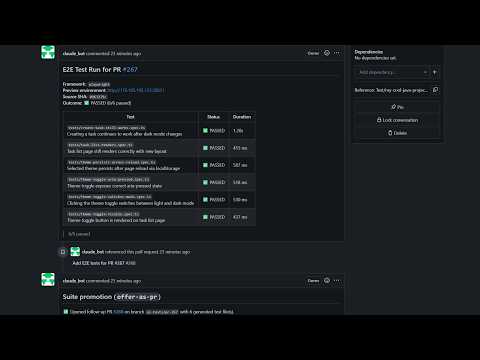
## 🧪 Project maturity & tested provider matrix AI-Git-Bot is a single-maintainer side project. I cannot realistically run the full feature set against every Git host × every AI provider combination, so most provider-specific code is built from the official API documentation and reviewed by AI, then validated end-to-end only on the stack I actually run in production. | Provider | Maturity | |---|---| | Gitea | ✅ Well-tested — primary target, exercised end-to-end (incl. webhooks, PR review, coding agent, writer agent, E2E full-stack QA) on every release. | | GitHub / GitHub Enterprise | ⚠️ Experimental — implemented from the REST/Webhook docs; basic flows have been smoke-tested but not exercised at scale. | | GitLab | ⚠️ Experimental — same caveat as GitHub. | | Bitbucket Cloud | ⚠️ Experimental — same caveat. | The Full-stack QA / E2E PR review workflow is the most complex moving part (deployment targets, generated test suites, callbacks, teardown lifecycle) and should be considered experimental on every provider including Gitea — runtime semantics differ subtly between hosts and not every combination has been exercised. 🐛 Bug reports are very welcome — please open a GitHub issue with the provider, version, workflow, and the relevant log excerpt; that is the fastest path to fixing the rough edges across the matrix. 🧰 Reproducible system-test containers — to keep the rough edges findable, every non-trivial workflow ships with a self-containeddocker-composestack undersystemtest/plus a recipe README. Bring up the bot + a real Git host + sample apps + (where applicable) a local LLM and exercise the workflow end-to-end without touching any production system: | Stack | Compose file | Recipe | |---|---|---| | Local Gitea + runner + bot |docker-compose-local-gitea.yml|systemtest/README.md| | Local GitLab + bot |docker-compose-local-gitlab.yml|systemtest/README.md| | E2E sample app for Full-stack QA |docker-compose-e2e-sample.yml|systemtest/README.md| |CI_ACTIONdeployment strategy |docker-compose-ci-action.yml|systemtest/README-ci-action.md| |MCPdeployment strategy |docker-compose-mcp-deployment.yml|systemtest/README-mcp-deployment.md| | MCP tool-calling against GitHub |docker-compose-mcp-github.yml|systemtest/README-mcp-github.md| | Suite-promotion workflow | — |systemtest/README-suite-promotion.md| | Local LLM via Ollama |docker-compose-ollama.yml|doc/OLLAMA.md| | Local LLM via llama.cpp |docker-compose-llamacpp.yml|doc/LLAMACPP.md| If you can reproduce a bug against one of these stacks, attach the compose file you used + the bot log; that turns most reports into a 1-commit fix.
🔍 Review + interactive Q&A in PRs
When a PR is opened with the bot already assigned as reviewer — or the bot is later re-requested — the review bot posts inline + summary feedback. Large diffs are chunked automatically with retry on token limits. Mention @bot in any comment or inline review comment to ask follow-up questions; the bot replies with full file/diff context and session history.
<details> <summary>📸 Screenshots: Reviews + conversations across platforms</summary>
Gitea: <img src="doc/screenshots/gitea/screenshot_initial_code_review.png" alt="Gitea Code Review" width="600"/>
GitHub: <img src="doc/screenshots/github/github_code_review_with_comment.png" alt="GitHub Code Review" width="600"/>
GitLab: <img src="doc/screenshots/gitlab/gitlab-pull-request-with-code-review.png" alt="GitLab Code Review" width="600"/>
Bitbucket: <img src="doc/screenshots/bitbucket/bitbucket-code-review.png" alt="Bitbucket Code Review" width="600"/>
Inline comment thread (Gitea): <img src="doc/screenshots/gitea/screenshot_code_review_with_inline_comment.png" alt="Inline review comment" width="600"/>
</details>
AI-Git-Bot是一款轻量级的AI工作流应用,提供了连接AI工具的功能,但其AI能力和自动化程度需要进一步提升。
- 可视化 Agent 工作流编排,无需编写复杂代码
- 支持多步骤自动化任务链,实现全流程无人值守
- 与外部 API、数据库和第三方服务无缝集成
- 内置错误处理与自动重试机制,保障稳定运行
- 提供可复用的自动化模板,快速在同类场景部署
- 自动化日常重复性工作,将精力集中于创造性任务
- 构建数据采集 → 处理 → 输出的完整自动化管线
- 实现跨平台、跨系统的数据流转和业务协同
- +MIT 协议,可免费商用
- +大幅减少重复性人工操作
- +可视化流程,清晰直观
- +可扩展性强,支持复杂场景
- −初始配置和调试需投入一定时间
- −强依赖外部服务的稳定性
- −复杂场景需具备一定技术基础
AI Skill Hub 为第三方内容聚合平台,本页面信息基于公开数据整理,不对工具功能和质量作任何法律背书。
建议在沙箱或测试环境中充分验证后,再部署至生产环境,并做好必要的安全评估。
✅ MIT 协议 — 最宽松的开源协议之一,可自由商用、修改、分发,仅需保留版权声明。
经综合评估,AI-Git-Bot 在Agent工作流赛道中表现稳健,质量良好。如果你已有明确的使用需求,可以直接上手体验;如果还在评估阶段,建议对比同类工具后再做决策。
| 原始名称 | ai-git-bot |
| Topics | workflowaiai-toolsautomation |
| GitHub | https://github.com/tmseidel/ai-git-bot |
| License | MIT |
| 语言 | Java |
收录时间:2026-05-23 · 更新时间:2026-05-23 · License:MIT · AI Skill Hub 不对第三方内容的准确性作法律背书。