AI Skill Hub 推荐使用:SFlow 是一款优质的Agent工作流。AI 综合评分 7.5 分,在同类工具中表现稳健。如果你正在寻找可靠的Agent工作流解决方案,这是一个值得深入了解的选择。
AI Native SecOps平台,基于LangGraph多智能体协调。自动化安全运维平台。
SFlow 是一套完整的 AI Agent 自动化工作流方案。通过可视化的节点编排,将复杂的多步骤任务拆解为清晰的自动化流程,实现全程无人值守的智能处理。支持与数百种外部服务和 API 无缝集成,适合构建数据处理管线、业务自动化和 AI 辅助决策系统。
AI Native SecOps平台,基于LangGraph多智能体协调。自动化安全运维平台。
SFlow 是一套完整的 AI Agent 自动化工作流方案。通过可视化的节点编排,将复杂的多步骤任务拆解为清晰的自动化流程,实现全程无人值守的智能处理。支持与数百种外部服务和 API 无缝集成,适合构建数据处理管线、业务自动化和 AI 辅助决策系统。
# 方式一:pip 安装(推荐)
pip install sflow

# 方式二:虚拟环境安装(推荐生产环境)
python -m venv .venv
source .venv/bin/activate  # Windows: .venv\Scripts\activate
pip install sflow

# 方式三:从源码安装(获取最新功能)
git clone https://github.com/Ch1nfo/SFlow
cd SFlow
pip install -e .

# 验证安装
python -c "import sflow; print('安装成功')"
# 命令行使用
sflow --help

# 基本用法
sflow input_file -o output_file

# Python 代码中调用
import sflow

# 示例
result = sflow.process("input")
print(result)
# sflow 配置文件示例(config.yml)
app:
  name: "sflow"
  debug: false
  log_level: "INFO"

# 运行时指定配置文件
sflow --config config.yml

# 或通过环境变量配置
export SFLOW_API_KEY="your-key"
export SFLOW_OUTPUT_DIR="./output"
<details> <summary><strong>System Architecture Diagram</strong></summary>
┌─────────────────────────────────────────────────────────────────┐
│                   React WebUI (Vite + TS)                       │
│  ┌──────────────┐  ┌─────────────────┐  ┌───────────────────┐   │
│  │ Overview /   │  │ Conversation UI │  │ Plugin & Config   │   │
│  │ Alerts /     │  │  + approvals    │  │    Management     │   │
│  │ Tasks        │  │                 │  │                   │   │
│  └──────────────┘  └─────────────────┘  └───────────────────┘   │
└──────────────────────────┬──────────────────────────────────────┘
                           │  REST API (FastAPI)
┌──────────────────────────▼──────────────────────────────────────┐
│              SentinelFlow Runtime (Python / FastAPI)            │
│  ┌────────────────────────────────────────────────────────────┐  │
│  │               Multi-Agent Orchestrator                     │  │
│  │   ┌──────────────────────────────────────────────────┐    │  │
│  │   │  Primary Agent (Supervisor)                       │    │  │
│  │   │  LangGraph StateGraph + ToolNode                  │    │  │
│  │   │  Context Window → ReAct → Worker/Skill Tools      │    │  │
│  │   │    ↓ sequential / parallel worker delegation      │    │  │
│  │   │  ┌────────────┐  ┌────────────┐  ┌────────────┐  │    │  │
│  │   │  │  Worker A  │  │  Worker B  │  │  Worker C  │  │    │  │
│  │   │  │ ReAct Sub- │  │ ReAct Sub- │  │ ReAct Sub- │  │    │  │
│  │   │  │   Graph    │  │   Graph    │  │   Graph    │  │    │  │
│  │   │  └────────────┘  └────────────┘  └────────────┘  │    │  │
│  │   └──────────────────────────────────────────────────┘    │  │
│  └────────────────────────────────────────────────────────────┘  │
│  ┌────────────────────────────────────────────────────────────┐  │
│  │                    Skill Runtime                           │  │
│  │    loader → executor → subprocess isolation → audit log    │  │
│  └────────────────────────────────────────────────────────────┘  │
│  ┌────────────────────────────────────────────────────────────┐  │
│  │            Prompt Window & Run Log Traceability            │  │
│  │  task anchors → case_context → compact tool records        │  │
│  │  full state/checkpoints/run logs remain available          │  │
│  └────────────────────────────────────────────────────────────┘  │
│  ┌────────────────────────────────────────────────────────────┐  │
│  │              Alert Ingestion & Task Queue                  │  │
│  │  Multi-Source API/Script Poller → Parser → Dedup → Queue   │  │
│  │  Source-Scoped Auto-Executor → Task Runner → Agent/Workflow│  │
│  └────────────────────────────────────────────────────────────┘  │
└─────────────────────────────────────────────────────────────────┘
Core Design Patterns
@tool functions; compact summaries, key facts, action results, approvals, and errors surface back to the Supervisorprepare_messages_for_llm() creates the actual LLM prompt view from full state, preserving task anchors and recent ReAct turns while compressing older tool recordscase_context carries current goal, alert refs, facts, actions taken, missing inputs, pending approvals, completed steps, and do-not-repeat hints for the current run onlyalert (JSON from SIEM) and conversation (human command); both routed through the same agent runtime_serialize_alert_result for a consistent, structured execution traceKey Components
SentinelFlowAgentService — Top-level service; routes to orchestrator or single-agent graph; serializes resultsbuild_orchestrator_graph() — Compiles the Supervisor + Worker multi-agent LangGraphbuild_agent_graph() — Builds a single-agent ReAct SubGraph (used for both workers and standalone agents)context_utils — Builds context manifests, task anchors, case context, prompt windows, key facts, compact tool summaries, and pre-execution input checksRunLogTracer / AgentRunLogService — Records per-run LLM prompt views, window information, worker boundaries, skill calls, approvals, and final resultsAlertDispatchService — SQLite-backed source-aware task queue; handles create, dedup, status transition, and finalizationAlertPollingService — Per-source scheduler that polls enabled API/script alert sources and dispatches normalized alerts into the task queueAlertAutoExecutionService — Asyncio-based source-scoped executor loop; processes queued and retry-eligible tasks without human actionAlertParserGenerator — LLM-assisted + heuristic field-mapping rule generator for arbitrary JSON alert payloadsSentinelFlowSkillRuntime — Manages skill lifecycle; adapts skills as LangChain tools for agent useAgentWorkflowRegistry — Lists and resolves workflow definitions for multi-step Agent WorkflowsSkillApprovalService — Persists approval records and checkpoint resume state for human-in-the-loop executionweekly_alert_cleanup_service — Optional weekly cleanup for stored alert tasks and run artifactsAuditService — Records runtime audit events for dispatch, task execution, approval handling, and background services</details>
<details> <summary><strong>Project Structure</strong></summary>
.
├── pyproject.toml                      # Python package metadata & CLI entrypoint
├── scripts/
│   ├── dev.py                          # Unified local dev entrypoint
│   └── serve_webui.py                  # Production WebUI static file server
├── .sentinelflow/                      # Local plugins, runtime.json, SQLite queue (generated at runtime)
├── runtime/
│   └── sentinelflow/
│       ├── agent/
│       │   ├── service.py              # Top-level agent service (orchestration logic)
│       │   ├── orchestrator_graph.py   # Supervisor + Worker SubGraph builder
│       │   ├── graph.py                # Single-agent ReAct graph builder
│       │   ├── registry.py             # Agent definition loader (agent.yaml)
│       │   ├── prompts.py              # System prompts & appendix templates
│       │   ├── context_utils.py        # Context manifest, prompt window, case_context, compact records
│       │   ├── run_log_tracer.py       # LLM prompt/run-log event tracing
│       │   ├── skill_run_analyzer.py   # Skill/closure/action result convergence
│       │   ├── policy.py               # Per-agent skill permission resolver
│       │   ├── nodes.py                # LangGraph node implementations
│       │   ├── tools.py                # Agent-facing tool definitions
│       │   └── state.py                # Agent graph state schema
│       ├── skills/
│       │   ├── loader.py               # SKILL.md discovery & validation
│       │   ├── executor.py             # Skill subprocess execution
│       │   ├── adapters.py             # Skill → LangChain tool adapters
│       │   ├── resolver.py             # Local/plugin skill resolution
│       │   └── models.py               # Skill data models
│       ├── alerts/
│       │   ├── client.py               # Alert source HTTP/script client
│       │   ├── poller.py               # Scheduled polling service
│       │   ├── parser_runtime.py       # Field-mapping parser engine
│       │   ├── parser_generator.py     # LLM + heuristic parser rule generator
│       │   └── dedup.py                # Alert deduplication store
│       ├── services/
│       │   ├── agent_run_log_service.py # Per-alert JSONL run logs
│       │   ├── dispatch_service.py     # SQLite-backed task queue & lifecycle
│       │   ├── task_runner_service.py  # Task execution orchestration
│       │   ├── auto_execution_service.py # Continuous auto-executor loop
│       │   ├── skill_approval_service.py # Skill approval records + checkpoint persistence
│       │   ├── triage_service.py       # Rule-based alert disposition fallback
│       │   ├── weekly_alert_cleanup_service.py # Optional weekly cleanup
│       │   └── audit_service.py        # Audit event log
│       ├── tools/                      # Built-in operational tools
│       ├── workflows/                  # Agent workflow registry & runner
│       ├── api/                        # FastAPI route handlers
│       ├── config/                     # Runtime config loader (.env + persisted JSON)
│       └── domain/                     # Shared enums, models, errors
│   └── tests/                          # Runtime regression tests
├── webui/
│   └── src/
│       ├── components/                 # React UI components
│       ├── pages/                      # Page-level views
│       ├── api/                        # API client (fetch wrappers)
│       ├── hooks/                      # Custom React hooks
│       └── styles/                     # Global styles & Tailwind config
</details>
<details> <summary><strong>Development Guide</strong></summary>
cd webui && pnpm install && cd ..
```bash
cd webui
pnpm install
cd ..python scripts/dev.py webui-build
| Security Overview Dashboard | Conversation Console |
|---|---|
| 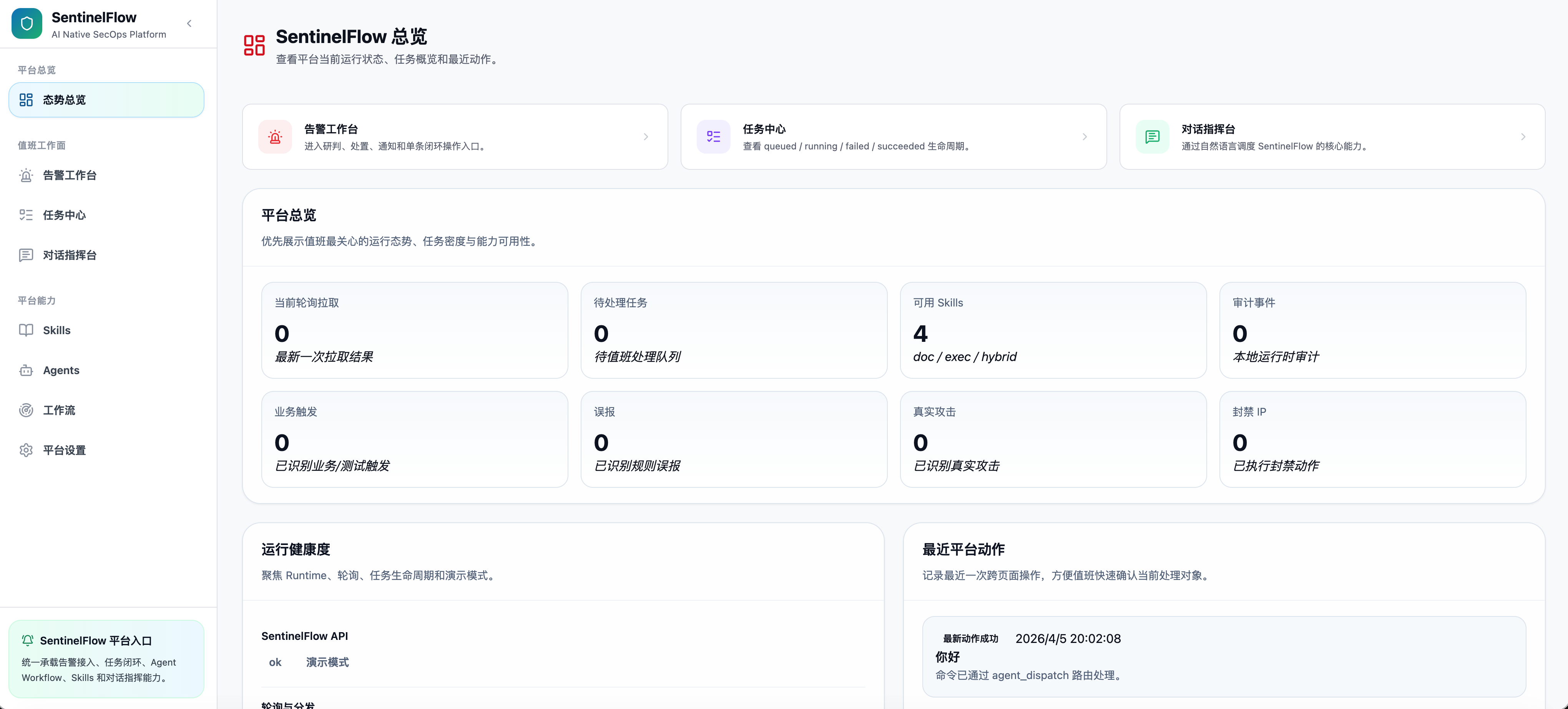 | 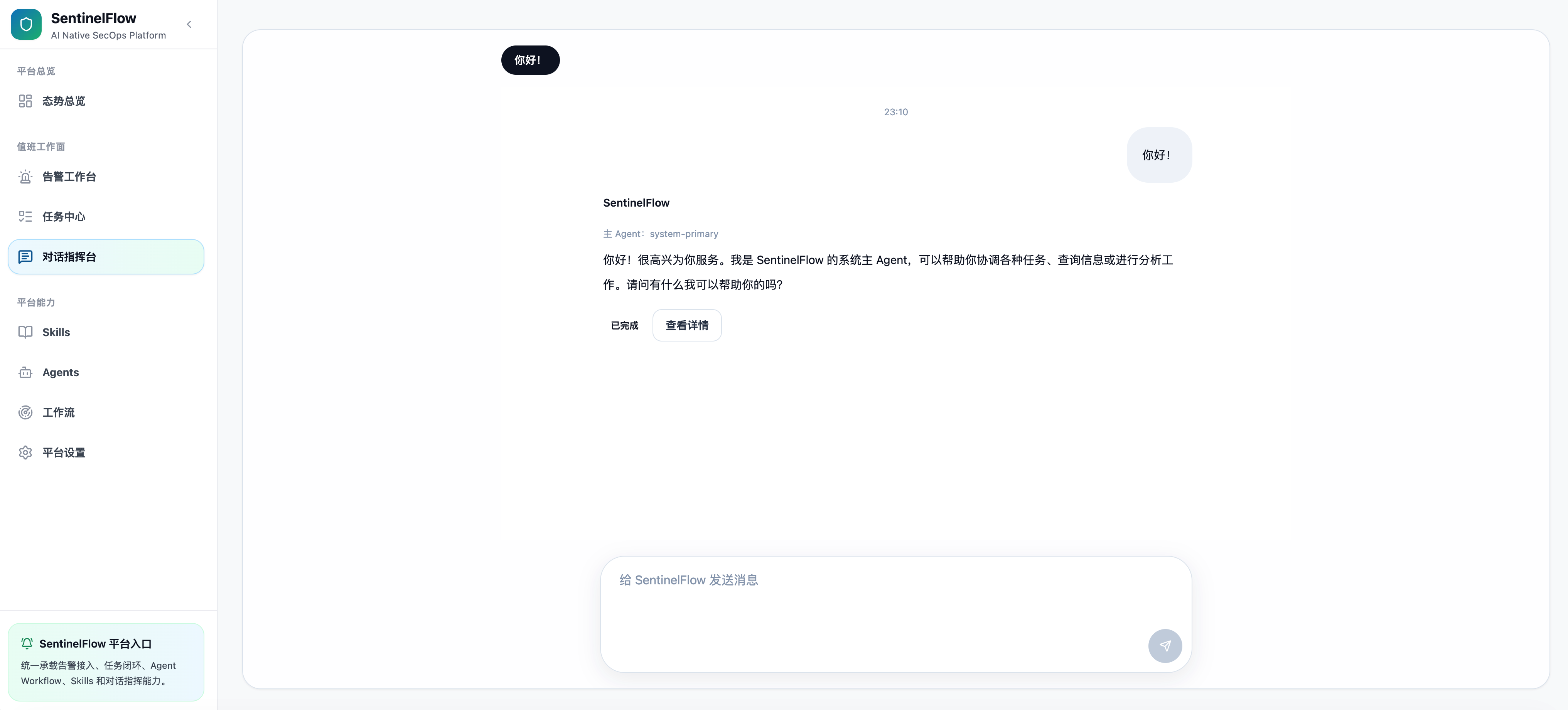 |
| Alert Workbench | Skill Management |
|---|---|
| 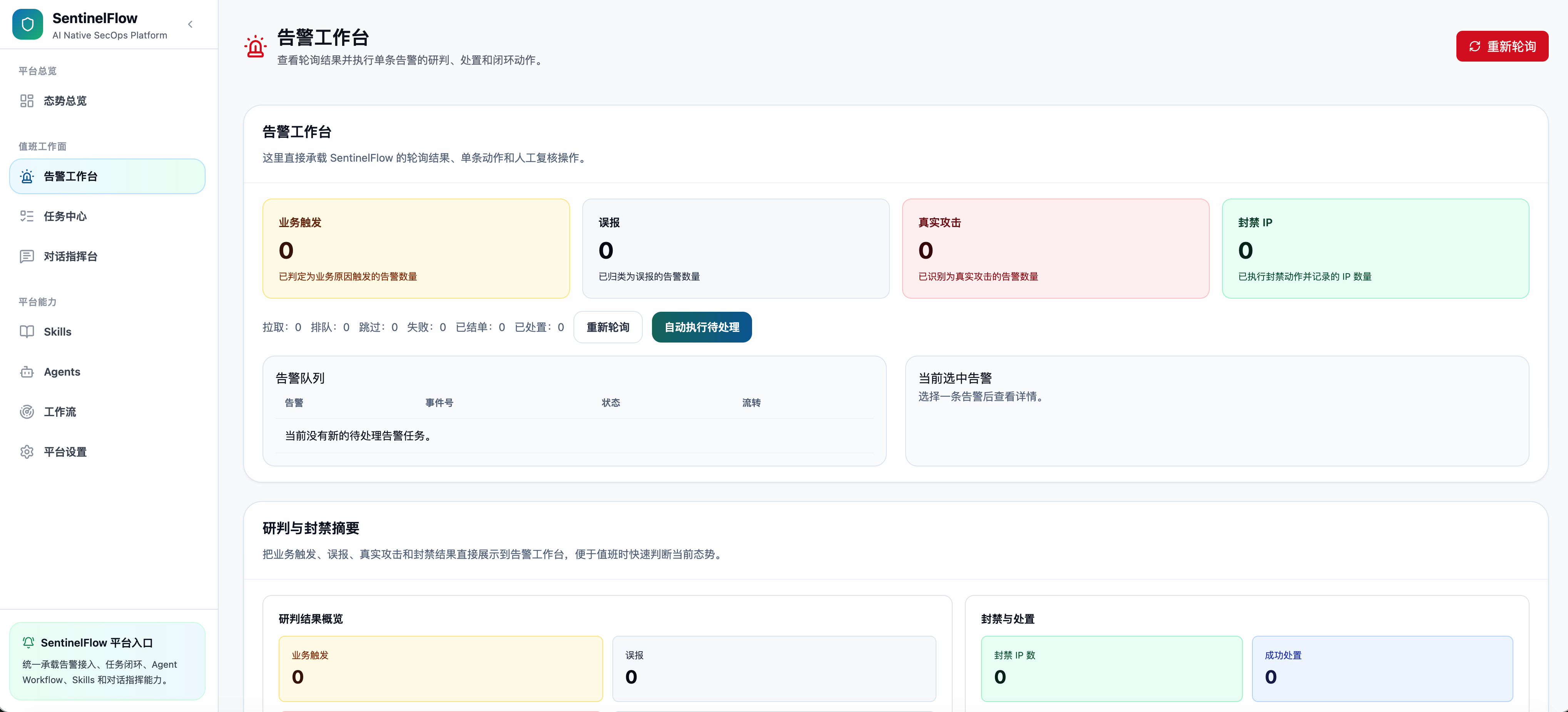 | 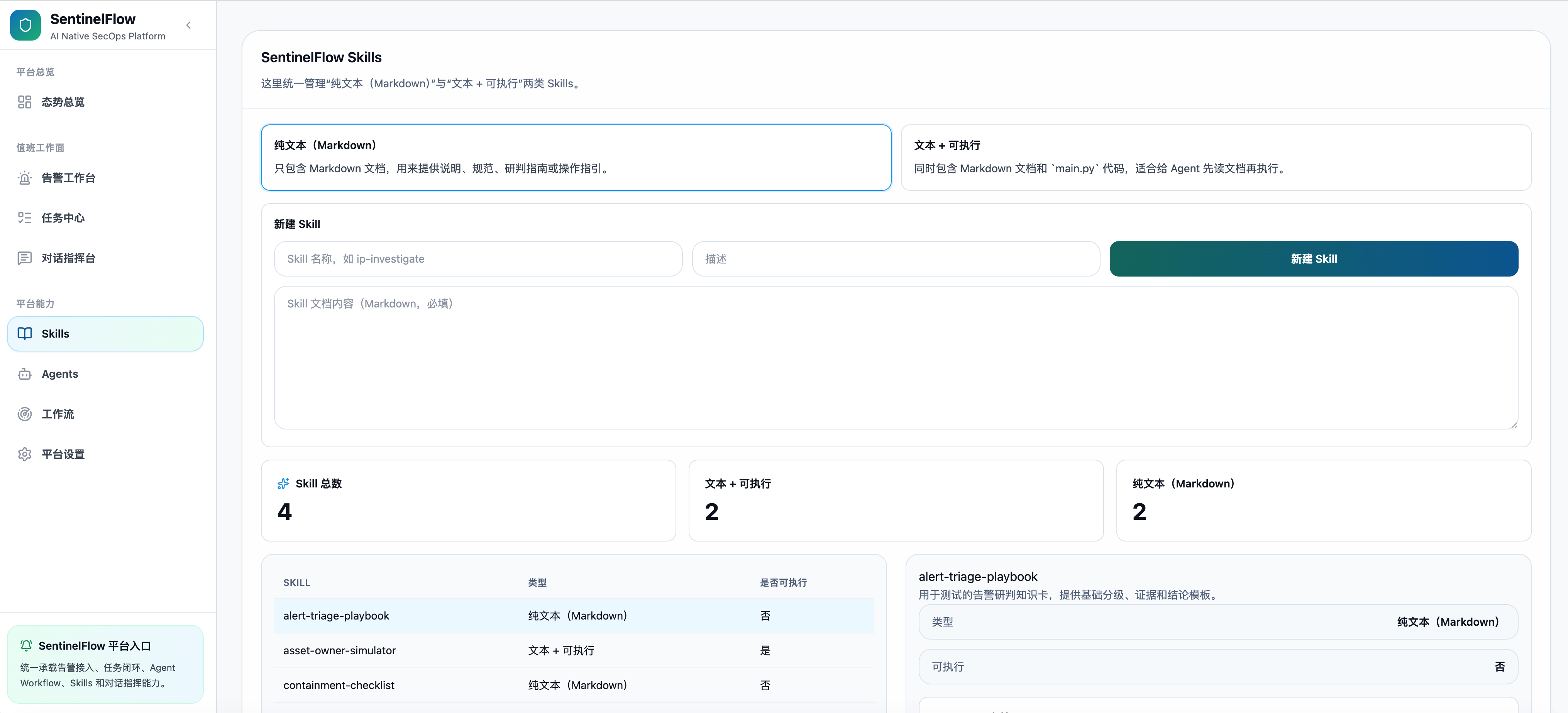 |
| Agent Management | Workflow Management |
|---|---|
| 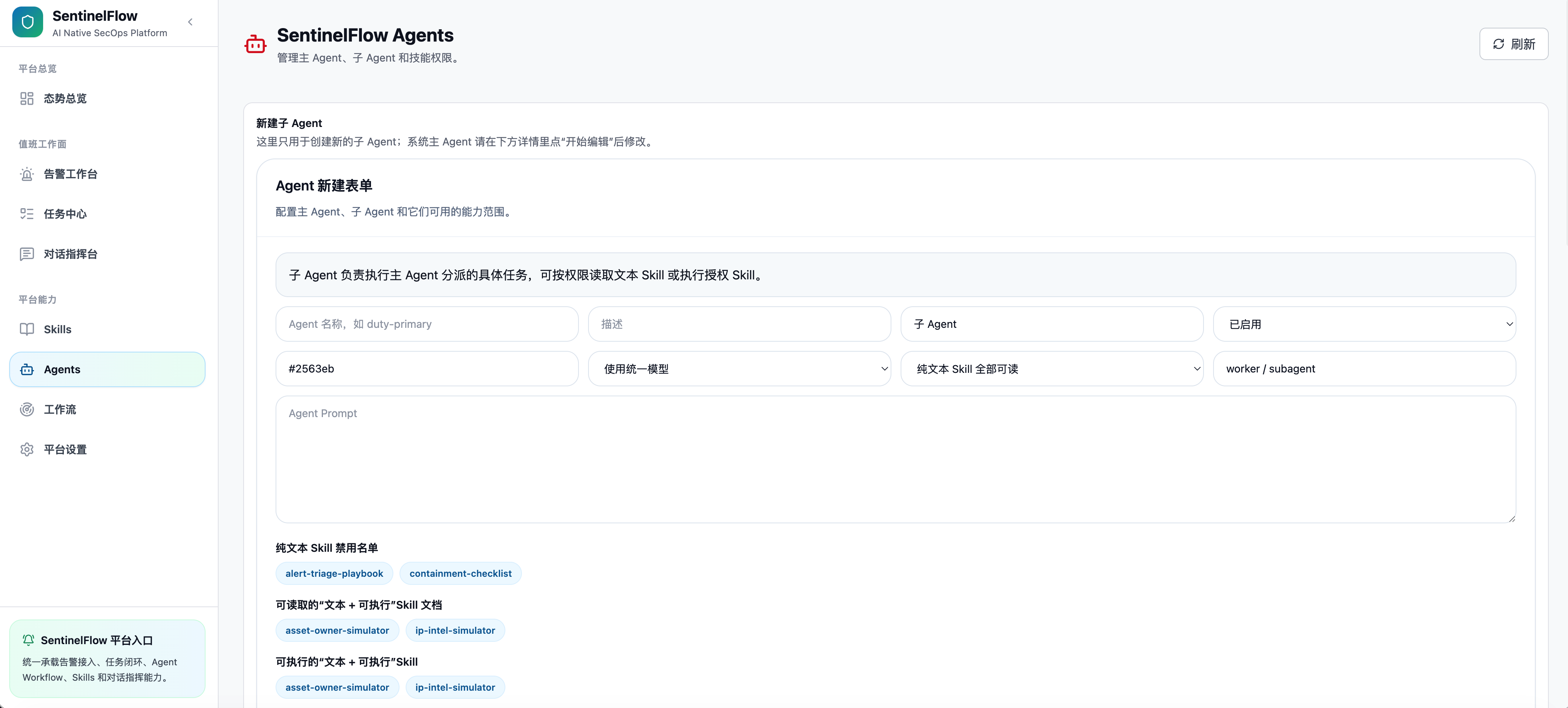 | 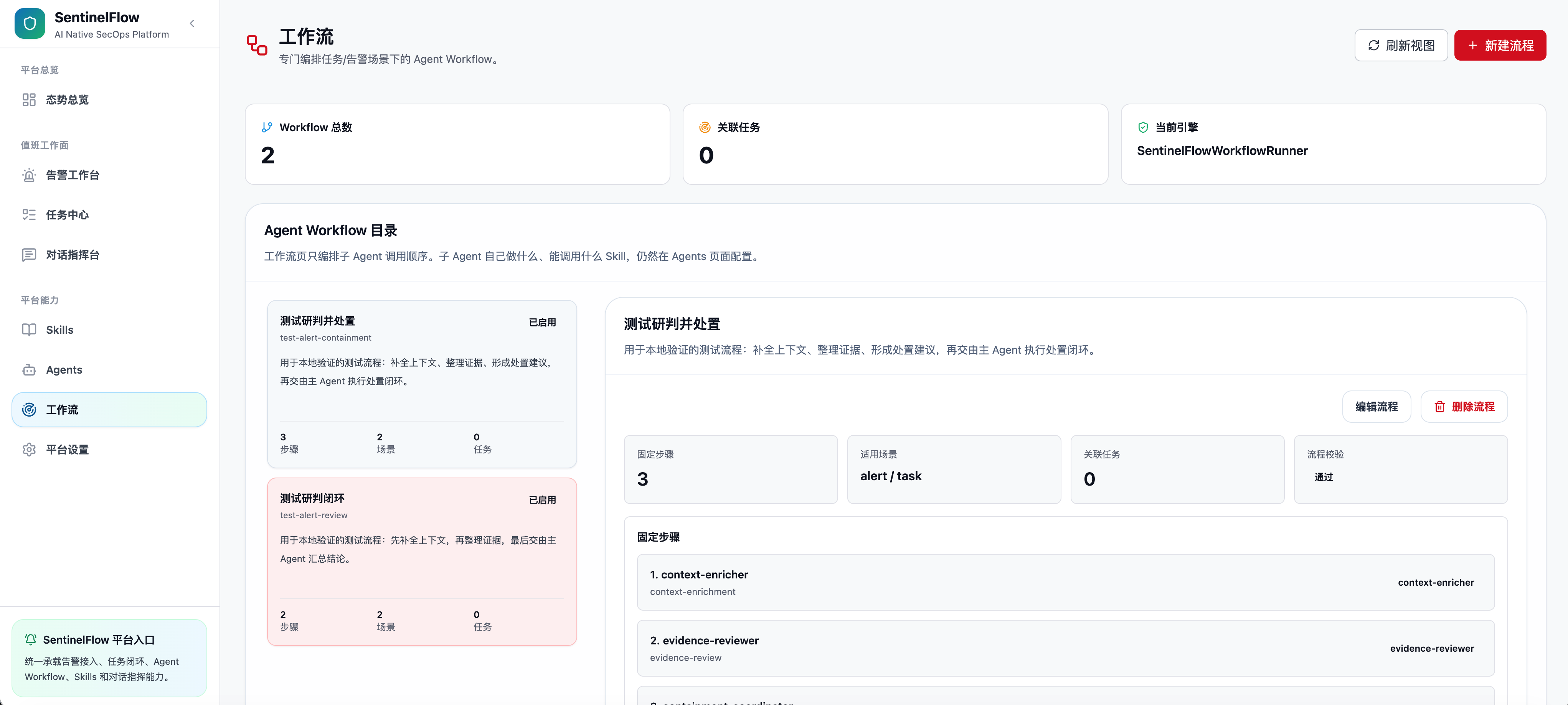 |
python -m venv .venv source .venv/bin/activate pip install -e ".[dev]"
The preferred way to configure SentinelFlow is through the WebUI Settings panel — all settings are persisted to .sentinelflow/runtime.json by default without requiring a server restart.
Alternatively, create a project-root .env file for environment-level defaults:
touch .envKey environment variables (all prefixed with SENTINELFLOW_):
```ini
SENTINELFLOW_LLM_API_KEY=sk-... SENTINELFLOW_LLM_API_BASE_URL=https://api.openai.com/v1 SENTINELFLOW_LLM_MODEL=gpt-4o SENTINELFLOW_LLM_THINKING_ADAPTER_ENABLED=false # enable only for thinking-model adapters such as DeepSeek
Open the WebUI and navigate to Settings. Configure your LLM endpoint and one or more alert sources — all settings are persisted immediately without a restart.
Alternatively, create a .env file for environment-level defaults:
```bash touch .env
```
Create a new directory under .sentinelflow/plugins/skills/ (default local workspace) with a SKILL.md, or use the Skill Management page in the WebUI to create one directly:
api mode polls any REST endpoint (configurable method, headers, query, body); script mode runs a custom Python script and reads its stdout as the alert payloadfield_mapping parser rule with live preview and one-click applyeventIds, alert_name, sip, dip, alert_time, etc.)<details> <summary><strong>What LLM providers does SentinelFlow support?</strong></summary>
SentinelFlow uses an OpenAI-compatible API interface (langchain-openai). Any provider that supports the OpenAI Chat Completions API format works — including OpenAI, Anthropic (via proxy), DeepSeek, Qwen, local models via Ollama/LM Studio, and API relay services.
Configure the endpoint in the WebUI Settings or via environment variables:
SENTINELFLOW_LLM_API_BASE_URL=https://your-provider/v1
SENTINELFLOW_LLM_API_KEY=your-key
SENTINELFLOW_LLM_MODEL=model-name
For DeepSeek-style thinking models, enable Thinking Model Adapter in Settings or set SENTINELFLOW_LLM_THINKING_ADAPTER_ENABLED=true. When enabled, SentinelFlow sends thinking: {"type": "disabled"} to avoid provider-side reasoning_content replay errors. Leave it disabled for providers that do not support this request body.
</details>
<details> <summary><strong>What alert source types are supported?</strong></summary>
SentinelFlow supports multiple named alert sources from the Settings panel. Each source can use one of two modes:
api): Polls any REST/HTTP endpoint. Supports GET/POST, custom headers, query parameters, and request body. Ideal for SIEM/SOAR platforms with a REST API.script): Runs a Python script you write directly in the UI. The script should print a JSON object to stdout containing count and alerts. Use this for custom data sources, local log files, or any integration that doesn't expose a REST endpoint.Each source has its own parser rule, polling interval, failed-task retry interval, auto-execution flag, and optional alert-analysis prompt. Tasks are stored with source_id / source_name, and deduplication is scoped by source plus event ID.
</details>
<details> <summary><strong>How does the AI parser generation work?</strong></summary>
Paste a sample alert JSON payload in the Settings panel and click Generate Parser. SentinelFlow sends the sample to your configured LLM, which returns a field_mapping rule that maps your schema's fields to SentinelFlow's canonical alert fields (eventIds, alert_name, sip, dip, etc.). A live preview shows how the rule would parse your sample. If the LLM call fails or is unavailable, a heuristic fallback rule is generated instead.
</details>
<details> <summary><strong>How do I define a Worker Sub-Agent?</strong></summary>
Create a directory under .sentinelflow/plugins/agents/ (default local workspace) with an agent.yaml and optional prompt files, or use the Agent Management page in the WebUI:
```yaml
该项目提供了一个开源的AI工作流平台,基于LangGraph多智能体协调技术,自动化安全运维流程。虽然项目质量较高,但仍需要进一步完善和测试。
AI Skill Hub 为第三方内容聚合平台,本页面信息基于公开数据整理,不对工具功能和质量作任何法律背书。
建议在沙箱或测试环境中充分验证后,再部署至生产环境,并做好必要的安全评估。
✅ MIT 协议 — 最宽松的开源协议之一,可自由商用、修改、分发,仅需保留版权声明。
总体来看,SFlow 是一款质量良好的Agent工作流,在同类工具中具备一定竞争力。AI Skill Hub 将持续追踪其更新动态,建议收藏备用,结合自身场景选择合适时机引入使用。
| 原始名称 | SFlow |
| 原始描述 | 开源AI工作流:AI Native SecOps platform powered by LangGraph multi-agent orchestration. Automa。⭐11 · Python |
| Topics | workflowpython |
| GitHub | https://github.com/Ch1nfo/SFlow |
| License | MIT |
| 语言 | Python |
收录时间:2026-05-23 · 更新时间:2026-05-23 · License:MIT · AI Skill Hub 不对第三方内容的准确性作法律背书。
选择 Agent 类型,复制安装指令后粘贴到对应客户端