营养跟踪工具
AI Skill Hub 强烈推荐:营养跟踪工具 是一款优质的MCP工具。AI 综合评分 8.0 分,在同类工具中表现稳健。如果你正在寻找可靠的MCP工具解决方案,这是一个值得深入了解的选择。
📚 深度解析
通过安装 营养跟踪工具,你的 AI 助手将获得额外的工具调用能力,可以用自然语言直接操控该工具的功能,无需学习复杂的命令行语法。MCP 工具的核心价值在于"一次配置,永久增强"——配置完成后,每次与 AI 对话时都可以无缝调用这些工具。
在技术实现上,MCP 工具通过标准的 JSON-RPC 协议与 AI 客户端通信,工具的功能以"工具列表"的形式暴露给 AI 模型,AI 可以按需调用。营养跟踪工具 提供了结构化的工具调用接口,使 AI 模型能够精确地理解和使用每个功能点,显著降低 AI 在工具使用上的错误率。
与传统的 API 集成相比,MCP 工具的优势在于无需编写代码——用户只需在配置文件中添加几行 JSON,即可让 AI 获得全新能力。AI Skill Hub 将 营养跟踪工具 评为 AI 评分 8.0 分,属于同类工具中的优质选择。
📋 工具概览
营养跟踪工具 是一款遵循 MCP(Model Context Protocol)标准协议的 AI 工具扩展。通过 MCP 协议,它可以让 Claude、Cursor 等主流 AI 客户端直接访问和操作外部工具、数据源和服务,实现 AI 能力的无缝扩展。无论是文件操作、数据库查询还是 API 调用,都可以通过自然语言在 AI 对话中直接触发,极大提升生产效率。
📖 中文文档
营养跟踪工具 是一款遵循 MCP(Model Context Protocol)标准协议的 AI 工具扩展。通过 MCP 协议,它可以让 Claude、Cursor 等主流 AI 客户端直接访问和操作外部工具、数据源和服务,实现 AI 能力的无缝扩展。无论是文件操作、数据库查询还是 API 调用,都可以通过自然语言在 AI 对话中直接触发,极大提升生产效率。
- 通过标准 MCP 协议与 Claude、Cursor 等主流 AI 客户端深度集成
- 提供结构化工具调用接口,显著降低 AI 集成复杂度
- 支持 Claude Desktop 和 Claude Code 无缝接入,开箱即用
- 可与其他 MCP 工具组合叠加,构建完整 AI 工作站
- 轻量无侵入设计,不影响现有系统架构
- 在 Claude Desktop 对话中直接调用本地工具,实现 AI 与系统的深度联动
- 通过自然语言驱动复杂的多步骤自动化任务,代替繁琐手动操作
- 将多个 MCP 工具组合使用,构建个人专属 AI 工作站
# 方式一:通过 Claude Code CLI 一键安装
claude skill install https://github.com/akutishevsky/nutrition-mcp

# 方式二:手动配置 claude_desktop_config.json
{
  "mcpServers": {
    "------": {
      "command": "npx",
      "args": ["-y", "nutrition-mcp"]
    }
  }
}

# 配置文件位置
# macOS: ~/Library/Application Support/Claude/claude_desktop_config.json
# Windows: %APPDATA%/Claude/claude_desktop_config.json
- 确认已安装 Node.js(v18 或以上版本)
- 打开 Claude Desktop 或 Claude Code 的 MCP 配置文件
- 按「交给 Agent 安装 → Claude Desktop」标签中的 JSON 配置填入 mcpServers 字段
- 保存配置文件并重启 Claude 客户端
- 重启后,在对话中即可使用本工具
# 安装后在 Claude 对话中直接使用
# 示例:
用户: 请帮我用 营养跟踪工具 执行以下任务...
Claude: [自动调用 营养跟踪工具 MCP 工具处理请求]

# 查看可用工具列表
# 在 Claude 中输入:"列出所有可用的 MCP 工具"
// claude_desktop_config.json 配置示例
{
  "mcpServers": {
    "______": {
      "command": "npx",
      "args": ["-y", "nutrition-mcp"],
      "env": {
        // "API_KEY": "your-api-key-here"
      }
    }
  }
}

// 保存后重启 Claude Desktop 生效
Nutrition MCP
A remote MCP server for personal nutrition tracking — log meals with calories, macros, fiber, total and added sugar, saturated and trans fat, sodium (with an optional daily ceiling) and caffeine (optionally ingredient by ingredient), look up generic foods in USDA FoodData Central and packaged products by barcode in Open Food Facts, record where each nutrient value came from, save meals you eat often and log them again by name, log water, body weight and body measurements, review nutrition history, and import an existing food diary from another app, all through conversation. Alcohol tracking is opt-in and off by default. The website and the in-chat widgets are available in English, German, Spanish, French, Dutch, Polish, Italian, Ukrainian, Japanese and Turkish; set_language picks the widget language.
[Help me pay for the servers on Patreon][patreon]
[patreon]: https://patreon.com/akutishevskyi
1. Supabase setup
- Create a Supabase project.
- Enable Email Auth (Authentication → Providers → Email) and disable email confirmation.
- Apply the schema. The full schema lives in
supabase/migrations/. With the Supabase CLI:
    supabase link --project-ref <your-project-ref>
    supabase db push
This creates every table, index, RLS policy, and foreign key the app needs. No local Postgres is involved — migrations run against your hosted project.
- Copy the service role key from Project Settings → API and use it as
SUPABASE_SECRET_KEY.
Deploy
The project includes a Dockerfile for container-based deployment.
- Push your repo to a hosting provider (e.g. DigitalOcean App Platform)
- Set the environment variables listed above
- The app auto-detects the Dockerfile and deploys on port
8080 - Point your domain to the deployed URL
Quick Start
Already hosted and ready to use — just connect it to your MCP client:
https://nutrition-mcp.com/mcpOn Claude.ai: open Nutrition MCP in the Claude directory and click Connect (see Connect to Claude.ai below)
On first connect, sign in with Google or enter an email and password and choose Create account. Your data persists across reconnections. Trouble connecting? See Troubleshooting.
By connecting you agree to the Terms of Service; how your data is handled is in the Privacy Policy.
Switching from another tracker? See the nutrition-app alternatives — how it compares to MyFitnessPal, Cronometer, Lose It!, MacroFactor, Yazio, and Lifesum. Bring your history with you: say "import my meals" and an importer opens in the chat, where you pick the CSV you exported from your old app, map its columns, and check what will be added before anything is saved. Exports from MyFitnessPal, Cronometer, Lose It! and MacroFactor are recognised automatically; any other CSV works by mapping its columns yourself. In clients that can't show in-chat panels, paste the export instead and the AI imports it for you. If your export has an alcohol column and you want it kept, turn alcohol tracking on before importing — the importer skips that column while tracking is off, and re-importing the same file later won't backfill it.
Demo
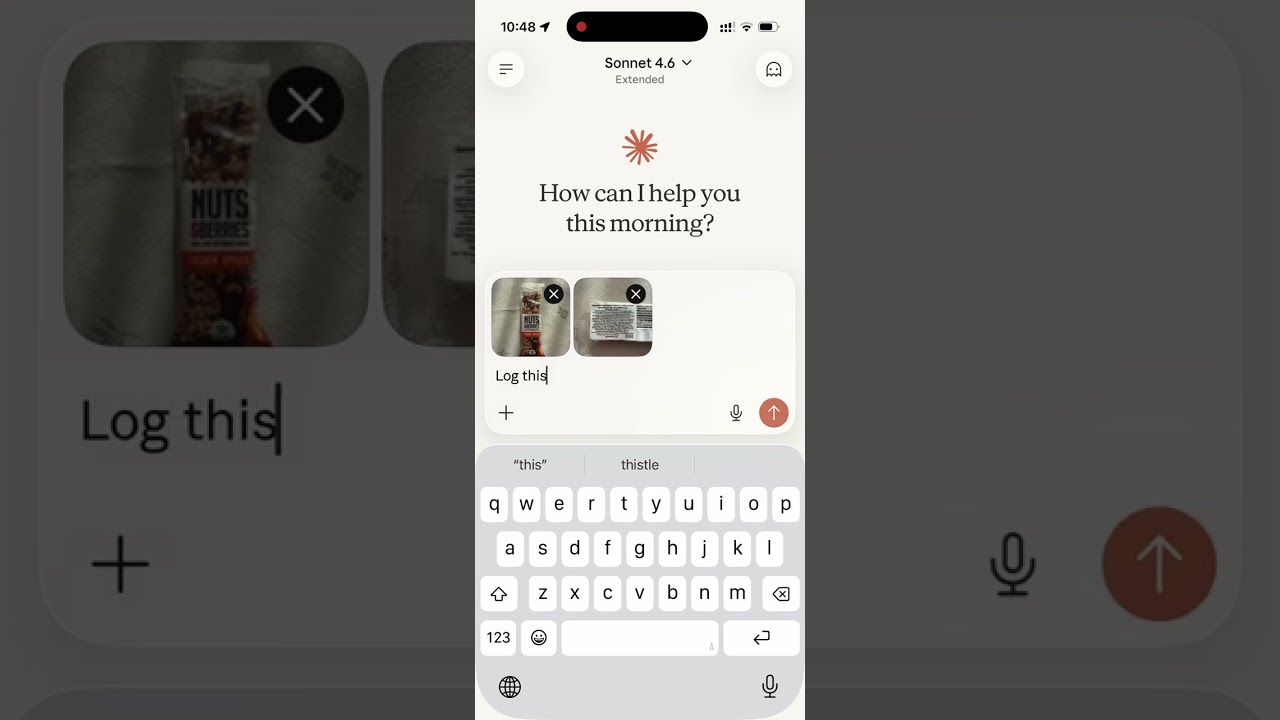
Read the story behind it: How I Replaced MyFitnessPal and Other Apps with a Single MCP Server
2. Environment variables
| Variable | Description |
|---|---|
SUPABASE_URL | Your Supabase project URL |
SUPABASE_SECRET_KEY | Supabase service role key (bypasses RLS) |
OAUTH_CLIENT_ID | _(optional, legacy)_ ID of the pre-registration static OAuth client. Clients now register themselves via POST /register; this only keeps older connections working until the legacy client is retired |
OAUTH_CLIENT_SECRET | _(optional, legacy)_ Secret of the legacy static OAuth client |
ALLOWED_ORIGINS | _(optional)_ Comma-separated list of extra browser origins allowed to call /mcp via CORS — localhost/127.0.0.1 on any port are always allowed regardless |
GOOGLE_CLIENT_ID | _(optional)_ Google OAuth client ID for "Sign in with Google" |
GOOGLE_CLIENT_SECRET | _(optional)_ Google OAuth client secret |
OFF_USER_AGENT | Open Food Facts User-Agent for barcode lookups, in the form AppName (email) |
USDA_API_KEY | _(optional)_ USDA FoodData Central API key for search_foods and get_food_macros; without it those tools report that USDA data is not configured |
PATREON_CLIENT_ID | _(optional)_ Patreon OAuth client ID, for showing recent posts on the landing page's Support section |
PATREON_CLIENT_SECRET | _(optional)_ Patreon OAuth client secret |
PATREON_CAMPAIGN_ID | _(optional)_ Patreon campaign ID to fetch posts from |
PATREON_ACCESS_TOKEN | _(optional)_ Creator's Access Token from Patreon's client management page — one-time bootstrap seed, see below |
PATREON_REFRESH_TOKEN | _(optional)_ Creator's Refresh Token from the same page — one-time bootstrap seed, see below |
PUBLIC_BASE_URL | _(optional)_ Public origin (e.g. https://your-domain.example) that the Apple Health shortcut is pointed at. Set it on any deploy that is not nutrition-mcp.com; without it, a phone paired on that deploy is sent to the production site |
HEALTH_SYNC_SHORTCUT_URL | _(optional, build time)_ https://www.icloud.com/shortcuts/… link to the published **Nutrition MCP Health** shortcut, shown as the install button on /apple-health. A Dockerfile build argument like NOINDEX; unset, the page says the shortcut is coming soon |
PORT | Server port (default: 8080) |
NOINDEX | _(optional)_ Any non-empty value sends X-Robots-Tag: noindex, nofollow on every response and leaves Google Analytics, Clarity and the consent banner (with its footer "Cookie settings" button) out of the generated pages, for a dev or staging deploy. Must be set at build time too, since the pages are generated during the build |
ADDED_SUGAR_REQUIRED_FROM | _(optional)_ ISO-8601 instant (a date, or a date-time with an offset) from which log_meal / update_meal refuse a sugar_g given without added_sugar_g. Unset, empty or unparseable leaves the rule off. Set it well after the deploy that first advertised added_sugar_g: hosts cache the tool list for days, and a client on an older list cannot send the field |
Legacy only — a fresh deploy doesn't need these, since every client registers its own credentials via POST /register. To set the optional OAUTH_CLIENT_* pair for the legacy static client:
bun run generate-oauth-credsor manually:
openssl rand -hex 16   # use as OAUTH_CLIENT_ID
openssl rand -hex 32   # use as OAUTH_CLIENT_SECRET
Patreon posts, one-time setup:PATREON_ACCESS_TOKEN/PATREON_REFRESH_TOKENare only ever read once, at server boot, to seed thepatreon_tokenstable if it's still empty — the server refreshes and stores its own pair from then on, so leaving these two set permanently is safe (every later boot is a no-op). You never need to touch the database by hand.
3. Google sign-in (optional)
Email/password works out of the box. To also offer "Continue with Google", follow docs/google-auth-setup.md to create a Google OAuth client, enable the Google provider in Supabase, and set GOOGLE_CLIENT_ID / GOOGLE_CLIENT_SECRET. This adds the POST /authorize/google and GET /auth/google/callback routes — see API Endpoints.
API Endpoints
| Endpoint | Description |
|---|---|
GET /health | Health check |
GET /.well-known/oauth-authorization-server | OAuth metadata discovery (root + /mcp-scoped variants) |
GET /.well-known/oauth-protected-resource | OAuth protected-resource metadata discovery (root + /mcp-scoped variants) |
POST /register | Dynamic client registration (RFC 7591) — per-client, redirect URIs enforced |
GET /authorize | OAuth authorization (shows login page) |
POST /authorize/google | Login-page form; redirects to Google's consent screen |
GET /auth/google/callback | Google OAuth callback — exchanges the code, completes sign-in |
POST /approve | Login/register handler |
POST /token | Token exchange — client-authenticated, redirect_uri + PKCE verifier required |
GET /.well-known/security.txt | Security contact (RFC 9116); Expires rolls forward daily |
GET /security.txt | 301 redirect to /.well-known/security.txt |
GET /favicon.ico | Server icon |
GET /favicon.svg | Site icon (SVG) |
GET /api/stats | Landing-page totals (meals, calories, macros, timezones), aggregated only |
GET /api/patreon-posts | Recent Patreon posts for the landing page's Support section |
GET /api/github-stars | Cached GitHub star count for the site's GitHub buttons |
POST /api/v1/health-sync/start | Apple Health sync: start connecting from the shortcut (returns a connect link) |
GET /health-sync/connect/:id | Apple Health sync: opens the normal sign-in page for that connect request |
GET /health-sync/callback | Apple Health sync: sign-in callback; hands a claim code back to the shortcut |
POST /api/v1/health-sync/claim | Apple Health sync: exchange claim code + device secret for the sync token |
GET /api/v1/health-sync/pending | Apple Health sync: closed-day totals to log (Bearer nmhs_… token) |
POST /api/v1/health-sync/ack | Apple Health sync: record what the shortcut logged (Bearer token) |
POST /api/v1/health-sync/revoke | Apple Health sync: disconnect (Bearer token) |
ALL /mcp | MCP endpoint (authenticated) |
Troubleshooting
The full version, in 10 languages, is at nutrition-mcp.com/tools#troubleshooting. In short:
- Won't connect, or keeps asking to sign in: remove the connector and add it again with exactly
https://nutrition-mcp.com/mcp, then sign in with the same email and password (or Google account) as before — your data belongs to the account, not the connection. It stays connected as long as you use it at least every 90 days. {"error":"session_expired"}on the sign-in page: the page is valid for 10 minutes and resets when the server restarts; reload it or start connecting again.session_mismatchmeans sign-in was finished in a different browser from the one that opened it.- Can't sign in / forgot password: use Sign in for an existing account — a wrong email or password shows "Wrong email or password" and never creates a new account; Create account is only for a first visit. If you signed up with Google, use Continue with Google. There is no self-service reset yet — email anton@nutrition-mcp.com from your account's address.
- History gone after reconnecting: each email is a separate account; sign in with the one you used originally.
- The AI answers but doesn't log: check the connector is enabled for the conversation, ask explicitly, and approve tool permission prompts.
- Meals on the wrong day: days follow your timezone (UTC until you set one). Set it with
set_timezone; past entries regroup, but one given a specific time while the timezone was wrong keeps that moment — fix it withupdate_meal. Set it before importing history: re-importing another app's file after a timezone change adds the rows again (a Nutrition MCP export is recognized and not duplicated). - No charts or cards: widgets need a host that supports MCP Apps; after
set_widget_display, start a new conversation. The meal-logged card only appears once goals are set. - Importer won't open or can't save: ask the AI to import the file itself with
bulk_import_meals(duplicates are skipped, so re-sending is safe as long as your timezone hasn't changed in between; set it before the first import). If you use the importer panel and want an alcohol column kept, turn alcohol tracking on first; the panel skips it while tracking is off. - "Rate limit exceeded" / "Too many failed authentication attempts": 60 requests a minute per account, 30 a minute per network on the sign-in pages. After 20 rejected connection attempts in a row, a network is paused for 5 minutes, growing to at most an hour — usually an old connector retrying; remove and re-add it.
- Barcode not found or wrong: data comes from Open Food Facts (8–14 digits, no caffeine data; added sugar only when the product lists it, marked when Open Food Facts estimated it from the ingredients); when no product is found, the name or a label photo can supply the figures instead.
- USDA data unavailable until a time is named: USDA FoodData Central lookups (
search_foods,get_food_macros) share one hourly quota across all users. After USDA's limit is reached, or when the key's hourly allowance is nearly used up, lookups pause for 60 minutes; each user is also capped at 30 lookups per hour. Foods looked up in the last 30 days keep working during a pause. USDA's names are in English, so search with English food names. - Yesterday isn't in Apple Health yet: days are sent once they are finished, at 05:00 the next morning in your timezone; the next sync after that (opening Health, stopping your alarm, or Sync now) brings it. Every sync covers the last 7 days.
- Apple Health shows more than chat: Health can't lower a value it already has. Delete that day's entries from Shortcuts under Health → Browse → Nutrition → (type) → Show All Data and enter the right total by hand. Never use "Delete All Data from Shortcuts" — it also removes what your other shortcuts logged. If every day looks doubled, another app writes the same types; switch one off under Health → Sharing → Apps.
- Apple Health sync stopped: run Nutrition MCP Health by hand to see why. If it asks to connect again (90 days without a sync, 365 days after connecting, or after Disconnect), sign in on the page it opens within 30 minutes. If it only syncs by hand, check its automations are on and set to Run Immediately; if a notice says a day didn't reach Health, allow Shortcuts to write every nutrition type under Health → Sharing → Apps → Shortcuts.
- Export link doesn't work: links expire after 60 minutes and each export replaces the last; ask for a fresh one. An export reporting 0 meals when you expected history usually means you signed in with a different email.
- Deleting your account:
delete_accountpermanently removes everything after you confirm; export first if you want a copy. - Reporting a problem: bugs on GitHub Issues (never include your password); security issues privately, as SECURITY.md describes.
高质量的开源MCP工具,易于使用
- 需要让 Claude / Cursor 操作本地工具的 AI 工程师
- 构建多智能体协作系统的 Agent 开发者
- 配置 MCP 服务器时建议使用 stdio 传输 + JSON-RPC,避免暴露公网
- 生产部署优先使用 Docker Compose 隔离依赖,并挂载 volume 持久化数据
- Agent 任务先做 dry-run 验证工具调用链,再开启自主执行
- API key 直接提交到 git 仓库(请用 .env 并加入 .gitignore)
- MCP 配置路径拼错或权限不足,重启 Claude Desktop 才生效
- 容器内无法访问宿主机 localhost — 使用 host.docker.internal
- Docker:nutrition-mcp 提供官方镜像,docker compose up 一键启动
- CLI:直接 npm install -g / pip install,命令行调用
- 云端托管:可放在 Vercel / Railway / Fly.io 等 PaaS 平台
⚡ 核心功能
- 通过标准 MCP 协议与 Claude、Cursor 等主流 AI 客户端深度集成
- 提供结构化工具调用接口,显著降低 AI 集成复杂度
- 支持 Claude Desktop 和 Claude Code 无缝接入,开箱即用
- 可与其他 MCP 工具组合叠加,构建完整 AI 工作站
- 轻量无侵入设计,不影响现有系统架构
- 需要让 Claude / Cursor 操作本地工具的 AI 工程师
- 构建多智能体协作系统的 Agent 开发者
- 配置 MCP 服务器时建议使用 stdio 传输 + JSON-RPC,避免暴露公网
- 生产部署优先使用 Docker Compose 隔离依赖,并挂载 volume 持久化数据
- Agent 任务先做 dry-run 验证工具调用链,再开启自主执行
- API key 直接提交到 git 仓库(请用 .env 并加入 .gitignore)
- MCP 配置路径拼错或权限不足,重启 Claude Desktop 才生效
- 容器内无法访问宿主机 localhost — 使用 host.docker.internal
👥 适合人群
🎯 使用场景
- 在 Claude Desktop 对话中直接调用本地工具,实现 AI 与系统的深度联动
- 通过自然语言驱动复杂的多步骤自动化任务,代替繁琐手动操作
- 将多个 MCP 工具组合使用,构建个人专属 AI 工作站
⚖️ 优点与不足
- +MIT 协议,可免费商用
- +标准化 MCP 协议,生态互联性强
- +与 Claude 官方生态无缝对接
- +即插即用,配置简单快捷
- −依赖 Claude 客户端,非 Claude 用户无法使用
- −MCP 协议仍在持续演进,接口可能变更
- −需要一定的配置步骤
AI Skill Hub 为第三方内容聚合平台,本页面信息基于公开数据整理,不对工具功能和质量作任何法律背书。
建议在沙箱或测试环境中充分验证后,再部署至生产环境,并做好必要的安全评估。
✅ MIT 协议 — 最宽松的开源协议之一,可自由商用、修改、分发,仅需保留版权声明。
🔗 相关工具推荐
❓ 常见问题 FAQ
总体来看,营养跟踪工具 是一款质量优秀的MCP工具,在同类工具中具备一定竞争力。AI Skill Hub 将持续追踪其更新动态,建议收藏备用,结合自身场景选择合适时机引入使用。
| 原始名称 | nutrition-mcp |
| 原始描述 | 开源MCP工具:A remote MCP server for personal nutrition tracking — log meals, track macros, a。⭐17 · TypeScript |
| Topics | meal-trackingnutritiontypescript |
| GitHub | https://github.com/akutishevsky/nutrition-mcp |
| License | MIT |
| 语言 | TypeScript |
收录时间:2026-06-27 · 更新时间:2026-06-27 · License:MIT · AI Skill Hub 不对第三方内容的准确性作法律背书。