MCP无障碍扫描
MCP无障碍扫描 是 AI Skill Hub 本期精选MCP工具之一。综合评分 8.0 分,整体质量较高。我们强烈推荐将其纳入你的 AI 工具库,帮助提升工作效率。
📚 深度解析
通过安装 MCP无障碍扫描,你的 AI 助手将获得额外的工具调用能力,可以用自然语言直接操控该工具的功能,无需学习复杂的命令行语法。MCP 工具的核心价值在于"一次配置,永久增强"——配置完成后,每次与 AI 对话时都可以无缝调用这些工具。
在技术实现上,MCP 工具通过标准的 JSON-RPC 协议与 AI 客户端通信,工具的功能以"工具列表"的形式暴露给 AI 模型,AI 可以按需调用。MCP无障碍扫描 提供了结构化的工具调用接口,使 AI 模型能够精确地理解和使用每个功能点,显著降低 AI 在工具使用上的错误率。
与传统的 API 集成相比,MCP 工具的优势在于无需编写代码——用户只需在配置文件中添加几行 JSON,即可让 AI 获得全新能力。AI Skill Hub 将 MCP无障碍扫描 评为 AI 评分 8.0 分,属于同类工具中的优质选择。
📋 工具概览
MCP无障碍扫描 是一款遵循 MCP(Model Context Protocol)标准协议的 AI 工具扩展。通过 MCP 协议,它可以让 Claude、Cursor 等主流 AI 客户端直接访问和操作外部工具、数据源和服务,实现 AI 能力的无缝扩展。无论是文件操作、数据库查询还是 API 调用,都可以通过自然语言在 AI 对话中直接触发,极大提升生产效率。
📖 中文文档
MCP无障碍扫描 是一款遵循 MCP(Model Context Protocol)标准协议的 AI 工具扩展。通过 MCP 协议,它可以让 Claude、Cursor 等主流 AI 客户端直接访问和操作外部工具、数据源和服务,实现 AI 能力的无缝扩展。无论是文件操作、数据库查询还是 API 调用,都可以通过自然语言在 AI 对话中直接触发,极大提升生产效率。
- 通过标准 MCP 协议与 Claude、Cursor 等主流 AI 客户端深度集成
- 提供结构化工具调用接口,显著降低 AI 集成复杂度
- 支持 Claude Desktop 和 Claude Code 无缝接入,开箱即用
- 可与其他 MCP 工具组合叠加,构建完整 AI 工作站
- 轻量无侵入设计,不影响现有系统架构
- 在 Claude Desktop 对话中直接调用本地工具,实现 AI 与系统的深度联动
- 通过自然语言驱动复杂的多步骤自动化任务,代替繁琐手动操作
- 将多个 MCP 工具组合使用,构建个人专属 AI 工作站
# 方式一:通过 Claude Code CLI 一键安装
claude skill install https://github.com/JustasMonkev/mcp-accessibility-scanner

# 方式二:手动配置 claude_desktop_config.json
{
  "mcpServers": {
    "mcp-----": {
      "command": "npx",
      "args": ["-y", "mcp-accessibility-scanner"]
    }
  }
}

# 配置文件位置
# macOS: ~/Library/Application Support/Claude/claude_desktop_config.json
# Windows: %APPDATA%/Claude/claude_desktop_config.json
- 确认已安装 Node.js(v18 或以上版本)
- 打开 Claude Desktop 或 Claude Code 的 MCP 配置文件
- 按「交给 Agent 安装 → Claude Desktop」标签中的 JSON 配置填入 mcpServers 字段
- 保存配置文件并重启 Claude 客户端
- 重启后,在对话中即可使用本工具
# 安装后在 Claude 对话中直接使用
# 示例:
用户: 请帮我用 MCP无障碍扫描 执行以下任务...
Claude: [自动调用 MCP无障碍扫描 MCP 工具处理请求]

# 查看可用工具列表
# 在 Claude 中输入:"列出所有可用的 MCP 工具"
// claude_desktop_config.json 配置示例
{
  "mcpServers": {
    "mcp_____": {
      "command": "npx",
      "args": ["-y", "mcp-accessibility-scanner"],
      "env": {
        // "API_KEY": "your-api-key-here"
      }
    }
  }
}

// 保存后重启 Claude Desktop 生效
MCP Accessibility Scanner 🔍
Accessibility checks inside your coding agent: axe scans, keyboard-focus checks and repeatable reports.
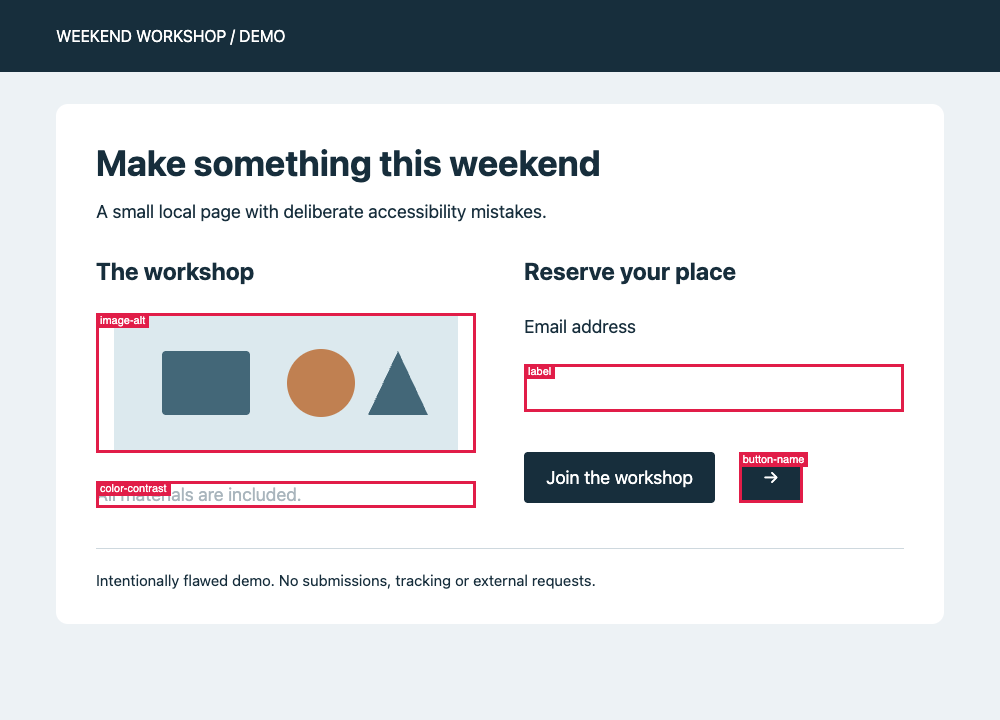
An intentionally flawed local demo page, checked with automated tools. These annotations were generated by scan_page with annotateScreenshot: true, not added by hand.
This MCP server lets your coding agent inspect a page, run axe checks, exercise keyboard focus and save findings for review. Automated checks don't certify WCAG compliance; manual accessibility testing is still needed. audit_screen_reader inspects the browser's accessibility tree, accessible names and element geometry. It does not test with an actual screen reader.
Features
Advanced Features
📑 Tab management for multi-page workflows 🌐 Monitor console messages and network requests ⏱️ Wait for dynamic content to load 📁 Handle file uploads and browser dialogs 🔄 Navigate through browser history
Installation
You can install the package using any of these methods:
Using npm:
npm install -g mcp-accessibility-scanner --allow-scripts=re2npm 12 does not run dependency install scripts unless you allow them. The scanner depends on re2, a native module whose install script downloads or builds re2.node; without it the server fails to start with Cannot find module './build/Release/re2.node'. Pass --allow-scripts=re2 to npm install -g and npx (older npm versions accept and ignore the flag). For a project dependency on npm 12 or later, run npm install-scripts approve re2 followed by npm rebuild re2 (approving does not run the script that was already skipped). On npm 11 and earlier, install scripts run by default; use npm rebuild re2 to restore a missing binary, provided scripts have not been explicitly disabled. To allow it for every global install on npm 12, run npm config set allow-scripts=re2 --location=user.
Installation with Docker
A pre-built image is available on Docker Hub. The image includes Chromium and is pre-configured for containerized use — no extra flags needed.
Pull from Docker Hub:
docker pull justasmonkev/mcp-accessibility-scannerClaude Code
claude mcp add mcp-accessibility-scanner -s user -- docker run -i --rm justasmonkev/mcp-accessibility-scannerTo persist screenshots and reports on your host, add a volume mount:
claude mcp add mcp-accessibility-scanner -s user \
  -- docker run -i --rm -v /tmp/mcp-output:/app/output justasmonkev/mcp-accessibility-scanner
Without the -v mount, output files only exist inside the container and are lost when it exits.
Docker Compose
docker compose up -dThe Compose configuration publishes the unauthenticated MCP HTTP transport on 127.0.0.1:8931 only. Do not expose this port to untrusted networks.
Build from source
docker build -t mcp-accessibility-scanner .Images built from this Dockerfile include tini as an init process; Docker's --init flag is optional.
Docker smoke test
npm run test:dockerInteractive route (no setup)
Keep every step in the same browser session. Within that session, audit_site crawls in a temporary tab of the same browser context, so cookies and local storage created while you drive the browser are available to the crawl:
1. browser_navigate to the login page
2. browser_fill_form / browser_click to sign in
3. browser_navigate to the first page you want audited
4. audit_site — the crawl inherits the session you just created
The interactive CLI, stdio MCP and initialized stateful HTTP connections can use their default session for this sequence. Handshake-free HTTP clients must call browser_session_open first and pass the returned browserSessionId to every navigation, interaction and scan call when using a mode that creates contexts per request. Otherwise the next request starts a new default context and loses the login and page state. Shared-context modes such as --extension and non-isolated CDP attach reject browser_session_open; use their shared context or a stateful connection instead. See Browser Session Tools for mode-specific behavior.
With the default persistent profile, sign-in state also survives across server restarts, so you usually only sign in once. The default profile is keyed to the server's working directory, so each workspace's server keeps its own sign-in state — servers launched for different workspaces neither share cookies nor contend for the same profile.
Quickstart: connect your coding agent
Install Google Chrome before the first audit. The configuration below uses system Chrome; installing the npm package does not install a browser. See browser configuration for alternatives.
Install the scanner:
npm install -g mcp-accessibility-scanner --allow-scripts=re2The flag allows the native re2 dependency to install on npm 12. If a prebuilt binary is unavailable, its installer needs a native build toolchain; see re2's installation notes.
Add this stdio server to your coding agent's MCP configuration, then restart or reconnect the client:
{
  "mcpServers": {
    "accessibility-scanner": {
      "command": "mcp-accessibility-scanner",
      "args": ["--headless", "--isolated", "--output-dir", "./a11y-output"]
    }
  }
}
The client must be able to find the installed command on its PATH. --isolated uses a fresh browser profile, not your personal Chrome session. Output paths are relative to the server's working directory; use an absolute --output-dir if your client starts it elsewhere. Client-specific setup and other installation methods are in the reference below.
Configuration
Here's the Claude Desktop configuration:
{
  "mcpServers": {
    "accessibility-scanner": {
      "command": "npx",
      "args": ["-y", "--allow-scripts=re2", "mcp-accessibility-scanner"]
    }
  }
}
Advanced Configuration
You can pass a configuration file to customize Playwright behavior:
{
  "mcpServers": {
    "accessibility-scanner": {
      "command": "npx",
      "args": ["-y", "--allow-scripts=re2", "mcp-accessibility-scanner", "--config", "/path/to/config.json"]
    }
  }
}
Exact-name tool selection
npx --allow-scripts=re2 mcp-accessibility-scanner --allowed-tools browser_pdf_save --blocked-tools browser_evaluate,browser_file_upload| CLI | Environment | JSON config |
|---|---|---|
--allowed-tools | PLAYWRIGHT_MCP_ALLOWED_TOOLS | allowedTools |
--blocked-tools | PLAYWRIGHT_MCP_BLOCKED_TOOLS | blockedTools |
CLI/environment values are comma-separated exact, case-sensitive names; JSON values are arrays of strings. allowedTools adds named tools to core and enabled capabilities; it is not a restrictive whitelist. For example, allowing browser_pdf_save does not disable navigation or accessibility audits, and allowing browser_install explicitly enables browser downloads without --caps install. Omitted lists preserve existing exposure defaults.
blockedTools wins over core tools, capabilities and allowedTools. Blocked tools are absent from tools/list and rejected on tools/call, even without prior listing and even when a request names a browser session. The server instructions sent at initialization stop recommending blocked tools, so clients are not directed to calls that would be rejected. If the blocked tool is the one that clears an open modal (browser_handle_dialog or browser_file_upload), the modal-state guidance names it and says it is blocked instead of offering it as the way forward; other tools keep refusing while the modal is open. The policy applies to standalone, CDP, extension, provider-switching and VS Code backends, over stdio and HTTP. browser_session_open, browser_session_close, accessibility tools and the proxy-owned browser_connect are not exempt. Allowing a tool does not bypass a provider's limitations or enable a connection mode; browser_connect still requires a mode that supplies it.
Precedence is CLI > environment > config file, independently for each list. A higher-precedence list replaces the lower one; lists are not merged. [] in JSON, --blocked-tools=, or an empty environment value explicitly clears that list (likewise for allowedTools). Empty lists add/block nothing; duplicates are harmless. Blank entries inside nonempty lists, non-array JSON values, unknown names (including generated webmcp_* page-tool names) and wildcards fail at startup.
Page-provided WebMCP tools remain discoverable by default and are outside this policy. Their generated webmcp_<name>_<identity> names hash an identity minted for each server run, document and registration, so a name copied from tools/list never matches after a restart or navigation. Instead of accepting a value that could never take effect, startup rejects webmcp_* names in both lists like any other unknown name. Page tools keep their existing scope and staleness checks; a persistent page-action policy would need a stable registration key and is not part of this feature.
This controls dispatch by tool name, not equivalent actions through other tools: for example, blocking browser_click does not prevent a page click through browser_evaluate. See the adoption decision.
Configuration Options
Create a config.json file with the following options:
{
  "browser": {
    "browserName": "chromium",
    "launchOptions": {
      "headless": true,
      "channel": "chrome"
    },
    "cdpLaunch": {
      "command": "open",
      "args": ["-a", "Slack", "--args", "--remote-debugging-port={port}"],
      "startupTimeoutMs": 30000
    }
  },
  "timeouts": {
    "navigationTimeout": 60000,
    "defaultTimeout": 5000,
    "settle": 500,
    "idle": 0
  },
  "network": {
    "allowedOrigins": ["example.com", "trusted-site.com"],
    "blockedOrigins": ["ads.example.com"]
  },
  "snapshot": {
    "boxes": true
  }
}
Available Options:
browser.browserName: Browser to use (chromium,firefox,webkit)
With WebKit on the pinned Playwright 1.63.0, the contents of an open <details> nested inside a closed <details> count as visible: they appear in browser_snapshot and browser_find results, and browser_verify_element_visible and browser_verify_text_visible succeed for them. Chromium and Firefox hide them until the outer <details> is opened. The upstream fix is not in a stable release yet. The server does not filter snapshots or patch Playwright to work around this. See the verification notes. - browser.allowedUploadDirs: Restrict files sent by browser_file_upload and browser_drop to regular files inside these directories, including resolved symlink targets. Restricted uploads and drops use a checked file handle and accept up to 50 MiB total per call. Unset allows any path; [] denies all file uploads and drops (text-only drops still work). Blank list entries are rejected. CLI: --allowed-upload-dirs (semicolon-separated; "" denies all), env: PLAYWRIGHT_MCP_ALLOWED_UPLOAD_DIRS (empty string denies all).
The list must be an array, not null. Roots must exist at startup: their canonical paths are resolved once and retained for the server's lifetime, so retargeting a configured symlink does not grant access to a new tree. Non-empty upload allowlists require macOS or Linux with /proc/self/fd available. macOS blocks ancestor symlinks during the file open; Linux checks the opened descriptor's path. Other platforms reject restricted file uploads and drops rather than rely on race-prone pathname checks. Unrestricted uploads, deny-all lists, and text-only drops keep working on all platforms. - browser.launchOptions.headless: Run browser in headless mode (default: true on Linux without display, false otherwise) - browser.launchOptions.channel: Browser channel (chrome, chrome-beta, msedge, etc.) - browser.contextOptions.clientCertificates: With client certificates, a configured launch proxy is also applied to fresh contexts unless browser.contextOptions.proxy explicitly overrides it. Playwright 1.63.0 ignores certificate-interceptor proxy bypass rules, so combining certificates with a nonblank effective proxy.bypass is rejected before launch. For a fresh context on a remote browser, configure its proxy explicitly; a proxy inherited only from that browser cannot be inspected. Existing attached contexts retain their current settings. - browser.launchOptions.proxy: Browser proxy (CLI: --proxy-server, --proxy-bypass; env: PLAYWRIGHT_MCP_PROXY_SERVER, PLAYWRIGHT_MCP_PROXY_BYPASS). Credentials in a CLI or environment proxy URL, such as http://user:password@myproxy:3128, are moved into proxy.username and proxy.password so the browser can answer 407 Proxy Authentication Required; percent-encode reserved characters such as @, : or / in them. A proxy set in the config file keeps its explicit username and password fields.
Authenticated proxy credential leak: The pinned Playwright 1.63.0 can send proxy credentials as website HTTP authentication after a proxy 407 challenge has been answered and cached, when a website responds with 401. This affects credentials supplied through --proxy-server, PLAYWRIGHT_MCP_PROXY_SERVER, browser.launchOptions.proxy, and browser.contextOptions.proxy. Avoid authenticated proxies until a release containing the upstream fix is adopted. Playwright 1.64.1, the latest stable release checked on October 20, 2026, also predates that fix. Startup emits one credential-free warning on stderr per configuration resolution when either configured proxy has credentials, including programmatic createConnection usage. The warning does not prevent the leak; unauthenticated proxies are unchanged. Proxies inherited only from an attached browser cannot be inspected or warned about by this server.
browser.launchOptions.chromiumSandbox: Defaults tofalsefor downloaded Chromium builds on Linux because they lack the setuid sandbox helper, andtrueotherwise. Remote and VS Code endpoints choose on the remote host. An explicit config orPLAYWRIGHT_MCP_SANDBOXvalue wins;--no-sandboxalways disables it.browser.cdpEndpoint: Attach to an already-running Chromium-family app with CDP enabledbrowser.cdpHeaders: Map of HTTP headers to send with the CDP connect request, e.g.{ "Authorization": "Bearer <token>" }, for endpoints that require header-based authenticationbrowser.cdpTimeout: Maximum time in milliseconds to wait when connecting to the CDP endpoint (default:30000)browser.cdpLaunch: Launch a Chromium-family desktop app with CDP enabled, wait for the endpoint, and manage the child process lifecycle.startupTimeoutMs(default30000) bounds the whole wait, attach attempts included; each attempt also stops atbrowser.cdpTimeout- CDP attach modes preserve the target browser's existing default-context settings instead of applying Playwright's defaults.
browser.contextOptions.storageState: Start a fresh context from a recorded Playwright storage state. Imports into existing CDP or VS Code contexts are rejected; use--isolatedfor CDP or sign in interactively. If the browser exposes no context, the server creates one with the state. CDP sessions joining that same server-created context inherit its live state without resetting it.browser.profileDirName: Chrome profile directory name used in extension mode, for exampleDefaultorProfile 1(CLI:--profile-dir-name, env:PLAYWRIGHT_MCP_PROFILE_DIR_NAME). Requires--user-data-dirand extension mode (--extensionor--connect-tool); defaults to the last-used profile that has the extension installed.timeouts.navigationTimeout: Maximum time for page navigation in milliseconds (default:60000)timeouts.defaultTimeout: Default timeout for Playwright operations in milliseconds (default:5000)timeouts.settle: How long to wait after every action for triggered work to settle before responding (default:500). An action that finishes quietly is first watched for up to 100ms (or the settle delay, whichever is shorter) so scheduled network work can still be awaited before the settle delay.timeouts.idle: Release the default browser context after this many idle milliseconds (default:0, disabled). Accepts integers from0to2147483647.network.allowedOrigins: List of origins to allow (blocks all others if specified)network.blockedOrigins: List of origins to blocksnapshot.boxes: Include each element's viewport-relative bounding box as[box=x,y,width,height]in snapshots (default:false; CLI:--snapshot-boxes, env:PLAYWRIGHT_MCP_SNAPSHOT_BOXES=1)imageResponses:allow(default) returns text and images;omitexcludes images;onlyomits text from successful responses containing images. Errors, browser lifecycle notices, and responses without images (including full-page screenshots) keep their text. Structured results and resource links are always preserved. Inonlymode, screenshot save-path text, generated code and any accompanying text-only findings are omitted; useallowif you need them. Interactive mode rejectsonlybecause its REPL prints text only; usealloworomitthere.autoremains a legacy alias forallow. CLI:--image-responses only; env:PLAYWRIGHT_MCP_IMAGE_RESPONSES=only. Precedence: CLI, then environment, then config file.server.authToken: When set, Streamable HTTP requests (--port) requireAuthorization: Bearer <token>or return401(env:PLAYWRIGHT_MCP_AUTH_TOKEN). Blank or malformed tokens fail at startup. The scheme is case-insensitive; the token is exact. Bearer auth does not encrypt traffic: authenticated listeners must bind to loopback, such as--host 127.0.0.1; use a TLS reverse proxy for remote access. The printed client config includes a header placeholder to replace locally, without logging the secret. Unset keeps unauthenticated access.filePaths: Optionalrelativeorabsoluterendering for output paths in screenshot/PDF results and generated code, report metadata, annotated/keyboard screenshots, and download summaries. Relative paths are based on the server working directory, not the client workspace or output directory. File writes, stored report contents, and absolutefile://resource URIs are unchanged. Omitted preserves legacy rendering: configured relative output directories produce relative paths, while default temp output paths are absolute (unlike upstream Playwright’s relative default). CLI:--file-paths absolute; env:PLAYWRIGHT_MCP_FILE_PATHS=absolute. Precedence: CLI, then environment, then config file.outputDir: Directory for output files — reports, screenshots, traces, and session logs (CLI:--output-dir, env:PLAYWRIGHT_MCP_OUTPUT_DIR). Defaults to a fresh directory under the system temp folder, resolved once per server run so all of a run's artifacts land together. The output location is always server configuration; the deprecated MCP roots capability (client workspace folders) is no longer consulted.redactUrlParams: Optional array of URL query/fragment parameter names whose nonempty values are rendered asREDACTED(CLI:--redact-url-params code,access_token; env:PLAYWRIGHT_MCP_REDACT_URL_PARAMS=code,access_token). Defaults to no URL-parameter redaction. Names match literally and case-insensitively, without decoding keys; repeated matches, relative links and hash-route query parameters are included. Empty values and unselected parameters are preserved. CLI overrides environment, which overrides the config file; lists replace rather than merge.[]in JSON or an empty CLI/environment value clears a lower-precedence list. Non-array config values, non-string entries and blank names fail before browser startup. See URL redaction coverage before sharing output or artifacts.
CLI equivalents are also available: --cdp-launch-command, --cdp-launch-args, --cdp-launch-cwd, --cdp-launch-port, --cdp-launch-startup-timeout, --cdp-endpoint, --cdp-header (repeat for multiple headers, e.g. --cdp-header "Authorization: Bearer <token>"), and --cdp-timeout. The CDP headers and timeout can also be set via the PLAYWRIGHT_MCP_CDP_HEADERS (one Name: Value entry per line) and PLAYWRIGHT_MCP_CDP_TIMEOUT environment variables.
If CDP attachment times out after the WebSocket connects, an existing tab may be blocking Playwright's browser initialization. On the pinned Playwright 1.63.0, a tab without a renderer — one whose renderer crashed, or one discarded by Chrome's Memory Saver — is never answered, so the attach cannot succeed while that tab exists (upstream fix, unreleased); a sleeping or unresponsive tab can stall it too (upstream report). --cdp-endpoint then fails after --cdp-timeout, and --cdp-launch by --cdp-launch-startup-timeout (each attach attempt also stops at --cdp-timeout), with an error that names this cause; --cdp-launch stops only the application it launched. For --cdp-endpoint, use an explicit positive --cdp-timeout to bound the attempt; 0 disables it and the attach can then wait forever. Reload or close the affected tab yourself, or attach to a separate disposable browser. noDefaults and --isolated do not skip initialization of existing tabs; the server does not close or reload your tabs or bypass Playwright's initialization to work around this. See the verification notes.
Playwright 1.63 does not support back/forward-cache (BFCache) restoration: an attached browser with BFCache enabled can return unusable references and omit iframe contents after back navigation. This was reproduced with full Chromium, Chrome, and Edge. For a browser you launch yourself, include --disable-back-forward-cache before attaching, or use the server's normal browser launch mode, which retains Playwright's default flag. The server does not change an attached browser's flags or replace back navigation with a reload. See the upstream maintainer's explanation, Playwright's BFCache limitation, and the verification and reproduction command.
HTTP listeners accept Host headers for loopback aliases, the bound non-wildcard address, and the configured hostname (--host, server.host, or PLAYWRIGHT_MCP_HOST). A named host must resolve to an address on the server to bind; other hostnames remain forbidden. Wildcard binds (--host 0.0.0.0 or --host ::) do not allow arbitrary hostnames or the wildcard address itself: use a loopback hostname or bind a specific hostname/address. Missing or invalid Host returns 400; disallowed hosts return 403. When present, Origin must use HTTP and exactly match the normalized Host hostname and port; HTTPS or a different authority returns 403. These checks also apply with bearer authentication, which still requires a loopback listener.
For remote HTTP access, configure the TLS reverse proxy explicitly. For example, with the MCP server bound using --host 127.0.0.1 --port 8931 and PLAYWRIGHT_MCP_AUTH_TOKEN set:
- Accept only your configured public hostname over HTTPS and forward
/mcptohttp://127.0.0.1:8931/mcp. - Set the upstream
Hostheader to127.0.0.1:8931, not the public hostname. Forward the client'sAuthorizationheader unchanged; do not inject a shared token for unauthenticated clients. - Before removing
Origin, reject any non-empty value outside your explicit trusted HTTPS origin list (for example,https://mcp.example.com). Allow absentOriginfor non-browser clients. Then removeOriginupstream, or rewrite it tohttp://127.0.0.1:8931. Never strip arbitrary origins without checking them first. - Disable response buffering for SSE streams. Browser clients on a different origin also need a narrowly scoped CORS policy at the proxy.
The server does not trust Forwarded or X-Forwarded-* to bypass its checks. Preserving the public Host or HTTPS Origin upstream returns 403, even with a valid bearer token.
Unexpected HTTP request setup failures, including stateful initialization, return a generic error with HTTP status 500. Parsed legacy JSON-RPC requests retain their IDs, batch errors omit notifications, and notification-only failures have an empty response body. Failed or rejected initialization disposes its unregistered backend. If the request body is still unread or the response has already started, the connection is closed instead of remaining available for reuse.
Caller-supplied screenshot, PDF, find-result, scan-page-matrix, and audit report filenames use a no-clobber policy: an existing file causes the tool call to fail instead of being overwritten. Windows-reserved basenames and names ending in a dot or space are rejected on every platform so configured names behave consistently across hosts.
Failed download saves are reported as tool errors in the current or next response, including after the tab closes; failed entries do not advertise a saved file or an ongoing download. The server retains up to 20 bounded error messages between responses and reports any omitted count. Full Chromium-family browsers on Playwright 1.63.0 have verified native crashes after persistent-profile relaunch. Error reporting does not fix that native crash. The explicit --isolated control passed, but does not preserve a profile between launches; use recorded storage state when needed for authentication. Existing profiles and browser defaults are preserved.
Use --timeout-settle or PLAYWRIGHT_MCP_TIMEOUT_SETTLE to override the post-action settle delay. It applies after every action so delayed DOM-only updates are included in the response; a short observation window also catches scheduled requests and waits for them before that delay.
Use --timeout-idle 300000, timeouts.idle, or PLAYWRIGHT_MCP_TIMEOUT_IDLE to release the default browser after five idle minutes. Shared contexts stay open while any client is working; the idle window starts after the last tool call or download finishes. Explicit recordings prevent idle release until browser_stop_recording finishes; passive --save-session capture does not. Cleanup finalizes traces. The next browser tool call reopens the connection and includes a note to navigate again and refresh element references. Attached CDP, extension, and VS Code browsers are disconnected; their external pages remain open. Close and session-management tools do not relaunch an idle browser. Explicit browser_session_open handles keep their separate PLAYWRIGHT_MCP_BROWSER_SESSION_TTL_MS behavior. Zero disables this feature; blank environment values leave the existing configuration unchanged.
The VS Code browser_connect tool accepts only playwright or playwright-core libraries and loopback WebSocket URLs. Set PLAYWRIGHT_MCP_VSCODE_ALLOW_REMOTE=1 to allow remote endpoints, which must use wss:. URL userinfo credentials are rejected.
HTTP Heartbeat
When the server runs with --port, it sends MCP heartbeat pings after a Streamable HTTP client opens the optional event stream. POST-only clients stay connected without heartbeat because server-initiated requests cannot reach them. Set PLAYWRIGHT_MCP_PING_TIMEOUT_MS to override the default 5000 ms timeout, or to 0 or any negative value to disable heartbeat pings. A client that answers ping with a JSON-RPC "method not found" error is treated as alive: the server stops heartbeating that session instead of closing it. Only an unanswered ping (timeout) or a transport failure closes the session.
Clients without the initialize handshake
Clients on the MCP 2026-07-28 revision no longer send the initialize handshake. With --port, requests carrying the revision's per-request _meta envelope are served natively on the 2026-07-28 protocol: server/discover is answered (so clients negotiating with versionNegotiation: 'auto' or a 2026-07-28 pin connect directly), results carry resultType and the SEP-2549 cache fields — dynamic browser tool lists use the conservative ttlMs: 0 default instead of a one-hour cache — and the SEP-2243 standard headers (MCP-Protocol-Version, Mcp-Method, Mcp-Name) are validated against the request body. Older handshake-free clients (2025-era requests without the envelope) are served statelessly as before. In both cases requests receive no heartbeat pings, and in the modes where the server creates browser contexts itself each request runs against a fresh default browser session: with the default persistent profile the per-request default context runs in its own disposable profile (like an explicit browser session), so parallel handshake-free requests do not contend for the stable profile — and the stable profile's sign-in state is not visible to them — while --isolated, remote endpoints and isolated CDP modes mint a fresh context per request anyway. Modes that reuse one live browser context are the exception: --extension (and a browser_connect or VS Code session switched to a connected-browser provider) and CDP attach without --isolated serve every handshake-free request from the same shared context, so its tabs, cookies and storage persist across requests — the same sharing that makes these modes refuse browser_session_open (in --vscode serving the session tools are the exception: they are host-scoped and keep running against the default provider even while switched — see Browser Session Tools). With a pinned --cdp-launch-port, only one launched application can be served at a time, so a second handshake-free request arriving while another request's browser context is still live is rejected with a clear error instead of silently attaching to the first request's application. With --user-data-dir, each handshake-free request launches a browser in the one configured profile: the profile's state persists across requests, and parallel requests contend for its browser lock and can fail with "Browser is already in use". Elsewhere, browser state that must persist across handshake-free requests belongs in an explicit browser session — a browserSessionId handle minted by browser_session_open in one request resolves in later ones (see Browser Session Tools). Clients that do send initialize keep the classic Mcp-Session-Id session behavior unchanged. When several such stateful clients are connected at once in the default persistent-profile mode, the first client's default context holds the stable profile — concurrent clients' default contexts run in their own disposable profiles (without the stable profile's sign-in state) until it is freed, instead of failing with "Browser is already in use".
CLI Modes
The scanner can run in two modes depending on how you use it.
Browser extension mode
Use --extension to connect through the current Playwright Extension, which must support extension protocol v2.
npx --allow-scripts=re2 mcp-accessibility-scanner --extensionSet PLAYWRIGHT_MCP_EXTENSION_TOKEN to the token shown by the extension to bypass the connection approval dialog. The relay's CDP WebSocket endpoint always requires a separate random token, generated per relay and appended automatically for the server's own connection. This CDP token is never passed in Chrome's launch arguments or extension URL; the extension approval token cannot authenticate a CDP client. Token-bypass connections are not background-safe: Chrome focuses the connection tab and window, and client-created tabs remain open after disconnect (upstream limitation). With a token, the extension must connect and finish setup within 30 seconds after the connection page opens. Failed attempts release the relay so the next tool call can retry. Without a token, manual approval waits until you approve or cancel the call. When --user-data-dir contains multiple Chrome profiles, the profile with the extension installed is selected automatically, preferring Chrome's last-used profile. Pass --profile-dir-name (or set PLAYWRIGHT_MCP_PROFILE_DIR_NAME) to select a profile explicitly; it requires --user-data-dir and accepts a Chrome profile directory name such as Default or Profile 1 (see "Profile Path" at chrome://version). The PLAYWRIGHT_MCP_EXTENSION_TOKEN approval token is specific to the profile, so when selecting a profile explicitly, use the token shown in that profile.
Packed extensions require an enabled record in the profile's preferences; a leftover extension directory alone does not count as installed. Profiles whose preferences mark the extension disabled or uninstalled are excluded from automatic selection and rejected for explicit selection. Explicit selection with a custom executable skips local installation checks. A whitespace-only PLAYWRIGHT_MCP_PROFILE_DIR_NAME is treated as unset; other string environment variables retain their existing blank-value handling.
Installation in VS Code
Install the Accessibility Scanner in VS Code using the VS Code CLI:
For VS Code:
code --add-mcp '{"name":"accessibility-scanner","command":"npx","args":["--allow-scripts=re2","mcp-accessibility-scanner"]}'For VS Code Insiders:
code-insiders --add-mcp '{"name":"accessibility-scanner","command":"npx","args":["--allow-scripts=re2","mcp-accessibility-scanner"]}'mcp-accessibility-scanner 是一款基于 MCP 协议的无障碍辅助功能扫描工具。它旨在通过自动化手段,帮助开发者快速检测网页的无障碍合规性,确保 Web 应用能够被各类辅助技术友好地访问。
该工具具备强大的自动化交互能力,支持多页面工作流中的 Tab 管理,并能实时监控 Console 消息与 Network 请求。针对动态加载的内容,它支持等待机制,并能处��文件上传、浏览器对话框以及浏览器历史记录导航,提供深度且智能的扫描体验。
您可以通过多种方式进行安装:使用 npm 全局安装 `npm install -g mcp-accessibility-scanner`;或者使用 Docker 部署,直接从 Docker Hub 拉取预构建镜像 `justasmonkev/mcp-accessibility-scanner`(已内置 Chromium,无需额外配置);此外,您也可以通过 Claude Code 命令直接运行 Docker 容器进行集成。
本项目提供了丰富的 Usage Examples,您可以根据不同的应用场景,通过命令行或集成在 Claude 等 AI 助手中使用该扫描器,实现自动化的无障碍审计流程。
用户可以通过修改 Claude Desktop 的配置文件来集成该 MCP Server。对于高级用户,支持通过 `--config` 参数传入自定义的 `config.json` 文件,从而精细化控制 Playwright 的浏览器行为及相关参数。
该工具提供 CLI Modes 模式,根据您的调用方式(如直接在终端运行或作为 MCP Server 运行),扫描器会切换至不同的运行模式以适应不同的交互需求。
工具支持复杂的多步 Workflow 自动化操作。例如:先使用 `browser_navigate` 访问页面,通过 `browser_snapshot` 获取元素状态,随后利用 `browser_click` 和 `browser_type` 进行模拟交互,最后通过 `scan_page` 执行无障碍扫描并使用 `browser_take_screenshot` 记录最终状态。
高质量的MCP工具,适合网页无障碍审计
- 需要让 Claude / Cursor 操作本地工具的 AI 工程师
- 配置 MCP 服务器时建议使用 stdio 传输 + JSON-RPC,避免暴露公网
- 生产部署优先使用 Docker Compose 隔离依赖,并挂载 volume 持久化数据
- API key 直接提交到 git 仓库(请用 .env 并加入 .gitignore)
- MCP 配置路径拼错或权限不足,重启 Claude Desktop 才生效
- 容器内无法访问宿主机 localhost — 使用 host.docker.internal
- Docker:mcp-accessibility-scanner 提供官方镜像,docker compose up 一键启动
- CLI:直接 npm install -g / pip install,命令行调用
- 云端托管:可放在 Vercel / Railway / Fly.io 等 PaaS 平台
⚡ 核心功能
- 通过标准 MCP 协议与 Claude、Cursor 等主流 AI 客户端深度集成
- 提供结构化工具调用接口,显著降低 AI 集成复杂度
- 支持 Claude Desktop 和 Claude Code 无缝接入,开箱即用
- 可与其他 MCP 工具组合叠加,构建完整 AI 工作站
- 轻量无侵入设计,不影响现有系统架构
- 需要让 Claude / Cursor 操作本地工具的 AI 工程师
- 配置 MCP 服务器时建议使用 stdio 传输 + JSON-RPC,避免暴露公网
- 生产部署优先使用 Docker Compose 隔离依赖,并挂载 volume 持久化数据
- API key 直接提交到 git 仓库(请用 .env 并加入 .gitignore)
- MCP 配置路径拼错或权限不足,重启 Claude Desktop 才生效
- 容器内无法访问宿主机 localhost — 使用 host.docker.internal
👥 适合人群
🎯 使用场景
- 在 Claude Desktop 对话中直接调用本地工具,实现 AI 与系统的深度联动
- 通过自然语言驱动复杂的多步骤自动化任务,代替繁琐手动操作
- 将多个 MCP 工具组合使用,构建个人专属 AI 工作站
⚖️ 优点与不足
- +MIT 协议,可免费商用
- +标准化 MCP 协议,生态互联性强
- +与 Claude 官方生态无缝对接
- +即插即用,配置简单快捷
- −依赖 Claude 客户端,非 Claude 用户无法使用
- −MCP 协议仍在持续演进,接口可能变更
- −需要一定的配置步骤
AI Skill Hub 为第三方内容聚合平台,本页面信息基于公开数据整理,不对工具功能和质量作任何法律背书。
建议在沙箱或测试环境中充分验证后,再部署至生产环境,并做好必要的安全评估。
✅ MIT 协议 — 最宽松的开源协议之一,可自由商用、修改、分发,仅需保留版权声明。
🔗 相关工具推荐
❓ 常见问题 FAQ
经综合评估,MCP无障碍扫描 在MCP工具赛道中表现稳健,质量优秀。如果你已有明确的使用需求,可以直接上手体验;如果还在评估阶段,建议对比同类工具后再做决策。
| 原始名称 | mcp-accessibility-scanner |
| 原始描述 | 开源MCP工具:An MCP (Model Context Protocol) server for performing accessibility audits on we。⭐56 · TypeScript |
| Topics | accessibilityaimcptypescript |
| GitHub | https://github.com/JustasMonkev/mcp-accessibility-scanner |
| License | MIT |
| 语言 | TypeScript |
收录时间:2026-07-05 · 更新时间:2026-07-11 · License:MIT · AI Skill Hub 不对第三方内容的准确性作法律背书。