davinci-resolve-mcp MCP工具
davinci-resolve-mcp MCP工具 是 AI Skill Hub 本期精选AI工具之一。已获得 1.1k 颗 GitHub Star,综合评分 8.2 分,整体质量较高。我们强烈推荐将其纳入你的 AI 工具库,帮助提升工作效率。
📚 深度解析
**为什么要使用开源工具而非商业 SaaS?**
对于个人开发者和有隐私需求的用户,本地部署的开源工具意味着数据不离本机,不受第三方服务商的数据政策约束。同时,开源工具通常没有使用次数限制和月度费用,一次安装即可长期使用,对于高频使用场景的总拥有成本(TCO)远低于订阅制商业工具。
**安装与环境准备**
davinci-resolve-mcp MCP工具 依赖 Python 运行环境。建议通过 pyenv(Python)或 nvm(Node.js)管理 Python 版本,避免全局环境污染。对于新手用户,推荐先创建虚拟环境(python -m venv venv && source venv/bin/activate),再安装依赖,这样即使出现问题也可以随时删除虚拟环境重新开始,不影响系统稳定性。
**社区与维护**
GitHub Issue 和 Discussion 是获取帮助的最快渠道。在提问前建议先检查 Closed Issues(已关闭的问题),大多数常见问题都已有解答。遇到 Bug 时,提供 pip list 的输出、完整错误堆栈和最小可复现示例,能显著提高开发者响应速度。AI Skill Hub 将持续追踪 davinci-resolve-mcp MCP工具 的版本更新,及时通知重要功能变化。
📋 工具概览
为DaVinci Resolve Studio提供MCP服务器集成的开源工具。支持通过MCP协议与达芬奇视频编辑软件交互,实现自动化工作流控制。适合视频后期制作专业人士和开发者集成定制工具。
davinci-resolve-mcp MCP工具 是一款基于 Python 开发的开源工具,专注于 MCP服务器、达芬奇、视频编辑 等核心功能。作为 GitHub 开源项目,它拥有活跃的社区支持和持续的版本迭代,代码完全透明可审计,支持本地部署以保护数据隐私。无论是个人使用还是集成到企业工作流,都能提供稳定可靠的解决方案。
📖 中文文档
为DaVinci Resolve Studio提供MCP服务器集成的开源工具。支持通过MCP协议与达芬奇视频编辑软件交互,实现自动化工作流控制。适合视频后期制作专业人士和开发者集成定制工具。
davinci-resolve-mcp MCP工具 是一款基于 Python 开发的开源工具,专注于 MCP服务器、达芬奇、视频编辑 等核心功能。作为 GitHub 开源项目,它拥有活跃的社区支持和持续的版本迭代,代码完全透明可审计,支持本地部署以保护数据隐私。无论是个人使用还是集成到企业工作流,都能提供稳定可靠的解决方案。
- 开源免费,支持本地部署,数据完全自主可控
- 活跃的 GitHub 开源社区,持续迭代更新
- 提供详细文档和使用示例,新手友好
- 支持自定义配置,灵活适配不同使用环境
- 可作为基础组件集成进现有技术栈或进行二次开发
- 本地部署运行,保护数据隐私,满足合规要求
- 自定义集成到现有系统,扩展技术栈能力
- 作为开源基础组件进行商业化二次开发
# 方式一:pip 安装(推荐)
pip install davinci-resolve-mcp

# 方式二:虚拟环境安装(推荐生产环境)
python -m venv .venv
source .venv/bin/activate  # Windows: .venv\Scripts\activate
pip install davinci-resolve-mcp

# 方式三:从源码安装(获取最新功能)
git clone https://github.com/samuelgursky/davinci-resolve-mcp
cd davinci-resolve-mcp
pip install -e .

# 验证安装
python -c "import davinci_resolve_mcp; print('安装成功')"
- 访问 GitHub 仓库页面
- 按照 README 文档完成依赖安装
- 根据系统环境完成初始化配置
- 参考官方示例或文档开始使用
- 遇到问题可在 GitHub Issues 中查找解答
# 命令行使用
davinci-resolve-mcp --help

# 基本用法
davinci-resolve-mcp input_file -o output_file

# Python 代码中调用
import davinci_resolve_mcp

# 示例
result = davinci_resolve_mcp.process("input")
print(result)
# davinci-resolve-mcp 配置文件示例(config.yml)
app:
  name: "davinci-resolve-mcp"
  debug: false
  log_level: "INFO"

# 运行时指定配置文件
davinci-resolve-mcp --config config.yml

# 或通过环境变量配置
export DAVINCI_RESOLVE_MCP_API_KEY="your-key"
export DAVINCI_RESOLVE_MCP_OUTPUT_DIR="./output"
DaVinci Resolve MCP Server
English | 简体中文









A Model Context Protocol (MCP) server that lets AI assistants control DaVinci Resolve Studio through the official Scripting API. It provides full API coverage plus guarded workflow helpers for editing, media pool organization, render setup, review markers, grading, Fusion, Fairlight, project lifecycle tasks, extension authoring, and source-safe media analysis.
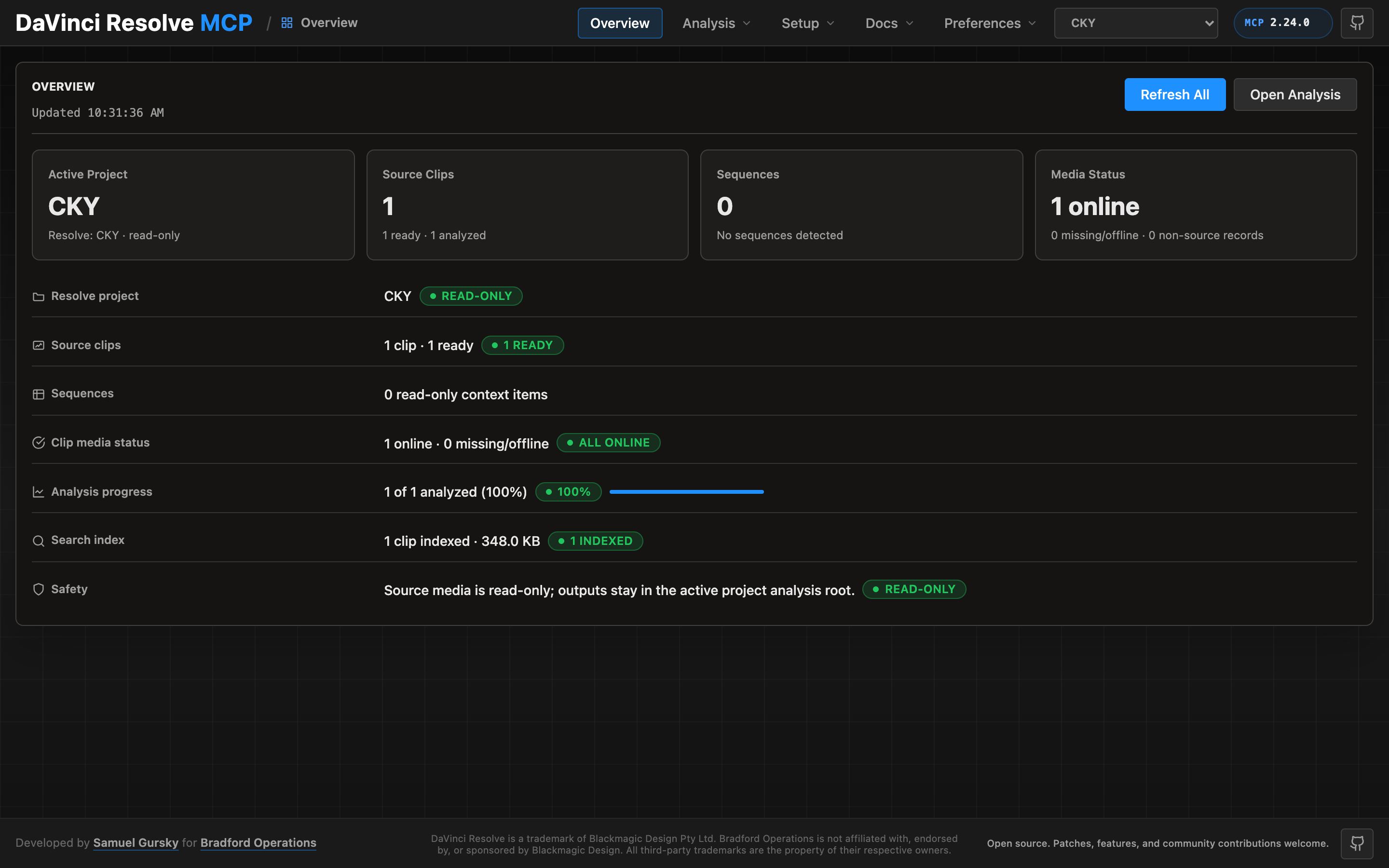
A local browser control panel ships with the server for inspecting Resolve state, running source-safe analysis, drilling into analyzed clips and shots, and editing analysis output inline. See the Control Panel Guide for the full tour.
Core Capabilities
| Area | What the compound server supports |
|---|---|
| App and project control | Launch/reconnect, page switching, project CRUD, project folders, databases, cloud project wrappers, settings, presets, archives |
| Media pool and ingest | Safe import, image sequences, multicam prep timelines, bin organization, metadata normalization, metadata field inventory, marks, annotations, relink/proxy/full-resolution guards |
| Media analysis | Source-safe file/clip/bin/project analysis, 2-pop/slate-clap sync-event detection, default Resolve metadata and Media Pool marker writeback, persisted analysis artifacts, existing-report reuse, host_chat_paths visual analysis (finalized per clip with commit_vision, works with any vision-capable MCP client) with opt-out, transcription with opt-out |
| Timeline editing and conform | Track/item probing, title text key scans/writes, copy/move/duplicate helpers, ripple insert, range operations, gaps/overlaps, source ranges, checked interchange exports/imports |
| Review annotations | Timeline/item/clip markers, custom data, flags, clip color, copy/move/sync cleanup, review reports, marker thumbnail review |
| Color and grading | Node graph probing, CDL validation, grade copy, DRX/LUT helpers, versions, Gallery stills, color groups |
| Fusion | Timeline-item comps, safe tool creation, input writes, port inspection, validated connections, scoped bulk writes |
| Audio and Fairlight | Track/item probes, source mapping, guarded audio property writes, voice isolation, auto-sync planning, transcription/subtitle probes |
| Render and deliver | Format/codec matrix probing, render settings validation, queued job lifecycle checks, guarded Quick Export |
| Extension authoring | Fuse, DCTL, ACES DCTL, and Resolve-page Lua/Python script lifecycle helpers with safe MCP-marked install/remove |
| Craft guidance | The bundled editorial, colour, audio, and workflow guidance served as prose over MCP — indexed, searchable, and readable by any client, not just ones with this repository on disk |
Reporting Bugs and Requesting Features
Tell your assistant "send this as a bug" or "send this as a feature request". It drafts a GitHub issue from the conversation, including the failing call and its error, and attaches the server version, Resolve build, connection mode and OS. Local paths, your username and anything that looks like a secret are redacted. Nothing is filed for you: you get a prefilled link, review the draft, and submit it on GitHub yourself. You can also open an issue directly.
Requirements
- DaVinci Resolve 18.5+ on macOS, Windows, or Linux. Studio supports external scripting directly. The free edition does not — Blackmagic gates external scripting to Studio — but it is still reachable through the in-app bridge, which runs inside Resolve from the ungated Workspace ▸ Scripts menu. - Python 3.10+ (3.10-3.12 is the lowest-risk range). Python 3.13/3.14 also work on recent Resolve builds (verified on Studio 20.3.2); older builds may fail to connect on 3.13+, in which case use 3.10-3.12. - Resolve external scripting set to Local (Studio). On the free edition this preference has no effect — use the in-app bridge instead.
Resolve 19.1.3 remains the compatibility baseline. Resolve 20.x scripting calls are additive, version-guarded, and live-tested on 20.3.2. Resolve 21.0 scripting additions (audio classification, speaker-detection transcription, IntelliSearch, slate analysis, motion-deblur, speech generation, session background-task control) are exposed behind runtime capability detection, so they stay inert on older builds and activate automatically on Resolve 21+. They are live-tested on Studio 21.0.2.4 — see the Resolve 21 delta. Note that AnalyzeForIntellisearch, AnalyzeForSlate and GenerateSpeech each require a separately-downloaded AI Extras pack, and Resolve reports a missing pack inconsistently (some return False, others an error string), so these actions report success: false with the Resolve-supplied reason rather than guessing.
Quick Start
npx davinci-resolve-mcp setupBefore connecting, open DaVinci Resolve Studio and set Preferences > General > External scripting using to Local. (On the free edition that preference does not help — see Free edition below.) The npm launcher installs a managed copy under your user application-data directory, then runs the universal Python installer. The installer creates a virtual environment, detects Resolve paths, and can configure Claude Desktop, Claude Code, Cursor, VS Code, Windsurf, Zed, Continue, Cline, Roo Code, OpenCode, Codex CLI, and JetBrains IDEs.
For source installs:
git clone https://github.com/samuelgursky/davinci-resolve-mcp.git
cd davinci-resolve-mcp
python install.py
For platform paths, client-specific config, and manual setup, see Installation and Configuration.
The installer and server check the latest GitHub release for MCP updates. Checks are best-effort and throttled; the server never blocks MCP startup for a prompt. The installer can prompt, snooze, ignore a release, disable checks, or apply an opt-in safe auto-update for clean git checkouts.
Advanced server — beyond the scripting API (optional, Node)
The same package ships a second, optional MCP server: davinci-resolve-advanced-mcp (bin bin/davinci-resolve-advanced-mcp.mjs). Where the Python server drives a live Resolve over the sanctioned scripting API, the advanced server does what the API can't — it reads and edits Resolve files (.drp / .drt / .drx) and applies DB/XML-level changes with no Resolve running, so it runs cloud or local. 18 tools: drp, drt, drx (per-clip grade codec plus a deterministic, offline grading/QC catalog — within-camera + cross-camera skin (v2 skin-line metric) + b-roll + neutral-patch WB matching, match-to-reference, saturation/black-balance, contrast-normalize, ASC CDL import, lossless grade-transfer + season-look authoring, named-LUT attach, scope reads + intent tags, verify-grade, display-referred frame extraction, broadcast-legal QC), offline_ref, conform (frame-oracle conform/relink QC + lineage), color_trace (carry grades across a re-conform), fusion, audio_plan, fairlight (bus routing), audio, project_read, project_db, pipeline (a DB-as-truth pipeline: compile YAML project specs into a canonical SQLite DB, then run stages with gates, provenance, and intent↔actual drift detection), capabilities, deliverable (deliverable QC / compliance), media (media front-end / AE ingest), editorial (editorial integrity / changelist), provenance (provenance / audit / episode report). It can also be consumed as a library (importable engine API), not just spawned as a server.
DRX grade writes are live-calibrated against Resolve Studio: grade params take Resolve's on-screen panel units by default (space: 'ui' | 'drx'), and the structural writes (power windows, qualifiers, HDR zones, HSL curves, ColorSlice, blur/key/motion-effects) are panel-readback-verified — per-control status in resolve-advanced/vendor/drx-parameters/CALIBRATION-STATUS.md. It also closes a UI-only gap: programmatic "Cleanup Node Graph" (drx relayout for one clip, project_db relayout_node_graphs for a whole project) — node layout tidied, grade content byte-preserved.
Add it alongside the live server (both ship in one npm install):
{
  "mcpServers": {
    "davinci-resolve": { "command": "<python>", "args": ["<path>/src/server.py"] },
    "davinci-resolve-advanced": { "command": "node", "args": ["<path>/bin/davinci-resolve-advanced-mcp.mjs"] }
  }
}
install.py prints both entries. The core is pure-JS/MIT with no required native modules; a few features need user-installed tools (ffmpeg for audio, sharp/better-sqlite3 for some paths) — call the capabilities tool for live status and install hints.
Unlike the Python server, this one has Node dependencies. npx davinci-resolve-mcp setup installs them into the managed install (npm install --omit=dev --omit=optional under resolve-advanced/) and only then registers the bin. If that install could not run — offline, or npm unavailable — setup registers an npx command for the advanced server instead, so the entry it writes always boots. To repair an existing install without re-running setup: npx davinci-resolve-mcp sync.
Operation envelope
Every compound tool return carries an _operation block beside its payload, so an agent reads one shape instead of a different key per tool: status (success / partial / blocked / failed), verification (with contradiction kept distinct — Resolve reported success and the readback disagreed), changes (the semantic delta), warnings, and an execution_id.
Two absences are meaningful and deliberate. verification.status: "unverified" means no evidence was reported, not "checked and clean". A missing changes means the action did not report a delta, not that nothing changed — an empty {} there would be a confident, wrong answer about an edit that simply never declared one.
The envelope is namespaced rather than merged into the top level because status, operation, warnings, result and changes are all already domain keys here; flattening would rewrite a background job's status: "done" and a confirm gate's status: "confirmation_required". `setup(action="set_defaults", params={"result_envelope": "pure" | "legacy"})` changes the shape, per call via params={"envelope": ...}, per process via RESOLVE_MCP_RESULT_ENVELOPE.
Optional Extras
The core install is deliberately small: Python, ffmpeg, and the Resolve scripting API. Some features need more, and each one refuses honestly with its own install line rather than degrading into a guess — a fabricated tempo or an invented level produces confident, wrong output, which is worse than no feature.
Run python scripts/doctor.py to see which of these you have.
| Extra | Unlocks | Licence |
|---|---|---|
| **ffmpeg** on PATH | Silence detection, dead-space markers, level measurement, audio analysis. The single most useful thing to install. | LGPL/GPL — invoked as a subprocess, never bundled |
pip install numpy | Colour pre-balance, reference-still matching, sound-density audit | BSD |
pip install librosa | Beat, bar and phrase detection for music-driven cutting | ISC |
pip install -U openai-whisper | Transcription, and everything word-level built on it | MIT |
pip install open_clip_torch | Visual similarity and find_similar | MIT |
pip install transformers | CLAP audio embeddings | Apache-2.0 |
pip install opencv-python | Additional frame analysis | Apache-2.0 |
media_analysis action capabilities reports the analysis stack in detail and tells you what each missing piece would enable.
Nothing here is bundled. Model weights carry their own licences separate from the code that loads them; check them before commercial use.
专业的MCP集成方案,为达芬奇用户提供自动化接口。社区活跃,实用性强,但受限于软件生态。
- 需要让 Claude / Cursor 操作本地工具的 AI 工程师
- 构建多智能体协作系统的 Agent 开发者
- 做语音类 AI 产品的开发者
- 配置 MCP 服务器时建议使用 stdio 传输 + JSON-RPC,避免暴露公网
- Agent 任务先做 dry-run 验证工具调用链,再开启自主执行
- API key 直接提交到 git 仓库(请用 .env 并加入 .gitignore)
- MCP 配置路径拼错或权限不足,重启 Claude Desktop 才生效
- Python 依赖冲突:建议用 venv / uv 隔离环境
- 云端托管:可放在 Vercel / Railway / Fly.io 等 PaaS 平台
⚡ 核心功能
- 开源免费,支持本地部署,数据完全自主可控
- 活跃的 GitHub 开源社区,持续迭代更新
- 提供详细文档和使用示例,新手友好
- 支持自定义配置,灵活适配不同使用环境
- 可作为基础组件集成进现有技术栈或进行二次开发
- 需要让 Claude / Cursor 操作本地工具的 AI 工程师
- 构建多智能体协作系统的 Agent 开发者
- 做语音类 AI 产品的开发者
- 配置 MCP 服务器时建议使用 stdio 传输 + JSON-RPC,避免暴露公网
- Agent 任务先做 dry-run 验证工具调用链,再开启自主执行
- API key 直接提交到 git 仓库(请用 .env 并加入 .gitignore)
- MCP 配置路径拼错或权限不足,重启 Claude Desktop 才生效
- Python 依赖冲突:建议用 venv / uv 隔离环境
👥 适合人群
🎯 使用场景
- 本地部署运行,保护数据隐私,满足合规要求
- 自定义集成到现有系统,扩展技术栈能力
- 作为开源基础组件进行商业化二次开发
⚖️ 优点与不足
- +MIT 协议,可免费商用
- +完全开源免费,无授权费用
- +本地部署,数据完全自主可控
- +开发者社区支持,遇问题可查可问
- −安装和初始配置可能需要一定技术基础
- −功能完整性通常不如成熟商业产品
- −技术支持主要依赖开源社区,响应速度不稳定
AI Skill Hub 为第三方内容聚合平台,本页面信息基于公开数据整理,不对工具功能和质量作任何法律背书。
建议在沙箱或测试环境中充分验证后,再部署至生产环境,并做好必要的安全评估。
✅ MIT 协议 — 最宽松的开源协议之一,可自由商用、修改、分发,仅需保留版权声明。
🔗 相关工具推荐
❓ 常见问题 FAQ
经综合评估,davinci-resolve-mcp MCP工具 在AI工具赛道中表现稳健,质量优秀。如果你已有明确的使用需求,可以直接上手体验;如果还在评估阶段,建议对比同类工具后再做决策。
| 原始名称 | davinci-resolve-mcp |
| 原始描述 | 开源MCP工具:MCP server integration for DaVinci Resolve Studio。⭐1.1k · Python |
| Topics | MCP服务器达芬奇视频编辑自动化工作流Blackmagic |
| GitHub | https://github.com/samuelgursky/davinci-resolve-mcp |
| License | MIT |
| 语言 | Python |
收录时间:2026-05-16 · 更新时间:2026-05-19 · License:MIT · AI Skill Hub 不对第三方内容的准确性作法律背书。